
Prompt Engineering for Lawyers: A Firm Standard, Not a Personal Skill
Prompt engineering for lawyers at firm level: a shared prompt library, a screen for confidential inputs, a citation check and supervision under ABA Opinion 512.
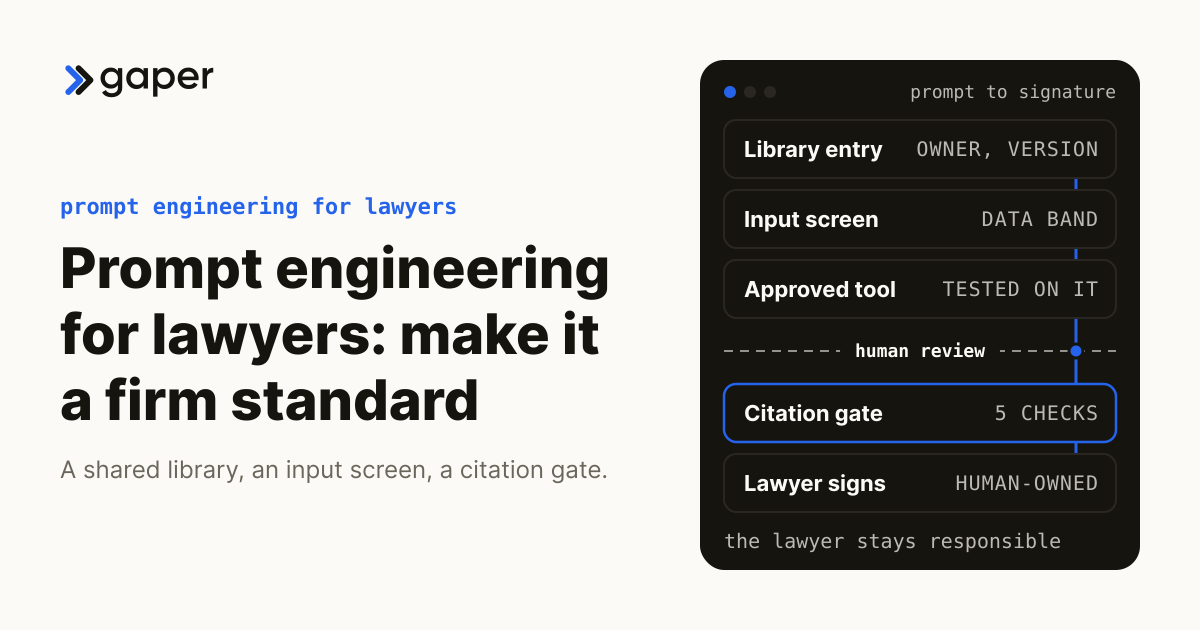
Prompt engineering for lawyers is the practice of writing instructions to a generative AI tool so its output stays inside the right law, the right documents and a format a lawyer can check. At firm level it is a standard rather than a personal skill: a shared prompt library with owners and versions, a screen for what may never go into a prompt, and a verification gate on every citation before work leaves the firm. ABA Formal Opinion 512, issued 29 July 2024, puts the supervision of that work on the firm's managerial and supervisory lawyers.
Why does prompt skill not scale across a law firm?
Because it lives in individual chat histories. One associate's tested prompt never reaches the next matter, two lawyers asking the same question get different output, and the partner reviewing a draft cannot see what was asked or what was pasted in. A firm standard fixes the inputs so that review means something.
The training gap makes this worse. For its 2025 Generative AI in Professional Services Report, the Thomson Reuters Institute polled 1,702 people across four professions in January and February 2025. It found that 64 percent had received no generative AI training at work, and that even in law firms and corporate legal departments, the highest-scoring segments, only 40 and 41 percent of respondents said generative AI training was available. Respondents were in eight countries, 42 percent of them in the US. The publisher sells AI tools and only surveyed people already familiar with generative AI, so take the figures as a signal rather than a measurement.
Lists of ChatGPT prompts for lawyers are written for one person, and they seldom record which tool a prompt was tested on, what data it may take or who checks the result. Those are firm questions. Opinion 512 ties competence under Model Rule 1.1 to understanding a tool's capabilities and limitations, and says that whatever review a lawyer chooses, "the lawyer is fully responsible for the work on behalf of the client."
What goes into a good legal prompt?
Five parts: the role and task, the jurisdiction and governing law, the source documents the tool may rely on, the output structure a reviewer will check, and an explicit ban on invented authority. Each part narrows what the tool can get wrong and makes errors easier to see.
In a library template, with example wording in italics:
| Part | What it controls | Example wording |
|---|---|---|
| Role and task | Who the tool acts as, one task only | Act as a junior associate preparing a first-draft issue list for a supervising partner. |
| Jurisdiction and governing law | Which law applies, what to flag | Apply [STATE] law and the agreement's governing law clause. Flag anything that turns on another jurisdiction. |
| Source documents | What the tool may rely on | Use only the documents below. If the answer is not in them, say you do not know. |
| Output structure | A shape a reviewer can check fast | Return a table: issue, clause number, exact quoted text, risk, open question. |
| No invented authority | What the tool must never do | Cite nothing that is not in the documents. Support every claim with a quote or mark it unsupported. |
The last part carries the most risk. Anthropic's guide to reducing hallucinations recommends the same moves: permit the model to say it does not know, have it extract word-for-word quotes before analyzing a long document, restrict it to the documents provided, and make it find a supporting quote for each claim or withdraw the claim. The guide also says these techniques reduce hallucinations without eliminating them. The prompt is the first control, never the last.
Break large requests into steps, an issue list first and analysis second, so each output is small enough to check.

What should never go into a prompt?
Anything the firm has not cleared for that specific tool. Client identities, facts and drafts belong only in a firm-approved tool whose terms the firm has read, privileged material only where counsel directs the use, and protective-order material only if the order allows it. Each library entry names the band of data it may take.
The screen follows Opinion 512, under which Model Rule 1.6 covers all information relating to the representation, whatever its source, which is broader than privilege. Client consent, personal accounts and the policy that governs them are covered in our guide to shadow AI in law firms.
Every library entry can point to one of five bands:
| Input | Personal AI account | Firm-approved tool, terms reviewed, training off |
|---|---|---|
| Public law, published guidance, blank templates | A policy call, never with client facts | Allowed |
| Client names, facts, drafts, correspondence | Never | Allowed once risk is assessed and consent is settled |
| Privileged communications and work product | Never | Only at a named lawyer's direction, with a record |
| Material marked confidential under a protective order | Never | Only if the order's AI terms are met |
| Another client's facts inside a template | Never | Never |
A protective order can set its own AI terms, as in Morgan v. V2X (D. Colo., 30 March 2026), so check the order before designated material goes into any prompt. Removing names does not always clear a prompt either: a deal's size and timing can identify a client.

For privileged work, the entry also records the directing lawyer and the approved tool. In United States v. Heppner (S.D.N.Y., 17 February 2026), the court suggested that had counsel directed the use, the tool might arguably have acted as a lawyer's agent, without saying that would be enough, and its confidentiality reasoning turned on the platform's privacy terms. Our analysis of the Heppner ruling covers the rest.
How should a firm verify AI citations before anything leaves the building?
The lawyer whose name goes on the work pulls and reads every authority in a primary source, every quotation is matched word for word, and dates and defined terms are checked against the matter file. Confirming that a case exists is not enough. The gate checks that each authority says what the draft claims.
Opinion 512 names the failures seen so far (citations to nonexistent opinions, inaccurate analysis of authority, misleading arguments) and says lawyers must review output, citations included, and correct such errors before filing. A gate makes that review repeatable:
| Check | Against | Who |
|---|---|---|
| Each authority exists and is cited correctly | A primary source with a citator | Drafting lawyer |
| Each authority supports its proposition | The full text, pin cite read | Drafting lawyer |
| Every quotation, date and defined term matches | The source document and matter file | Drafting lawyer or paralegal |
| No missing controlling authority or misleading argument | The supervisor's judgment | Supervising lawyer, before signing |
| AI disclosure or certification | The judge's standing order | Signing lawyer, before filing |
Our legal AI hub covers how reliable AI research tools have proved in testing and what happened in the fake-citation sanctions cases. The short version: lawyers were sanctioned for not checking, not for using AI, and disclosure rules vary judge by judge.
Opinion 512 lets review be calibrated: a lawyer who tested a tool's contract summaries on a manually reviewed sample and found them accurate need not necessarily review every document. Recorded tests give each library task that basis.
What belongs in a firm prompt library?
One entry per repeatable task, each with a named owner, the tools it is approved for, the data it may receive, the prompt text with a version history, a test record, the checks it requires and a review date. It is a controlled document, not a shared folder of favorite prompts.
| Field | What it records |
|---|---|
| Task and owner | One task, and the lawyer who answers for its output |
| Approved tools | The only tools the prompt was tested on |
| Data band | Which inputs from the screening table it may take |
| Prompt text and version | Every change dated, with the reason |
| Test record | Sample inputs, outputs and the reviewer's verdict |
| Required checks | Which verification gate rows apply |
| Ownership Map tier | Automated; Agent-drafted, human-approved; or Human-owned |
| Retest triggers | A new tool, a new model, a failed check, the review date |
Build the test record from real past work with a written definition of a passing result, the discipline our guide to evaluating AI agents applies to software. Retest triggers matter because the model under a prompt changes on the vendor's schedule: Anthropic's model deprecations page shows Claude Sonnet 4.5 deprecated on 30 September 2026, with API retirement scheduled for 30 November 2026. Ask each legal AI vendor how it announces model changes.
Templates hold placeholders, never facts: Opinion 512 cites a joint Pennsylvania and Philadelphia bar opinion warning that tools without ethical-wall safeguards may raise conflict issues under Rules 1.7 and 1.9. It also suggests marking AI-generated material in client and firm files, a sensible last step for every entry.
The practice-support lead maintains the library, practice group partners approve their entries, and whoever owns AI at the firm, a steering committee or a Chief AI Officer, approves tools. Our AI steering committee guide covers that structure.
Who is accountable when a library prompt gets it wrong?
The lawyer who relies on the output, every time, whatever review they chose. Opinion 512 also requires managerial lawyers to set clear policies on permitted use, and requires supervisors to make reasonable efforts, including training, so that lawyers and nonlawyers comply.
The library turns each supervision duty into a control it owns:
- Policy. The firm's AI policy points to the library: library prompts first, approved tools only.
- Training. Lawyers and staff train on the library's own entries, including each tool's limits and the data band each entry allows.
- Vendor diligence. An entry lists only tools that passed the firm's vendor file.
- Client communication. Entries flag tasks whose output feeds a significant client decision, so the responsible lawyer knows when to consult the client.
- Billing. Each entry carries a time code for prompting and review, so bills show actual time.
The rules behind those controls, from vendor contracts to telling clients and billing AI-assisted work, are answered in our legal AI hub. The Model Rules bind only as each state adopts them, and ethics opinions are advisory, so check your own state's rules. This is information, not legal advice.
When should a prompt become a supervised agent?
When the same library prompt runs on the same kind of document many times a week, needs files from your document management system, and has a verification step that eats most of the time it saves. At that point access control, logging and testing belong in software the firm owns, not in each lawyer's chat window.
Other signals: the pasting is where screening fails, part of the gate can be structured (every citation extracted into a worksheet the lawyer checks), and a client audit may ask who approved what. Then apply the Rent-vs-Own test. Rent a point tool for narrow, common work, such as research inside a vendor's own content. Own a supervised agent when the workflow touches your systems of record, client data or risk, such as your documents and playbooks.
Reference build: illustrative, not a client engagement. A citation-check agent reads a draft brief or research memo from the document management system, only for users who already have access to the matter. It extracts every authority, quotation, date and defined term into the verification-gate worksheet, then fills each row with the passage it found in the matter file or the firm's licensed sources, and marks any row it cannot support. On the Gaper Ownership Map, extraction is Automated, the worksheet is Agent-drafted, human-approved, and reading each authority and signing the filing stay Human-owned. Prompts, tests and approvals stay in the firm's own repository and logs.
How Gaper builds legal agents you own
Gaper is the AI-native implementation partner that deploys supervised AI agents you own. Our forward-deployed engineers build inside your systems, repository and cloud, against your data and access controls. The Gaper method runs Assess, Scope, Build, Supervise, Hand over, and the firm keeps the code, prompts, evaluation set, runbook and audit trail.
If a well-run library inside a tool you already license covers the work, we will say so; our page on what an AI-native implementation partner does explains when a partner is the wrong call. When one workflow has outgrown its prompt, a free AI assessment maps it and makes the build or buy decision.
Where should a practice-support lead start?
With the prompts people already use. Collect them without penalty, pick the handful of tasks that recur most, write each one up as a library entry with an owner and a test, and train everyone against those entries. A short library that everyone uses beats a long one that nobody opens.
Good first candidates are deposition summaries, first-pass clause review and research memo outlines. A prompt with an owner, a test and a gate is a firm asset; one that lives in a single lawyer's chat history is a risk the firm cannot see.
Thirty minutes, no commitment. We map one workflow, make the build or buy call, and scope the smallest thing worth shipping.
Frequently asked questions
Why does prompt skill not scale across a law firm?
What goes into a good legal prompt?
What should never go into a prompt?
How should a firm verify AI citations before anything leaves the building?
What belongs in a firm prompt library?
Who is accountable when a library prompt gets it wrong?


Ready to turn AI into execution?
Book a free assessment of one workflow. We map it, make an honest build versus buy call before any code, and if an off the shelf product covers the job we will tell you so.