
Automate Tax Workpaper Preparation: What Automates, What Assists, and What Stays With the Preparer
A step by step look at tax workpaper preparation for CPA firms: which steps automate today, which only draft, and which stay with the licensed preparer.
It is the second week of March. A preparer has 40 organizers open and a client folder full of PDFs named scan001 through scan214. Three K-1s have not arrived. Most of that afternoon is not tax work. It is opening files, naming them, filing them, and chasing what is missing.
That is the part firms want to hand over. This page walks the workpaper workflow one step at a time. For each step it says what software can finish alone, what it can only draft, and what a licensed preparer still owns. Where no published source exists, it says so.
What is actually inside a tax workpaper set
A workpaper is the document or schedule that supports a number on the return. The set of them is what a reviewer, or an examiner, ties the return back to.
For a 1040, that means W-2s, 1099s, brokerage statements, K-1s, closing statements, and the schedules built from them. For an 1120 or 1065, it means the trial balance, the account groupings, the tax journal entries, and the leadsheets that tie to return lines.
Same word, two very different jobs. Firms that miss that difference buy the wrong tool.
Where do the hours actually go in workpaper preparation?
Nobody has published an independent time study of workpaper preparation at CPA firms. Any number you see on this topic comes from a vendor measuring its own product.
What you can measure is the gap at your own firm. Time the span between the last client document arriving and the binder being ready for review.
That span is mostly clerical. Identifying each file, splitting combined PDFs, renaming, filing into return order, and tracking what is still missing.
Calculation is rarely the bottleneck. Assembly is.
Step zero: the proforma and the carryforward
Before a single document arrives, last year's return rolls forward. The proforma sets the organizer, the carryforward schedules, and the index the whole binder files into.
This step already automates inside your tax software. What does not automate is deciding which prior year positions still apply.
A sold rental, a new state, an entity that changed form: each one breaks a clean roll forward. Get the index right here, or every later step files into the wrong shape.
Step one: the document chase
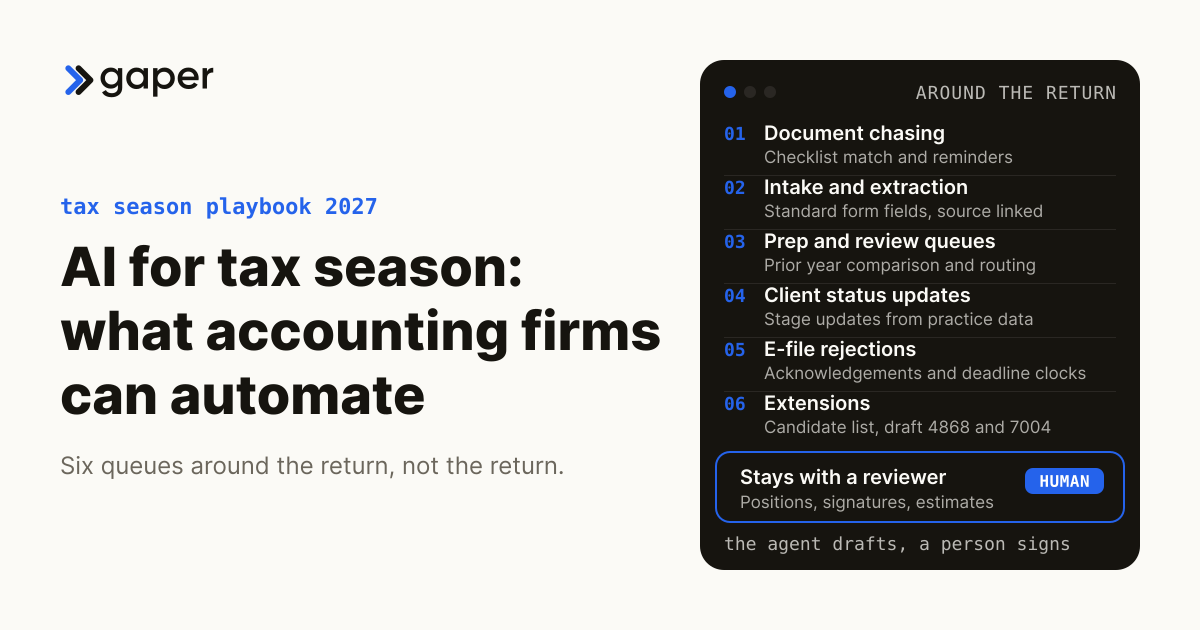
This step assists, it does not automate. Reminders, organizer status and missing item lists can run on their own. Deciding which client needs a phone call instead of a fourth email stays with a person.
Drafting the chase email is a good early use. Karbon describes its AI email features as producing "fully editable suggestions for quick email responses". That is the right shape. The software writes, the person sends.
The reason to start here is that failure is loud. A badly worded reminder gets a reply. A badly coded accrual does not.
Step two: sorting, splitting, renaming and indexing
This step automates. Recognizing a form type, splitting a combined scan, renaming to a convention and filing into return order is pattern work with a visible failure mode.
It carries the lowest judgment risk in the workflow. Indexing a PDF makes no determination about tax liability. A misfiled page shows up immediately as a page in the wrong section.
The data risk is not lower at all. The tool still receives complete W-2s, 1099s and brokerage statements, carrying names, addresses and Social Security numbers. Every vendor question you would ask about extraction applies here unchanged.
Step three: extraction from standard forms
This step automates with a remainder, and the remainder is the honest part. Thomson Reuters states that "1040SCAN eliminates the need to verify OCR data for 65% of standard documents by combining patented text-layer matching and AI".
Read the other side of that sentence. Roughly a third of standard documents still go to a person. Non-standard documents are not inside the 65% at all.
That is a useful ceiling, not a disappointing one. It tells a practice lead how much preparer time is genuinely in play.
Which extracted fields still go to a person
The uncertain ones, and the software says which. SurePrep's Review Wizard color codes fields by extraction confidence, and a flagged entry "indicates a field OCR is uncertain about that field and requires verification".
Every serious tool in this category works the same way. A confidence score per field, then a queue for the fields that fall short.
When you evaluate a build, ask for the threshold and who owns the queue. A system with no queue is not more accurate. It is just quieter about being wrong.
Why K-1s break extraction tools
There is no standard layout for a K-1 package. Supplemental schedules, footnotes and state allocations land in a different place on every issuer's version. Template matching fails the first time it meets a layout it has not seen.
Vendors in this niche quote handling times per K-1. Those are vendor estimates with no published method and no sample, so treat the timing as unknown.
The format problem is the real fact. Plan for K-1s to stay a manual step this season, and budget the reviewer hours accordingly.
Step four: populating the return and clearing diagnostics
This is where extraction either pays off or does not. Data moves from the binder into the tax software, and the software throws diagnostics.
Population automates when a field maps cleanly. A W-2 box lands in a W-2 box. It stops automating the moment a figure needs a decision first: basis, an allocation, a state apportionment, a carryforward that no longer applies.
Diagnostics are a review queue by another name. Clearing them is judgment work, and firms forget to staff it when they count the time extraction saved.
Ask two things before you buy. What share of extracted fields does the vendor write straight into your tax software, and what share lands in a workpaper a preparer then keys from.
Is a 1065 workpaper set the same job as a 1040 set?
No, and the automation ceiling is completely different. A 1040 set is source document driven, so the work is extraction and indexing. A business return set is trial balance driven, so the work is mapping and adjustment.
Mapping accounts to tax groupings is repeatable once the chart of accounts is stable. Deciding whether a difference is temporary or permanent is not.
If a vendor gives you one answer covering both jobs, they have not looked closely at either.
The trial balance has to be right before any of this helps
Automation downstream of a bad trial balance produces a tidy, confident, wrong binder. The close comes first.
Rules based cleanup has published limits. QuickBooks lets you create "up to 2,000 bank rules", and a single rule can carry only five conditions. Those caps are the shape of what deterministic rules can hold.
Past that point a firm is choosing between more rules and better judgment. That is the real reason firms start looking at agents.
What the bank feed AI already admits about itself
Intuit grades its own suggestions by confidence. The bottom tier says plainly that "QuickBooks has limited data behind the suggestion".
The top tier is not understanding either. Intuit describes it as strong data with a clear pattern in your history. That explains why a brand new engagement gets poor suggestions for the first two months.
Xero publishes its own figure as a marketing claim, saying it "reconciles your transactions at 97% accuracy". No method appears on the page. Treat it as a vendor claim, and remember the unstated remainder lands on your reviewer.
Tax journal entries and book to tax differences
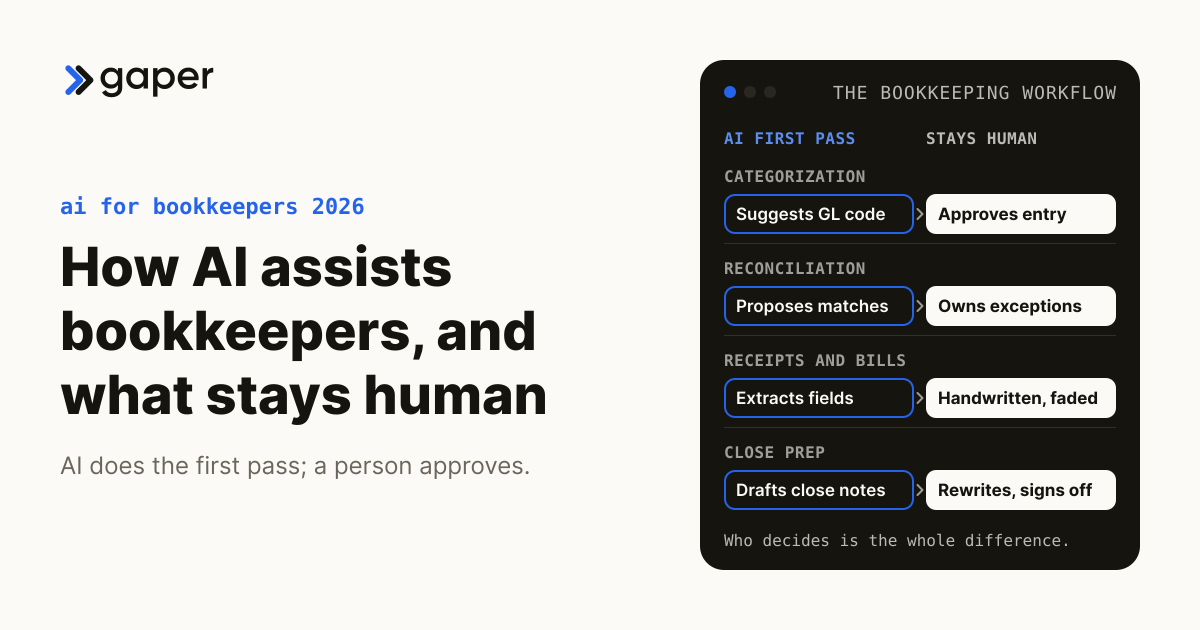
This stays human. A tool can propose the entry and carry the schedule. It cannot own the position.
The AICPA standards are explicit. Tools "should be used to enhance or improve the member's understanding of a tax issue, not to supplant the member's professional judgment". The standard makes the point with the penalties of perjury attestation on Form 1040.
That standard took effect on 1 January 2024. It names artificial intelligence as a tool it covers.
Leadsheets and tie-outs
These sit in the supervised middle. Building the leadsheet, pulling the grouped balances and carrying the cross references can run automatically. Approving the tie to a return line does not.
The practical test is traceability. A reviewer should be able to click a figure and land on the page it came from.
If the trail ends at a model output with no underlying document, you have added speed and removed evidence.
Who signs off on a number the machine put in the binder?
A named person does, at every sign-off level. The AICPA standards leave no room here, stating that "that responsibility cannot be transferred entirely to reliance on a tool".
The same section allows reasonable reliance. Automation is permitted. Unsupervised automation is not.
In the audit log, the approver has to be a human account. If it is a service account, the firm has automated away its own evidence.
Do firms actually want the agent to finish the job?
Mostly no, and the survey data is clear. Intuit commissioned a 2026 survey of 725 US accounting professionals, and "only 6% want AI to execute autonomously".
The preferred shape is draft plus review. In the same survey, 40% want AI as a support tool. Another 34% want AI to draft, with a human reviewing and signing off.
That survey is vendor funded, so weigh it accordingly. It still describes the product shape firms are asking for.
Does faster preparation make review faster?
Not automatically, and there is good evidence it can go the other way. The PCAOB found that technology assisted analysis "may return dozens or even hundreds of items within the population that meet one or more criteria established by the auditor".
Those are issuer audit standards, not tax rules, so they do not bind a 1040 binder. The finding still describes what happens when software examines everything instead of a sample.
A flag is not a finding. The IAASB works the same point through an example, concluding that automated procedures "do not provide sufficiently persuasive audit evidence for Group A, rather it further informs the auditor's risk assessment".
Two standard setters, the same warning. Automation moves the bottleneck toward review. Plan reviewer capacity before launch, not after.
What the reviewer has to see in the file
Enough to check the work, not just accept it. Three things belong with the workpaper. The inputs used, how the output was checked, and the name of the person who checked it.
Aon's risk consultant recommends exactly that, telling firms to document "the prompts used, how the outputs were verified, and who performed the review".
Audit standards describe the same test. PCAOB AS 1201 governs issuer audits rather than tax work, and it makes a reviewer evaluate whether "the work was performed and documented". A tax reviewer needs the same evidence to sign.
The compliance questions that follow the data
Three questions follow client data through every step above. What does the tool receive, where does it run, and who checked the output.
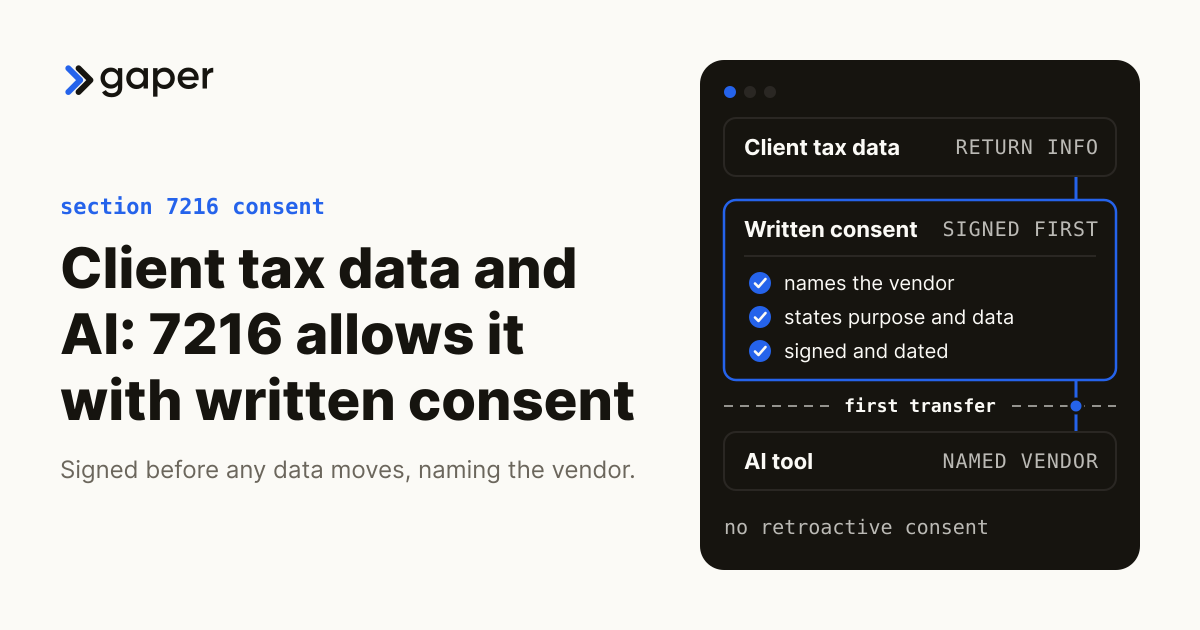
Section 7216 makes unauthorized disclosure or use of return information a crime for the preparer. Its regulations also treat a software contractor receiving return information as a tax return preparer.
That does not shrink your exposure. The penalty reaches everyone who qualifies as a preparer, your firm included, and the vendor carrying some of it does not move any off you.
The definition reaches what the tool produces, not only what you upload. An AI written workpaper note built from return data is return information too.
We cover vendor diligence, consent wording, the Safeguards Rule and client disclosure in full on AI agents for accounting. Two points below apply specifically to a workpaper pipeline.
Does it matter which country the model runs in?
It matters, and it changes the pipeline design. The regulation states that where a recipient sits outside the United States, "the taxpayer's consent under § 301.7216-3 prior to any disclosure is required". That holds even when the person works for your own firm.
The regulation's own example treats remote viewing as disclosure. A contractor abroad who only looks at data hosted on a US server still triggers consent.
For 1040 filers the default is redaction. A US preparer "must redact or otherwise mask the taxpayer's SSN before the tax return information is disclosed outside of the United States".
That default is not absolute. A narrow exception at 301.7216-3(b)(4)(ii) allows consent to send the SSN offshore, but only through an adequate data protection safeguard as defined by the Secretary. The firm must also verify that safeguard inside the consent request itself.
Either way, build the redaction step. Any offshore or foreign hosted pipeline needs one.
Who is liable when the binder has a wrong number?
The firm is. Aon's risk consultant warns that "Generative AI can be confidently wrong", and that relying on its output without proper review becomes a professional liability problem. When nobody caught the error, the client comes after the firm, not the tool vendor.
Carriers are already asking at renewal. Aon's Stan Sterna says insurers "want to see firms are approaching the use of AI with the same basic risk management protocols" used for engagement letters.
There is no claims history yet to price. That is a reason to write the policy now, not a reason to skip it.
How much time does automating workpaper preparation actually save?
No independent published benchmark exists. Every figure circulating on this topic is a vendor estimate about that vendor's own product, usually with no sample size and no method.
What is measured is how little is automated today. Thomson Reuters surveyed 639 tax and accounting firm professionals. It found that "about half (49%) of the respondents to this year's survey estimate that one-quarter of their tax workflows are automated". Another 18% use no automation at all.
The stated blockers are practical. In the same survey, 47% named lack of time and resources, and 45% named the cost of implementation.
How to measure it at your own firm
Baseline three numbers before anything is switched on. Prep to review cycle time by return type, rework volume, and the number of follow-up loops back to the client.
Most firms skip this and cannot recover it later. In the 2025 AICPA and CPA.com National MAP Survey of 1,073 completing firms, "40% said they had not yet figured out how to track efficiencies due to technological advancements".
Pick numbers you can pull from your own systems. A vendor dashboard is not a baseline.
Is your firm behind?
Probably not, and the survey data is reassuring. A 2026 survey of 486 bookkeeping and accounting professionals, mostly owners and partners at small firms, asked the AI users among them about trust. Only "19% trust AI enough to use it with limited review".
That survey is vendor published, so label it as such. Among the firms in it already using AI, only one in five can point to a measurable return on the spend.
Breadth is high, depth is low. Widespread chatbot use is not the same as a changed workflow.
What should a firm automate first?
Intake and indexing. The work is clerical, the failure is visible, and it makes no determination about tax liability.
Run it on a closed prior period first. Compare what the tool produced against what the team actually did, on returns where you already know the answer.
Then take extraction on standard forms, with the uncertain fields queued to a named person. Leave K-1s, accruals and book to tax differences alone in season one.
Should a firm buy a workpaper tool or build its own agent?
Buy for the standard 1040 path. Indexed binders, form extraction and tax software integration already exist, and rebuilding them is wasted money.
Build where your work does not match a product. Usually that means the odd business returns and the firm specific leadsheet formats. It also means the client follow-up loops, and anything that has to run inside your own cloud for a consent or security reason.
Most firms have no internal build capacity today. The 2024 CPA.com and AICPA CAS Benchmark Survey drew 206 self-selected respondents, and the report concedes that self-selection bias.
It found that "only 13% of all respondents are actively looking for opportunities to automate" with an internal group building bots. More than 67% partner with software vendors instead.
What to ask a vendor before signing
Once the buy or build call is made, the questions get specific. Five of them, in writing, before any demo.
Where is the data handled and stored. Does any of it leave the United States. Is client data used to train anything. What does the published document scope exclude. What audit trail does the reviewer get.
The first three decide your section 7216 answer. The fourth decides the size of your March exception queue. The fifth decides whether the file is defensible at review.
Add one more for any attest practice. AICPA quality management standards now cover resources obtained from service providers, including "a methodology, an IT application, or people used in an engagement".
What breaks in the first busy season after you automate
Two things, and both are predictable. The documents that fall outside the tool's published scope, and the assumption that somebody already checked the output.
Every extraction product publishes exclusions. Orientation requirements, missing identifiers and specific account types drop out to manual handling, and they surface in the worst week of the year.
Decide in November who owns that queue. A queue with no owner is how a firm discovers in April that automation made review slower.
Where to start
If you want a read on which of your workpaper steps are worth automating, book a free AI assessment at /appointment. We will walk your actual 1040 and business return workflows, mark each step as automate, assist or human, and tell you plainly where a build does not pay for itself.
Free assessment. No commitment.
Frequently asked questions
Where do the hours actually go in workpaper preparation?
Is a 1065 workpaper set the same job as a 1040 set?
Who signs off on a number the machine put in the binder?
Do firms actually want the agent to finish the job?
Does faster preparation make review faster?
Does it matter which country the model runs in?
Ready to turn AI into execution?
Book a free assessment of one workflow. We map it, make an honest build versus buy call before any code, and if an off the shelf product covers the job we will tell you so.