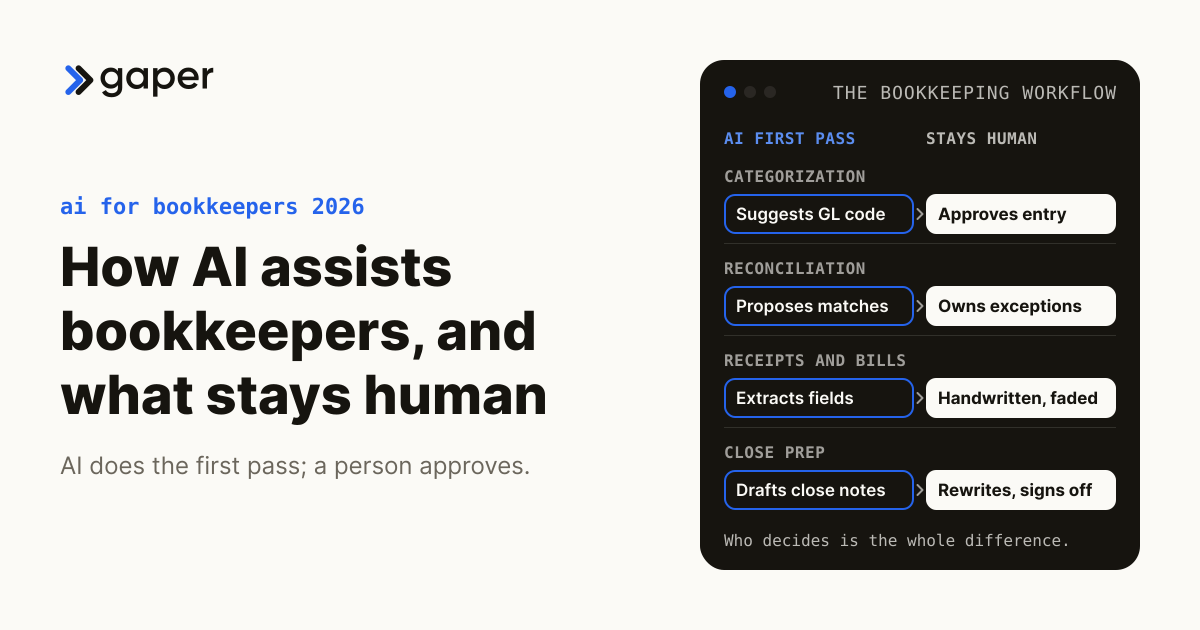
How AI Assists Bookkeepers
How AI helps bookkeepers in 2026 across categorization, reconciliation, and reporting, with the outcomes that justify the switch.

How AI Assists Bookkeepers Across Categorization, Reconciliation, and Reporting in 2026
Key Takeaways
- ML-based transaction categorization now hits 95 percent first-pass accuracy after one to two months of training on the firm’s history.
- Invoice and receipt OCR cuts 50 to 70 percent of manual data entry hours for solo bookkeepers and small firms.
- Anomaly detection on the GL surfaces duplicates, miscoding, and fraud signals days after they happen, not weeks.
- Bookkeepers who adopt AI properly serve 2 to 3 times more clients at the same quality level.
- Human judgment still owns client relationships, complex transactions, regulatory calls, and tax strategy.
Table of Contents
- Why Bookkeepers Need AI Help in 2026
- Seven Bookkeeping Tasks AI Now Handles Well
- The Modern Bookkeeper’s AI Tool Stack
- What the Published Evidence Supports on Hours, Capacity, and Errors
- What Still Needs the Human Bookkeeper
- What to Say to a Client Who Asks Why the Fee Is Unchanged
- Do We Have to Tell Clients We Use AI, and Does the Engagement Letter Need New Language?
- Does Putting Client Financial Data Into an AI Tool Breach Confidentiality?
- Who Is Liable When the Model Miscodes Something Into a Return or a Covenant?
- What Audit Trail an AI-Assisted Ledger Must Produce
- A 30-Day Rollout for Solo Bookkeepers and Small Firms
- What’s Next for AI-Native Bookkeeping in 2026-2027
- Frequently Asked Questions
Why Bookkeepers Need AI Help in 2026
The reason how AI assists bookkeepers matters is supply. The Bureau of Labor Statistics counted 1,532,400 bookkeeping, accounting, and auditing clerks in 2025 and projects employment in the occupation to decline 6 percent over the 2025 to 2035 decade, while still projecting about 144,100 openings a year, nearly all of them from people transferring out or retiring. That is a slow drain rather than a collapse, and it lands on a pipeline that is also thinning: 55,152 accounting bachelor's and master's degrees were awarded in 2023-24, down 6.6 percent year over year. The work still scales with client count, so a firm that cannot hire its way out has to change how the work gets done.
Three shifts converged in the last 18 months to turn AI from a curiosity into table stakes. QuickBooks Online shipped Intuit Assist with categorization and bill capture baked in. Xero pushed Hubdoc and Dext into the default workflow. Intuit now documents eight named agents inside QuickBooks Online, including an Accounting AI that the documentation says updates transactions automatically alongside a general assurance that the user is always in control. None of the agent-layer vendors publish an audited accuracy benchmark, and Intuit's documentation does not state clearly which agent actions post without a human approval step, which makes that the first question to put to any vendor. The firms that have not started feel the pressure from clients who expect the same week-of-month reporting their accountants on the other side of town are already delivering.
Bookkeeping workforce and close benchmarks, as published
1,532,400
Bookkeeping, accounting, and auditing clerks employed in 2025, BLS
Workforce
-6%
Projected change in the occupation, 2025 to 2035, BLS
Outlook
144,100
Openings projected each year regardless, from transfers and retirements, BLS
Churn
6.4 days
Median monthly close across 2,300 organizations, APQC via CFO.com
Baseline
Every figure above links to its published source. The close benchmark comes from a 2018 APQC survey and should be read as a dated baseline rather than a current reading.
The takeaway is that the question is no longer whether to adopt AI. The question is which workflows to hand to the model first and what review layer stays in human hands. The next section breaks down the seven tasks most firms delegate first, with the review posture each one needs and the measurement that shows whether it worked.
What Is a Bookkeeping AI Agent, and How Is It Different From the AI in QuickBooks and Xero?
An AI agent is software that takes a multi-step action on your books, a bank rule is software that applies a condition you wrote yourself, and the gap between them is who decides. A rule says "if the payee contains SHELL, code it to Fuel." An agent reads the transaction, the attached receipt, the vendor history and the chart of accounts, picks a code it was never explicitly told to pick, and either posts it or queues it for approval. That last clause is the whole evaluation.
The line is blurring because the ledger vendors are shipping agents themselves. Intuit documents eight named agents inside QuickBooks Online, Accounting AI, Customer AI, Payments AI, Project Management AI, Finance AI, Payroll AI, Sales Tax AI and Business Tax AI (Intuit QuickBooks support, 2026). So if your firm already pays for QuickBooks Online, agent functionality may already be active on your clients' files. This is not a dormant switch waiting to be flipped. Intuit's own documentation states that "Currently, there isn't a way to turn off AI features individually" (Intuit QuickBooks support, 2026).
That makes the approval boundary the first thing to establish, not the last. The same documentation says Accounting AI "updates transactions automatically" while also saying "you are always in control", and only Payroll AI is described as involving managers for confirmations or approvals (Intuit QuickBooks support, 2026). Those statements are in tension, and the page does not resolve them. Get the vendor to state in writing which actions post to the ledger without a human click, on which tiers, and how they can be constrained.
The practical test for whether you need anything beyond the built-in agents: can you express your firm's judgment calls as configuration in the product you already own? If the answer is yes, buy nothing. If your answer involves multi-entity allocations, client-specific coding conventions, or an approval trail your reviewer actually uses, that is the layer the ledger vendors do not sell you.
Seven Bookkeeping Tasks AI Now Handles Well
Seven workflows dominate the modern bookkeeping week. The ledger below lists each one with the review posture it needs and the metric that shows whether the assist is working on your own book. It deliberately carries no accuracy percentages and no hours-saved figures, because no vendor and no independent study publishes audited numbers for these tasks, and a figure invented for a page like this one would be worse than none. The model carries the volume work. The bookkeeper carries the approval, the judgment, and the client conversation.
Bookkeeper task ledger, AI assist and the review posture each task needs
| Task | AI assist | Review posture | What to measure |
|---|---|---|---|
| Transaction categorization | ML on history, GL code suggestions | Approve every posted entry | First-pass acceptance rate on your own ledger |
| Invoice and receipt OCR | Vendor, amount, line item extract | Spot check, full check on handwritten and thermal | Fields corrected per document |
| Bank reconciliation suggestions | Match payments to invoices | Batch approve, review exceptions one by one | Unmatched items at cutoff |
| Anomaly and duplicate detection | Miscoding, dupes, fraud signals | Treat a flag as a question, never a finding | True flags against false flags |
| P&L and AP aging narrative | Plain English variance write up | Rewrite before it leaves the firm | Edits per draft |
| Tax prep bundle | 1099s, K-1s, sales tax, receipts | The preparer signs, so the preparer reviews in full | Items returned at review |
| Client communication drafts | Missing receipt and follow up | Read before send | Drafts sent unedited |
| Whole book | The firm stays the final authority on every entry | Days to close, against the 6.4 day median |
The tax prep line deserves the heaviest review, because the penalty sits with the preparer and not with the software. IRC 6694 sets the penalty for an unreasonable position at the greater of $1,000 or 50 percent of the income derived, rising to the greater of $5,000 or 75 percent where the conduct is willful or reckless, and the reasonable-cause defence turns on the preparer acting in good faith. There is no statutory defence that the software did it. Firms reviewing the broader playbook on AI accounting assistants for firms will recognize most of these line items already running in the firms that have moved.
Which Clients and Ledgers Are a Bad Fit for AI Bookkeeping
Some ledgers should not have an agent pointed at them at all, and naming them is what makes the task ledger above credible. The common failure is a firm that pilots on its single messiest client, watches the accuracy collapse, and concludes the category does not work.
Do not automate first on these:
- Client trust and escrow accounts. Attorney IOLTA accounts, real estate escrow and similar fiduciary ledgers are governed by state bar and state regulator rules that generally require specific handling and reconciliation. The exposure from a wrong posting is a licence issue, not a reclassification. Check your jurisdiction's rules before any automation touches these.
- Percentage-of-completion and construction work in progress. Revenue recognition here turns on a cost-to-complete estimate that a person makes. The agent can code the cost, but it cannot supply the judgment the revenue number depends on.
- Inventory with standard costing and variance analysis. Variance is meaningful only against a standard someone set deliberately. An agent categorising the variance account without understanding the standard produces confident nonsense.
- Multi-currency remeasurement. Functional currency determination, and the choice between remeasurement and translation, are judgment calls made once per entity and applied consistently. Automate the transaction capture, not the determination.
- Anything in litigation, under audit, or under forensic review. If the books are evidence, freeze the process. A changed categorisation method mid-period is a question you will have to answer.
- Clients you are about to disengage, or whose books you have not yet cleaned. Training a categorisation layer on a ledger you already distrust bakes the errors in.
The clients that work best are the boring ones: recurring vendors, stable chart of accounts, clean bank feeds, and a run of history you would be comfortable defending. Pick two of those for the pilot. The hard clients are where a human bookkeeper earns the fee, which is the honest reason to leave them alone.
What Data the Tool Needs Before It Is Useful, and How Far Back
The prerequisite is history, and the constraint is that bank feeds do not give you much of it. Intuit's own banking guidance is blunt: "Transactions older than 90 days can't be downloaded. You'll need to add them to QuickBooks Online manually" (Intuit QuickBooks support, 2026). The manual route has its own limits: Intuit's upload article says the file "must be in English and 350 KB or less", suggests a QBO file, and accepts QFX or CSV, with "up to 1,000 lines per upload" (Intuit QuickBooks support, 2026). If you build your own feed on Plaid instead, the default transaction window is 90 days and the maximum is 730 days, set through the days_requested parameter at link token creation (Plaid, 2026). So roughly two years is the practical ceiling, 90 days is the default, and the difference is work someone has to do per client, in 1,000-line chunks.
No vendor appears to publish a minimum volume of history required before categorisation becomes reliable, so treat any number you are quoted as a sales claim and ask how it was measured.
The bigger cost is the chart of accounts. A messy chart is not a data problem the model fixes, it is a data problem the model amplifies, because it will learn and reproduce your inconsistencies at speed. If the same expense has landed in three different accounts across the last year, the agent has no basis to choose and will pick the most frequent, which is often the wrong one.
Budget the cleanup honestly. Per client, before you connect anything:
| Prerequisite | What good looks like | Where it slips |
|---|---|---|
| Transaction history | 12 months in the ledger, reconciled | Feed stops at 90 days, the rest is manual upload |
| Chart of accounts | One account per economic event, no duplicates | Legacy accounts nobody will delete |
| Vendor list | Deduplicated, consistent naming | Same vendor spelled four ways |
| Source documents | Receipts and bills attached to transactions | Paper and email backlogs |
| Opening balances | Prior period closed and signed off | Unreconciled suspense accounts |
Twelve months in that table is a working rule of thumb, not a sourced threshold, for the reason given above. Pick the period you would be comfortable defending to a reviewer, and hold vendors to the same standard by asking them to show their working.
This is a one-off per client, not a recurring tax, but it is a real week of work on a neglected file. Sequence the pilot so the cleanup happens before week one, not during it.
The Modern Bookkeeper’s AI Tool Stack
The modern bookkeeper does not pick one tool. She picks a stack. The bottom layer is the books of record, which is QuickBooks Online for most US small businesses and Xero for the rest. On top of that sits a capture layer for receipts and bills, then an AI agent layer for categorization, reconciliation, and narrative work, and finally a custom rule layer where the firm encodes its judgment calls. The whole thing has to talk through clean integrations, and that is where most rollouts stall.
The four-layer modern bookkeeper stack
| # | Item | What it means |
|---|---|---|
| 04 | Custom rule and audit layer | Firm-specific GL rules, multi-entity logic, audit trail. Built with Python or QBO and Xero APIs. |
| 03 | AI agent layer | AccountsGPT, Intuit Assist, Vic.ai, Trullion, Truewind. Categorization, reconciliation, narrative drafts. Botkeeper sat in this layer for years and ceased operations in February 2026 after 11 years and roughly $90 million raised. |
| 02 | Capture and OCR layer | Hubdoc, Dext, Bill, Ramp receipts. Pulls every invoice, bill, and receipt into the books before the model touches it. |
| 01 | Books of record | QuickBooks Online for most US small businesses, Xero for the rest. NetSuite once a client crosses 100 employees. |
Each layer is a separate buying decision, and layer 3 is the layer that can disappear. Botkeeper closed in February 2026, and before it Bench Accounting stopped operating on a Friday in December 2024 and was acquired the following Monday, with more than 12,000 small business customers whose books lived inside the provider environment. The structural protection is to keep the ledger in a tenant the firm controls, so that losing an agent vendor costs you a tool and not your records.
AccountsGPT is the agent layer entry that Gaper has trained specifically on US accounting workflows. It is built around GL code structures, multi-entity charts of accounts, and the document types a small business CPA sees in a year, so configuration starts from accounting structures rather than from a blank general-purpose model. The capture and books layers stay where they are. The agent layer plugs in. The rule layer is where most firms call in help because it is the part that turns a generic model into a firm-specific bookkeeper. Firms reading ways ChatGPT can optimize accounting usually end up here after they outgrow the off-the-shelf setup. The rule layer is real engineering against real limits: Xero caps every app at 60 API calls a minute and 5,000 a day, and says those limits cannot be increased, and QuickBooks throttles per company file, which constrains batch processing across a large client book.
What an AI Bookkeeping Stack Actually Costs Per Client and Per Year
Here is the honest answer: the ledger layer has published prices, the agent layer mostly does not, and the integration work is the line that decides the total. Anyone who gives you a single per-client number without asking about your chart of accounts is guessing.
What is actually published:
| Layer | Published price | Per client per month |
|---|---|---|
| Books of record (Xero) | Early $25, Growing $55, Established $90 (Xero, 2026) | $25 to $90 |
| Books of record (QuickBooks Online) | List varies by tier; ProAdvisor firm-billed discount is 30 percent off ongoing, while the client-billed direct discount is 30 percent for 12 months only (Intuit, 2026) | List less 30 percent |
| Capture and OCR | Xero bundles Smart Document Capture into all three plans at no extra cost (Xero, 2026) | Often $0, check before adding a line |
| Agent layer | No list price published | Unknown, quote required |
| Model tokens (if you build) | Anthropic list per million tokens: Opus 5 $5 in and $25 out, Sonnet 5 $2 and $10, Haiku 4.5 $1 and $5 (Anthropic, 2026) | Tokens per document times rate |
| Integration and rule layer | Not a published price anywhere | Your own engineering quote |
Two things fall straight out of that table. First, a separate capture line item can be double counting if you are on Xero, because document capture is already included. Second, none of the agent-layer vendors in this page's stack table published a list price at the time of writing, September 2026; every one routes to contact sales. Verify that for yourself before you budget, because pricing pages change, and assume a minimum commitment until a quote says otherwise.
Note also which QuickBooks discount you are quoted. Firm-billed ProAdvisor pricing is 30 percent off on an ongoing basis, while the client-billed direct discount is 30 percent for 12 months and then reverts to full list (Intuit, 2026). Modelling year one on the client-billed number and year two on nothing is a common way to miss a price rise across a whole book.
For arithmetic on a 200 client book, the ledger layer alone on Xero Growing at $55 list is $132,000 a year, and that is before a single line of AI. Xero Early is cheaper at $25 but is capped at 20 invoices and 5 bills (Xero, 2026), so it does not carry a real client.
Model costs are worth sizing yourself rather than accepting a per-document price. Take a representative bill, count its tokens, multiply by the published rate, multiply by monthly document volume. For most firms that number is small next to the ledger subscriptions and trivial next to the integration work.
Buy an Off-the-Shelf Tool or Build Your Own on the QuickBooks and Xero APIs?
Buy first, and build only the rule layer, because the maintenance cost of a build is permanent and the published API constraints are harder than most firms expect.
Xero publishes hard limits that apply to every app connecting to its API and states they cannot be increased: 5 concurrent calls, 60 calls per minute, 5,000 calls per day, with an app-wide ceiling of 10,000 calls per minute, and an HTTP 429 when you exceed them (Xero Developer, 2026). Across 200 client organisations, a daily per-organisation budget of 5,000 calls sounds generous until a backfill runs. QuickBooks Online throttles per company file as well, which constrains batch processing across a large book. Confirm the current figures on Intuit's developer site rather than trusting an integrator blog, because the numbers circulating secondhand are not sourced to Intuit.
The failure rate matters more than the build cost. MIT's Project NANDA reports that of organisations looking at enterprise-grade custom or vendor-sold AI systems, "Sixty percent of organizations evaluated such tools, but only 20 percent reached pilot stage and just 5 percent reached production" (MIT Project NANDA, The GenAI Divide, 2025, PDF copy re-hosted by Cloudelligent). That report is labelled preliminary findings and states its own sample limits, including possible selection bias, so treat it as directional. Directionally, it says most builds do not ship.
| Over three years | Buy | Build |
|---|---|---|
| Year 1 cost | Subscription, quoted per client | Engineering build plus subscriptions |
| Ongoing cost | Subscription only | Subscription plus permanent maintenance |
| API version changes | Vendor absorbs them | You absorb them, on their schedule |
| Firm-specific rules | Limited to vendor configuration | Whatever you can specify |
| Exit cost | Switch vendors | You still own the code and the debt |
| Vendor failure risk | Real, see Bench in 2024 and Botkeeper in 2026 | None, but key-person risk instead |
No documented cadence for breaking API changes on either platform appears to be published, so the maintenance line has to be qualitative. It is not zero, and it does not stop. The defensible middle path is to buy the categorisation and capture layers and build only the thin rule and audit layer that encodes your firm's judgment, because that is the part no vendor will ever ship for you.
How This Differs From Outsourcing to a Provider Like Bench or Pilot
The structural difference is where the books live, and it is the only part of this decision that matters when a provider fails. An AI layer running inside your own QuickBooks or Xero tenant leaves you with a ledger you control. A provider who performs the bookkeeping in their environment leaves you with an account you can lose access to.
That is not a hypothetical risk. Bench Accounting announced an abrupt shutdown on Friday 27 December 2024 and was acquired by Employer.com the following Monday, 30 December, affecting more than 12,000 small business customers (PYMNTS, 2024). Botkeeper, which earlier versions of this page listed in the agent layer, shut down in February 2026 after 11 years, with founder Enrico Palmerino citing macroeconomic shifts and industry consolidation hitting its largest clients; the company had raised roughly $90 million including a $42 million Series C in November 2021 (Accounting Today, 2026). Botkeeper is not a live option. Before you sign with anyone, confirm the vendor is still trading, and build the check into your annual review rather than your onboarding.
Pilot draws the distinction explicitly in its own marketing. Its Essentials tier starts at $99 per month for up to $100,000 in monthly expenses, and its Custom tier states you "Keep your existing QuickBooks account and historical data" (Pilot, 2026). That is the right question to ask every provider, in writing. No provider's contractual exit terms are characterised here, because marketing copy is not a termination clause; ask for the clause itself.
| Question | AI in your own tenant | Outsourced provider |
|---|---|---|
| Who owns the ledger subscription | Your firm or the client | Often the provider |
| If the provider fails Friday | Nothing changes | You need an exit plan by Monday |
| Where the rules live | Your configuration | Their internal process |
| What you get on exit | Everything, you never left | Whatever the contract says |
Whatever you choose, the recordkeeping obligation does not move. Rev. Proc. 97-22 section 3.03 states that a taxpayer's use of a third party "does not relieve the taxpayer of the responsibilities described in this revenue procedure" (IRS, Rev. Proc. 97-22). You can outsource the work. You cannot outsource the responsibility.
What to Ask a Vendor About Security, Data Residency and Model Training
Ask these before the demo, not after the risk committee stalls the rollout. If your firm also prepares returns, you are under the FTC Safeguards Rule, which requires a written information security programme with nine components under 16 C.F.R. section 314.4, including a designated Qualified Individual, a written risk assessment, and service provider oversight. The FTC's own guidance says to "Select service providers with the skills and experience to maintain appropriate safeguards", with contracts that "spell out your security expectations, build in ways to monitor your service provider's work", and to reassess periodically (FTC, 2024). Firms holding information on fewer than 5,000 consumers are exempt from certain provisions (FTC, 2024). Signing an AI bookkeeping vendor is exactly the event that oversight duty was written for.
The question list, and the document you should get for each:
| Ask | Document to insist on |
|---|---|
| Do you train models on our content? | Contractual language, not a marketing page |
| Who owns the outputs? | The ownership clause, quoted |
| Where is data processed and stored, and can we pin a region? | Written statement of subprocessors and regions |
| Are any subprocessors outside the US? | Subprocessor list, updated with notice |
| What is your retention period, and can we set it to zero? | Data retention terms |
| Which actions post to the ledger without a human click? | Product documentation, in writing |
| What do we get on exit, and in what format? | Termination and data return clause |
| Do you carry a current third-party security report? | The report, under NDA |
On the first two, Anthropic's commercial terms are a useful benchmark to hold others against: "Anthropic may not train models on Customer Content from Services" and "Anthropic agrees that Customer (a) retains all rights to its Inputs, and (b) owns its Outputs" (Anthropic, 2026). That is the standard of clarity to demand. The equivalent clauses from the accounting-automation vendors named on this page are not quoted here, and you should not assume they say the same thing.
Two specifics people miss. Offshore processing triggers disclosure obligations under the section 7216 consent rules, set out in the section below on telling clients you use AI. And under Rev. Proc. 97-22 section 4.01(7), an electronic storage system "must not be subject, in whole or in part, to any agreement (such as a contract or license) that would limit or restrict the Service's access to and use of the electronic storage system" (IRS, Rev. Proc. 97-22). A SaaS agreement that can lock a client out of their own records is a problem before it is a preference.
What the Published Evidence Supports on Hours, Capacity, and Errors
There is no independent, non-vendor study of accounting automation ROI to cite, and that absence is the most useful thing to know before a partner signs anything. Every dollar figure in circulation traces back to a vendor. What can be sourced is a set of published baselines and a method for measuring your own firm against them.
Published baselines a firm can measure against
Close cycle time
Median 6.4 calendar days, top quartile 4.8 days or less, bottom quartile 10 days or more, across a sample of 2,300 organizations
Odds of reaching production
60 percent of organizations evaluated enterprise AI tools, 20 percent reached pilot, 5 percent reached production
Return on the money already spent
Despite $30 to $40 billion of enterprise investment in generative AI, 95 percent of organizations are getting zero return
Published software floor
Xero lists $25, $55, and $90 per month by tier with document capture included; Intuit lists 30 percent off ongoing on firm-billed ProAdvisor pricing
Read the MIT figures with their own caveats attached. That report is labelled preliminary findings. It rests on a review of more than 300 publicly disclosed AI initiatives, 52 structured interviews, and 153 survey responses gathered between January and June 2025, and it states its own sample limitations, including possible selection bias. It is evidence about the odds, not a verdict on any one firm.
The measurement that matters is the one the firm runs itself. Take a clean before reading on two clients: days from trial balance to issued statements, hours booked to the engagement, entries reopened after close, and items returned at review. Take the same four readings after two closes with the assist switched on. Four numbers a partner measured beat any number a page like this one could quote.
Capacity, not hours, is where the economics sit, but capacity is also the hardest claim to verify, and no published figure supports a specific client-count gain from automation. What a firm can check is whether demand exists for the capacity it frees. Through 2 May 2025 the IRS counted 74,445,000 e-filed returns prepared by tax professionals, up 2.1 percent, against 64,478,000 self-prepared returns, up 1.2 percent, so professionally prepared work is still growing faster than the do-it-yourself alternative. Small CPA firms reading AI financial management for startups will recognize the same shape on the operator side.
If AI Cuts the Hours on a Fixed-Fee Engagement, Do We Lose the Revenue?
On a fixed fee, no. The margin accrues to the firm, which is the whole argument for fixed fee in the first place. On an hourly engagement you lose it directly and immediately, because cutting the hours cuts the invoice. That is the case to work through first, and it is the one the savings statement above quietly assumes away.
Work the three cases separately, because they behave nothing alike.
Hourly. Efficiency is a pay cut unless the reclaimed hours go to billable work you were previously turning away. The tool only pays for itself if demand exists to absorb the capacity. If your realisation is already soft and your pipeline is thin, automating an hourly book destroys revenue and returns nothing. Do not start here.
Fixed fee. The margin stays with the firm. The risk is different: it is that a client who learns a machine does the first pass asks for a reduction, which is the conversation covered in the section on what to say to a client who asks why the fee is unchanged. Your defensible position is that the fee buys a reviewed, signed set of books, not a count of keystrokes.
Value or subscription pricing. Structurally immune to hours, and the natural destination, but do not reprice a book onto it in the same quarter you deploy a new tool. You will not be able to tell which change moved the number.
No professional standard constraining how a firm prices work performed with automation is known to be in force, though that is an absence of evidence rather than a confirmed absence of a rule, and it is worth a call to your state board if you are unsure. Treat pricing as a commercial decision.
The practical sequence: leave prices unchanged for the first two quarters, measure what actually happened, then convert hourly engagements to fixed fee at their current annualised value rather than at their new lower hours. Converting at the old value is the move that captures the efficiency. Converting at the new hour count hands it to the client and leaves you with the tool bill. And remember the reclaimed capacity has a floor value, because the median pay for bookkeeping, accounting and auditing clerks is $50,670 a year (BLS, 2025). Hours you no longer need to buy are worth at least what you were paying for them.
What Happens to Staff, and How Do Juniors Learn to Review?
This is the objection raised in the room, and the honest answer is that the training pipeline problem is real and the headcount problem is smaller than people fear.
On headcount, the Bureau of Labor Statistics projects employment of bookkeeping, accounting and auditing clerks to decline 6 percent over the 2025 to 2035 decade from 1,532,400 employed in 2025, while still projecting about 144,100 openings a year, all of them expected to come from the need to replace workers who transfer to other occupations or leave the labour force, such as to retire (BLS, 2025). That is a modest decline against heavy replacement demand, not a collapse. Meanwhile the supply side is thinning independently: 55,152 accounting bachelor's and master's degrees were awarded in the 2023-24 academic year, down 6.6 percent year over year, and new CPA exam candidates fell from 42,626 in 2023 to 28,082 in 2024, though the exam changes that year make the candidate drop partly an artefact (Journal of Accountancy, 2025). Against that backdrop, the binding constraint for a firm of this size is more likely to be hiring than headcount.
The training problem is the one to take seriously. First-pass coding is how a junior learns what a wrong entry looks like. Remove it and you have a reviewer shortage in three years, made worse because reviewing machine output is measurably harder than people assume. The peer-reviewed finding is blunt: "Automation complacency is found in both naive and expert participants and cannot be overcome with simple practice", and "Automation bias occurs in both naive and expert participants, cannot be prevented by training or instructions, and can affect decision making in individuals as well as in teams" (Parasuraman and Manzey, Human Factors, 2010).
Read that carefully. Training your juniors to review carefully does not fix it. Design does.
Three things that do work structurally. Keep a rotating book of clients coded manually so juniors still build pattern recognition on real ledgers. Seed deliberate errors into review batches and track catch rates, which turns complacency into a measurable number rather than a virtue. And never let one person both run the agent and approve its output on the same client.
How Long Before This Pays for Itself, and What the Ramp Looks Like
Any payback number you are quoted should be discounted heavily, because there is no independent, non-vendor study of accounting automation ROI in general circulation to anchor it. The ROI figures that do circulate are overwhelmingly vendor-published or vendor-commissioned, so treat any of them as marketing until you can see the methodology.
So build the ramp yourself, as a method rather than a promise. The shape is predictable even when the numbers are not, because there is a trough. In the early months you pay for the tool, you pay for the cleanup, and you still pay a person to review everything the tool produces. Costs are strictly higher than before. That is normal and it is where most rollouts get cancelled by someone who expected month two to look like the case study.
| Phase | What you are paying for | What you should see |
|---|---|---|
| Pre-work | Chart of accounts cleanup, history upload | No savings, real cost |
| Early | Tool plus full manual review of every suggestion | Costs above baseline, accuracy data accumulating |
| Middle | Tool plus sampled review on stable categories | First genuine hour reduction, narrow scope |
| Later | Tool plus exception review | Savings if, and only if, capacity gets sold or costs get cut |
Payback arrives at the point where reclaimed hours are either billed to new work or removed from the cost base. If neither happens, there is no payback, only a new subscription. That is the discipline the MIT finding points at: the report states that despite "$30-40 billion in enterprise investment into GenAI", 95 percent of organizations are getting zero return, based on a review of over 300 publicly disclosed AI initiatives, 52 structured interviews and 153 survey responses gathered between January and June 2025, and the authors label it preliminary findings and acknowledge possible selection bias (MIT Project NANDA, The GenAI Divide, 2025, PDF copy re-hosted by Cloudelligent). Caveats and all, the mechanism it describes is the one to avoid: deployment without a decision about what the freed capacity is for.
Decide that before you sign. Write down, in one sentence, whether the hours become new clients or lower cost. A rollout without that sentence does not pay back.
What Still Needs the Human Bookkeeper
The model is good at volume work. It is bad at judgment, relationships, and edge cases. The split that holds up under review is the one professional obligation already implies. The model classifies, drafts, and reconciles. The bookkeeper approves, advises, and owns the client. Forcing the model into the judgment lane is how firms lose accuracy and trust. The clearest way to keep the split honest is to write it down for the team and the client before the rollout starts.
AI handles
Volume, repetition, pattern
- Transaction categorization to suggested GL codes
- OCR on PDF, image, and handwritten receipts
- Matching transactions to invoices and bills
- Duplicate and miscoding detection at the GL
- First draft of P&L narrative and AP aging notes
- Routine missing receipt and follow up emails
Human owns
Judgment, relationship, edge case
- Final approval on every posted journal entry
- Client conversations about cash, growth, and risk
- M&A, equity, and multi-entity transactions
- State and federal regulatory interpretation
- Tax strategy, not just tax prep
- Sign off on year end financials and audit responses
The principle that keeps this split clean is that the bookkeeper is the final authority on every posted entry, and the obligation does not move when a vendor does the work. IRS Rev. Proc. 97-22 requires that records be cross-referenced so there is an audit trail between the general ledger and the source documents, and section 3.03 of the same procedure states that using a third party for electronic storage does not relieve the taxpayer of those responsibilities. Note also that the QuickBooks Online audit log keeps events for two years and cannot be switched off, which is shorter than most retention expectations, so the native log needs an export routine behind it. The model proposes, the bookkeeper approves, and the trail records both sides of that interaction. Clients who care about the trail can ask for it. Clients who do not care still benefit because the firm catches the mistakes before the books leave the firm. The bookkeeper still owns the relationship and the judgment, which is the part the client is actually paying for.
What to Say to a Client Who Asks Why the Fee Is Unchanged
You will get this call, usually from your most price-sensitive client, usually within a month of mentioning AI. Have the sentence ready, because the partner who improvises concedes the fee.
The sentence is this: your fee buys reviewed, signed, defensible books, and it always has. It has never been priced on how long the typing took.
Then make it concrete, because the abstract version sounds evasive. What the client is actually buying, and what has not changed:
- A named person who reviews every entry before it posts and is accountable for it
- Someone who answers when their lender, their buyer or a tax authority asks a question about a number
- Judgment on the entries that are not routine, which is where the real risk sits
- Continuity, so the books are consistent from month to month and year to year
- A firm carrying professional liability cover and a professional obligation to them
What has changed is where your time goes, and it is fair to say so. Less of it goes to transcription and more goes to review, exceptions and the conversation they are having with you right now. If anything, the reviewed hours are the expensive ones.
If they push, do not defend the price, change the frame: ask what they would like more of. Most clients pushing on fee are not really asking for a discount, they are asking whether the relationship is still worth what it costs. Offering a monthly variance walkthrough, a faster close, or a cash forecast usually ends the conversation better than five percent off does, and it moves the engagement toward work they will not try to price against a machine.
Two things not to say. Do not claim you are not using AI if you are, because it is discoverable and the credibility loss is permanent. And do not volunteer that the tool saved you hours without immediately saying what those hours now go to, because in the silence the client will fill in the answer themselves.
Do We Have to Tell Clients We Use AI, and Does the Engagement Letter Need New Language?
Start by getting the trigger right, because this is where firms reason themselves into the wrong answer. The trigger is not the AI, it is whether client tax return information leaves your firm and reaches a third party. A vendor that processes your clients' data is a disclosure. A model running entirely inside your own tenant may not be, and that is a question for your attorney on your specific architecture. Emailing a spreadsheet to an offshore human bookkeeper triggers the rules in full with no AI involved at all.
Where a disclosure does occur and your firm prepares tax returns, this stops being a marketing preference and becomes a consent question with a prescribed form. Section 7216 governs disclosure and use of tax return information by preparers, and Rev. Proc. 2013-14 sets out exactly how consent must be obtained.
The specifics that catch firms out:
- Consent "must be contained on a separate written document" under section 5.01 (IRS, Rev. Proc. 2013-14). It can be an attachment to your engagement letter. It cannot be a clause buried inside it.
- Duration defaults to one year. The mandatory language in section 5.04(1)(a) reads: "If you do not specify the duration of your consent, your consent is valid for one year from the date of signature" (IRS, Rev. Proc. 2013-14).
- Opt-out consents are prohibited. Section 5.04(2) states that a consent requiring the taxpayer to remove or deselect disclosures or uses they do not want "is not permitted" (IRS, Rev. Proc. 2013-14).
- Consent cannot be a condition of service. The mandatory language says so explicitly: "If we obtain your signature on this form by conditioning our tax return preparation services on your consent, your consent will not be valid" (IRS, Rev. Proc. 2013-14).
- Paper consents must be at least 12-point type on 8.5 by 11 inch or larger paper (IRS, Rev. Proc. 2013-14).
- If the vendor processes offshore, section 5.04(1)(e)(i) requires the statement: "This consent to disclose may result in your tax return information being disclosed to a tax return preparer located outside the United States" (IRS, Rev. Proc. 2013-14).
Note what that last set does to the common vendor pattern of burying AI processing consent in a click-through. It does not work here.
Separately, under the AICPA Code, Rule 1.700.001 provides that "a member in public practice shall not disclose any confidential client information without the specific consent of the client", and Interpretation 1.700.040 gives two routes when using a third-party service provider: contract with the provider for confidentiality with reasonable assurance of appropriate procedures, or obtain the client's specific consent (Journal of Accountancy, 2015). Most firms take the contractual route, which makes the vendor agreement your compliance artefact.
Requirements vary by state board of accountancy, so check yours directly rather than assuming silence means permission. Have your attorney draft both the letter language and the separate consent before the pilot starts, not after.
Does Putting Client Financial Data Into an AI Tool Breach Confidentiality?
It can, and the exposure is larger than most partners assume because the civil penalty is per disclosure rather than per incident.
Three regimes apply at once if your firm touches tax work.
AICPA confidentiality. Rule 1.700.001 prohibits disclosing confidential client information without specific client consent, and Interpretation 1.700.040 permits use of a third-party service provider only where the member either contracts for confidentiality with reasonable assurance of appropriate procedures, or gets the client's consent. The enforcement standard is worth memorising: "A member will be considered to have violated the Confidential Client Information Rule if the member cannot demonstrate that safeguards were applied" (Journal of Accountancy, 2015). The burden sits on you to show the safeguards, so the contract and the diligence file are the defence.
Section 7216, criminal. A preparer who knowingly or recklessly discloses or uses tax return information without authorisation "shall be fined not more than $1,000 ($100,000 in the case of a disclosure or use to which section 6713(b) applies), or imprisoned not more than 1 year, or both" (IRC 7216).
Section 6713, civil, and this is the one firms actually risk. "The penalty for violating section 6713 is $250 for each disclosure or use, not to exceed a total of $10,000 for a calendar year" (IRS, Rev. Proc. 2013-14 section 3.02). Read that as written. Pasting a batch of client records into an unapproved tool is not one event, it is as many events as there are disclosures, until the annual cap.
Rev. Proc. 2013-14 section 5.07 also lists six acceptable adequate data protection safeguard frameworks, including the AICPA/CICA Privacy Framework and IRS Publication 1075 (IRS, Rev. Proc. 2013-14). Ask your vendor which one they meet.
The operational control that matters more than any policy document: staff using a consumer chatbot on client data is the realistic breach path, not the vetted vendor. Name the approved tools, block the rest, and say clearly that pasting client data anywhere else is a disciplinary matter. That control costs nothing and removes most of the risk.
Who Is Liable When the Model Miscodes Something Into a Return or a Covenant?
Your firm is. The principle in the human-owned column of this page, that the bookkeeper gives final approval on every posted journal entry, has a legal consequence: approval transfers the responsibility to the approver.
Start with the recordkeeping point, because it settles the outsourcing argument. Rev. Proc. 97-22 section 3.03 provides that a taxpayer's use of a third party such as a service bureau "does not relieve the taxpayer of the responsibilities described in this revenue procedure" (IRS, Rev. Proc. 97-22). A vendor in the chain does not move the obligation.
If a miscoding flows into a return, preparer penalties attach to the preparer. Under IRC 6694(a), an understatement due to an unreasonable position carries "the greater of $1,000 or 50 percent of the income derived" by the preparer, and under 6694(b), willful or reckless conduct carries "the greater of (A) $5,000, or (B) 75 percent of the income derived" (IRC 6694). There is a defence, and its wording matters: "No penalty shall be imposed under this subsection if it is shown that there is reasonable cause for the understatement and the tax return preparer acted in good faith" (6694(a)(3)) (IRC 6694). That turns on the preparer's own reasonable cause and good faith. It is not a "the software did it" excuse, and a defence built on unreviewed machine output is a weak one.
On a loan covenant calculation, the exposure is contractual and flows through the client relationship rather than a statute, which usually means a professional liability claim rather than a penalty.
Three practical steps. Read the limitation of liability and any output-accuracy language in your vendor's terms before signing; the terms of the vendors named on this page are not quoted here, and you should not assume what they say. Ask your professional liability broker how your current policy responds to a loss involving automated processing, and whether they want notice of the tool. And keep the approval record, because your defence is evidence that a qualified person reviewed the entry, which is the audit trail question covered in the section on what an AI-assisted ledger must produce.
What Audit Trail an AI-Assisted Ledger Must Produce
An AI-assisted ledger must produce a cross-referenced trail from every posted journal entry back to its source document, and that requirement already applies today. Rev. Proc. 97-22 section 4.01(4) requires that information in an electronic storage system and the taxpayer's books and records "must be cross-referenced in a manner that provides an audit trail between the general ledger and the source document(s)" (IRS, Rev. Proc. 97-22).
Read that against an AI workflow. The chain has to run from the posted journal entry, back to the source receipt or bill, and be reproducible. An AI suggestion plus an approval click satisfies it only if the source document is attached and linked, and if the record shows who approved and when. A categorisation with no attached source document does not satisfy it, whether a person or a model produced it.
Two more provisions of the same revenue procedure bear on tooling. Section 3.03 confirms that using a third party does not relieve the taxpayer of these responsibilities. And section 4.01(7) requires that the storage system "must not be subject, in whole or in part, to any agreement (such as a contract or license) that would limit or restrict the Service's access to and use of the electronic storage system" (IRS, Rev. Proc. 97-22), which is a reason to read the vendor agreement before the client's records live inside it.
One practical trap. The QuickBooks Online audit log captures financial transactions, deleted transactions, payroll submissions, sign-ins, settings changes and edits to customers, vendors and employees, and it cannot be switched off, but Intuit states that "Events recorded in the audit log are available for two years" (Intuit QuickBooks support, 2026). Two years is shorter than most record retention expectations and far shorter than the period a return can be examined. If the native log is your AI evidence, build a scheduled export to your own storage from week one, because backfilling it later is not possible.
Design the rollout around this rather than retrofitting it. Capture, per entry: the source document, the suggested code, the final code, the approver, the timestamp, and the rule or model version in force. That record is also your reasonable cause defence.
A 30-Day Rollout for Solo Bookkeepers and Small Firms
A 30 day rollout is the sweet spot for a solo bookkeeper or a 2 to 20 person firm. It is short enough to keep the team focused, long enough to land a meaningful workflow change, and aligned with the typical month end cadence so the firm can measure before and after on the same close. The sequence below starts with the lowest risk, highest volume task and ends with the workflow that needs the most human review. Treat it as a structure to adapt rather than a benchmarked timeline, because no vendor publishes verified implementation durations.
30 day AI rollout for a bookkeeping practice
W1
Week 1
Pick two pilot clients. Connect the ledger to your chosen capture and agent tools, and take the before readings.
W2
Week 2
Load history and review every suggestion. QuickBooks Online bank feeds pull roughly 90 days on first connect, so anything older arrives by manual CSV, QFX, QBO or OFX upload.
W3
Week 3
Turn on reconciliation suggestions and anomaly detection. Approve in batches.
W4
Week 4
First AI assisted close. Compare hours, accuracy, and client report time to last month.
Two pilot clients is the right number. One is too narrow. Three or more is too noisy for a first measurement.
The execution risk on this rollout is not the AI work. It is the integration debt with QBO, Xero, Plaid, Hubdoc, and the firm’s existing rule files. Solo bookkeepers can usually wire this themselves in a week if they pick standard tools. Firms with multi entity clients or older books usually need engineering help for the rule layer, and the wiring and the audit log are best scoped together rather than bolted on afterwards. Bookkeepers tracking the broader 2026 picture in accounting industry trends see this pattern across firm sizes.
How to Baseline the Pilot and Measure Whether It Worked
Capture the baseline before week one or the pilot ends in opinion. The 30-day plan above says to compare hours and accuracy to last month, which only works if last month was measured, and in most firms it was not.
Capture these for the two pilot clients, for the two closes preceding the pilot:
| Metric | How to capture | When |
|---|---|---|
| Hours per client per month | Time entries, split preparation versus review | Before week 1 |
| Days to close | Trial balance run date to statements issued | Before week 1 |
| Transactions requiring rework | Count reclassifications and reopened months | Before week 1 |
| Uncategorised at first pass | Count at the point the file reaches review | Before week 1 |
| Review catch rate | Errors found in review, over entries reviewed | Before week 1 |
| Client report delivery date | Calendar date the client received the pack | Before week 1 |
Days to close has a published external benchmark you can position against, though note its age: APQC's General Accounting Open Standards Benchmarking survey, reported in 2018 across 2,300 organisations, found a median monthly close of 6.4 calendar days, with the top quartile at 4.8 days or less and the bottom quartile at 10 days or more, measured as cycle time in calendar days from running the trial balance to completing the consolidated financial statements (APQC via CFO.com, 2018). Use it to know roughly where you sit, not as a target, and read it as eight-year-old data.
The measurement trap is sample size. Two clients over one close is a handful of exceptions, and a difference of a few errors either way is noise. No accounting-specific guidance on the sample size needed to distinguish a real accuracy change from chance appears to be published, so treat a single close as directional and hold the decision until you have at least three, ideally on the same clients and the same staff.
Two rules keep the result honest. Do not change staffing, pricing or the chart of accounts during the pilot, or you will not know what moved the number. And write down the decision rule in advance: what result continues the rollout, what result stops it. Deciding afterwards is how a failed pilot gets extended.
What a Failed Rollout Looks Like, and the Early Warning Signs
A failed rollout rarely announces itself. It looks like adoption right up until someone reopens six months of books.
The base rate deserves attention. MIT's Project NANDA reports that for enterprise-grade custom or vendor-sold AI systems, "Sixty percent of organizations evaluated such tools, but only 20 percent reached pilot stage and just 5 percent reached production", from a study labelled preliminary findings and acknowledging possible selection bias (MIT Project NANDA, The GenAI Divide, 2025, PDF copy re-hosted by Cloudelligent). Most of that attrition happens quietly.
The tripwires, in the order they usually appear:
- Approval time per batch falls while volume rises. This is rubber-stamping, and it is the leading indicator. The research is unambiguous that you cannot train it away: "Automation complacency is found in both naive and expert participants and cannot be overcome with simple practice" (Parasuraman and Manzey, Human Factors, 2010). Measure approval time, do not exhort people to be careful.
- Review catch rate drops toward zero. Either the model got perfect or your reviewer stopped looking. Seeded test errors tell you which.
- Staff keep a private spreadsheet. When the team maintains a shadow process, they do not trust the tool and the hours have not actually moved.
- A rising exception queue nobody owns. Exceptions that age past a close are the ones that become reclassifications.
- Scope creep onto the messy clients before the clean ones are stable. Pointing the agent at a construction or trust-account ledger in month two is how firms conclude the whole category does not work.
- The vendor stops shipping, or stops answering. Botkeeper shut down in February 2026 after 11 years and roughly $90 million raised (Accounting Today, 2026), and Bench shut down over a weekend in December 2024, affecting more than 12,000 small business customers (PYMNTS, 2024). Quiet release notes and slow support are a signal, not an annoyance.
The response to any of these is the same: narrow the scope back to the categories that were working, not abandon the tool and not push through. A rollout that shrinks deliberately in month two usually survives. One that expands on schedule regardless of the numbers usually does not.
What’s Next for AI-Native Bookkeeping in 2026-2027
The next 18 months bring three shifts that change what bookkeepers ask for. Continuous close moves from a hub city pilot to a default expectation. AI tax review starts to share the load with the CPA. Evidence standards draw more attention, though no state board guidance on AI in attest work has been confirmed and none should be assumed. The rules worth planning against are the ones that already exist. IRS Rev. Proc. 97-22 already requires a cross-referenced audit trail from the general ledger back to source documents, and the FTC Safeguards Rule already requires a firm to select service providers with the skills to maintain appropriate safeguards and to contract for them.
| # | Item | What it means |
|---|---|---|
| 01 | Continuous close | Books that close day by day rather than month by month. Bookkeeper signs off at the end of each day with a 10 minute review. |
| 02 | AI assisted tax review | Model proposes deductions, classification, and filing positions. CPA reviews and signs the return with a versioned trail. |
| 03 | Audit trail expectations | The obligations that already exist: an IRS-required cross-reference from ledger to source document, and service provider oversight under the FTC Safeguards Rule. No state board AI guidance is confirmed. |
The takeaway for a firm partner or manager is the same. Pick one workflow from the seven above, run it on two clients on top of the ledger you already use, take the four readings from the evidence section, then decide whether to layer the next workflow on top. Before signing any vendor, get three things in writing: that your data is not used to train models, that you own the outputs, and that you can export books, rules and history on exit. Anthropic publishes commercial terms stating that it may not train models on customer content and that the customer owns its outputs, which is a reasonable benchmark to hold other vendors against. Firms working accounting for tech companies see this shift first because their clients already expect a daily dashboard rather than a monthly PDF.
Will Clients Run Their Own Books and Stop Paying Us?
Some will, and they are mostly clients you already lose to a spreadsheet. The evidence does not support a broad disintermediation story, and the best data on this comes from the adjacent market where self-service software has been cheap, mature and heavily marketed for twenty years.
Through 2 May 2025, the IRS reported 74,445,000 e-filed returns prepared by tax professionals, up 2.1 percent year over year, against 64,478,000 self-prepared returns, up 1.2 percent, out of 138,923,000 total e-filed returns (IRS, 2025). Professionally prepared returns still outnumber self-prepared ones and grew faster. Two decades of consumer tax software did not remove the preparer.
The mechanism is worth naming, because it is the same one that protects a bookkeeping practice. Software removes the typing. It does not remove the question of whether the answer is right, and it does not assume responsibility for it. A client who wants a lender, a buyer or a tax authority to accept the numbers still needs someone accountable for them.
Entry-level tooling is also narrower than the marketing implies. Xero's Early plan at $25 per month is limited to 20 invoices and 5 bills (Xero, 2026), which does not carry a real trading business. The tiers that do carry one cost more and assume competence the owner usually does not have.
Where you should genuinely expect erosion: very small, very simple clients on compliance-only engagements, priced on the transcription work. That segment was always fragile, and it is the correct thing to lose.
The strategic response is not to defend the data entry. It is to make sure every client relationship contains at least one thing the software cannot supply: a review someone signs, a forecast someone defends, or an answer to a question the client has not thought to ask yet. Firms that do that keep the client. Firms whose entire value is a monthly PDF were already at risk before any of this.
If you want help deciding which of your workflows is safe to automate first, book a free AI assessment and we will scope one workflow with you.
Frequently asked questions
Which bookkeeping task should a solo bookkeeper automate with AI first?
How accurate is AI for bookkeeping in 2026?
What does the modern bookkeeper's AI tool stack look like?
Will AI replace bookkeepers and accountants?

Automation Does Not Cut Your Invoice. It Cuts Your Renewal.
IndustryAI Implementation Cost for Accounting Firms (2026 Bands)
One AI workflow costs an accounting firm $12,000 to $34,000 to build and $690 to $2,630 a month to run, once you count the reviewer. Full tables and when to buy instead.
Sep 4, 2026IndustryHow to Scale an Accounting Firm Without Hiring More Staff
A nine person firm reclaims about 857 hours in year one. That is either $99,000 of advisory capacity or a $72,000 avoided hire, never both. Scaled by firm size.
Aug 16, 2026Ready to turn AI into execution?
Book a free assessment of one workflow. We map it, make an honest build versus buy call before any code, and if an off the shelf product covers the job we will tell you so.