15 Best Accounting Software for SaaS Companies (2026): What to Look For
Compare 15 accounting tools for SaaS companies, from QuickBooks and Xero to NetSuite, with October 2026 prices, ASC 606 support, and when to own an AI agent.
The best accounting software for a SaaS company depends on its stage: QuickBooks Online, Xero, Zoho Books or FreshBooks for early bookkeeping, Stripe Billing or Chargebee for subscriptions, and Sage Intacct or NetSuite once ASC 606 revenue schedules, several entities and a full audit trail matter. Plan on pairing a ledger with a billing tool, and check how the two connect before you compare prices. Below are 15 options with October 2026 prices from each vendor's own website, and the point where owning an AI agent beats buying one more tool.
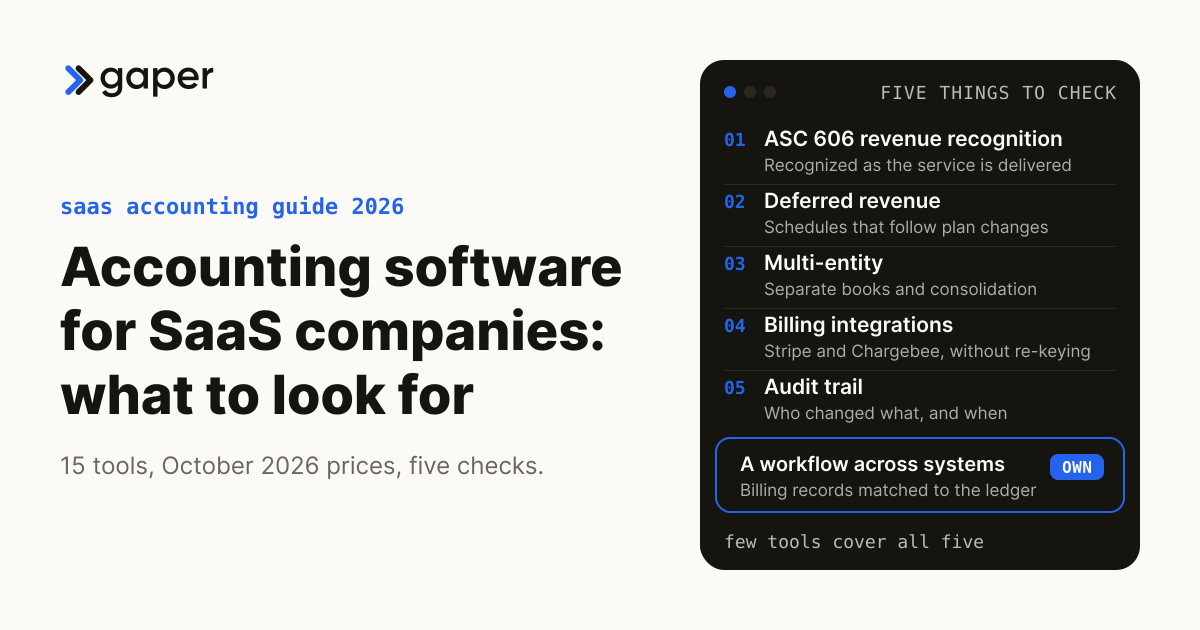
What to look for, in one box. SaaS accounting software should cover five things. ASC 606 revenue recognition: subscription revenue is recognized as the service is delivered over the term, not when the cash arrives. Deferred revenue: schedules for annual and prepaid plans that update when a customer upgrades, downgrades or cancels. Multi-entity: separate books and consolidation once you open a second company or country. Billing and subscription integrations: invoices and payments flow in from tools such as Stripe and Chargebee without re-keying. Audit trail: a record of who changed what, and when, that your auditor can follow. Few tools below cover all five, so plan on combining a ledger with a billing tool.
Updated October 2026: every price, plan and feature below was rechecked at the vendor's own website on 20 October 2026 (US list prices, before introductory discounts). Statistics that could not be traced to their source were removed, and Bench's December 2024 shutdown and sale are noted.
Running a SaaS company comes with its own set of accounting challenges. You're not just dealing with straightforward invoices or one-time payments; you're managing recurring revenue, subscription billing cycles, deferred revenue recognition, and often multi-currency transactions. If any of this sounds familiar, you've probably already felt basic bookkeeping software start to strain.
You need accounting software that fits a SaaS company's particular requirements if you want to keep up in a competitive, fast-growing market. Why? Because accurate financial management isn't just about crunching numbers; it's the backbone of your growth, compliance, and scalability.
Here's a quick reality check from the people who keep the books. In Intuit's 2026 Accountant Technology Survey (725 US accounting and bookkeeping professionals, fielded online in May 2026 and commissioned by Intuit), only 41% said their tools are fully integrated, and respondents reported losing about 5 hours a week moving, re-entering or reconciling information across tools (Intuit, June 2026).
Every hand-off between billing, bank and ledger is a place for errors to creep in, and they tend to surface at month-end close or in an audit.
When selecting the best accounting software for SaaS, a system that automates time-consuming tasks and gives you real-time visibility matters more than one that simply records transactions. AI features are now common in these tools, and a supervised AI agent can cover the gaps between them. This guide walks you through 15 accounting software tools for SaaS companies, what each costs in 2026, and where each one stops.
What to Look For in Accounting Software for SaaS Companies
Some accounting tools are better than others when it comes to handling the financial side of a SaaS company. Unlike traditional businesses, SaaS companies deal with recurring revenue, subscription models, and often operate across several countries. This means you need SaaS accounting tools that go beyond the basics and address these complexities head-on.
Sales tax is a good example. Neil Bass, Managing Member at Bass Tax Group, points out that SaaS taxability is unsettled in the United States: because SaaS is neither clearly tangible nor intangible, some states tax it as a service and others do not.
When selecting the right accounting software for your business, you should prioritize the following:
1# Subscription Billing and Revenue Recognition
Your business is based on recurring payments, and keeping up with those subscriptions is necessary. Look for subscription billing software that can automate billing cycles and handle upgrades and downgrades seamlessly. The software should also track deferred revenue for accurate financial reporting. Revenue recognition software can help you stay compliant with ASC 606 (US GAAP) and IFRS 15, avoiding unpleasant surprises during audits. (The policies and practices behind this, rather than the software, are covered in accounting for tech companies.)
2# Multi-Currency and Multi-Jurisdiction Support
Managing transactions in multiple currencies and navigating tax laws across jurisdictions can be very difficult if your SaaS company has international operations. The right accounting software converts currencies automatically and helps you apply regional tax rules. For international clients and subscription renewals, this is particularly important. Check the plan tier: several tools below include multi-currency only on their higher plans.
3# Automated Invoicing and Payment Reconciliation
No one has time to chase down unpaid invoices or manually reconcile payments.
Alberto Aleo, a sales and marketing consultant, notes that many people find chasing unpaid invoices awkward, even rude, although payment is simply the other half of the deal.
The best SaaS accounting tools automate invoicing, send reminders to customers, and match payments to invoices with little manual work. This improves cash flow management and reduces the risk of errors. Earlier versions of this guide quoted a 40% error reduction from BlackLine; the BlackLine article it linked does not contain that figure, so it has been removed.
4# Scalability for Fast-Growing Startups
Your SaaS business is growing fast. That means your accounting software needs to grow with you, handling an increasing volume of transactions, users and entities over time. You don't want to switch software just as your financial processes get more complex. Put simply, a tool that works for 100 customers today should also work for 10,000 tomorrow.
5# Integration Capabilities with CRMs and Other SaaS Tools
Your accounting software shouldn't work in isolation. It needs to integrate with your CRM (like Salesforce or HubSpot), your billing tool (like Stripe or Chargebee) and the other critical tools in your stack. Integration means you are not wasting time switching between systems. It streamlines your workflows and minimizes data silos.
6# The Role of AI in Improving Efficiency and Compliance
This is where things get interesting. Artificial intelligence (AI) in contemporary accounting tools automates repetitive work such as categorizing transactions, matching payments and flagging anomalies. AI can surface likely mistakes for review before they become an issue, but it does not make you compliant on its own: a person still owns revenue recognition judgments and signs off the close.
AccountsGPT, Gaper's supervised accounting agent build, is one example of the agent approach: it reads invoices and statements, matches transactions across systems and drafts reports inside your own systems, with a person approving anything that posts.
When choosing your accounting software, think of it as more than just a tool. With the right features and well-supervised AI, you'll scale more smoothly and spend less time battling spreadsheets.
Not sure which of your finance workflows software already covers and which need a person or an agent? The free accounting workflow automation matrix sorts 36 common accounting workflows into what can run end to end, what needs approval and what stays human, and adjusts for QuickBooks Online, Xero, NetSuite or Sage Intacct.
The 15 Best Accounting Software for SaaS Companies in 2026
With the increasing complexity of subscription-based business models, selecting the right accounting software for your SaaS company is more critical than ever. To make your decision easier, we've rounded up 15 tools for SaaS businesses, evaluating them on ease of use, scalability, AI capabilities, SaaS-specific features, and integration support. Prices are US list prices from each vendor's own pricing page, checked 20 October 2026, before introductory discounts; plans change often, so confirm on the vendor page before you buy.
1# QuickBooks Online
QuickBooks Online remains a favorite among startups and small SaaS companies. It's affordable at the entry level and user-friendly, with solid basic accounting: invoicing, expense tracking, and financial reporting. Revenue recognition, which automatically tracks and enters deferred revenue, is a QuickBooks Online Advanced feature limited to straight-line methods; percentage and milestone methods are only in Intuit Enterprise Suite (Intuit help).
- Best For: Startups and small SaaS businesses looking for simplicity.
- Key Features: Subscription management (limited), robust financial tracking, multicurrency on Essentials, Plus and Advanced (Intuit help), and numerous integrations.
- Drawback: Revenue recognition only on the Advanced plan and only straight-line; multi-entity books mean moving to Intuit Enterprise Suite, which Intuit says is built for multi-entity organizations.
- Price (checked 20 Oct 2026): Simple Start $38, Essentials $85, Plus $140 and Advanced $340 a month, plus a Free plan for one user (QuickBooks pricing).
2# AccountsGPT
AccountsGPT is Gaper's supervised accounting agent build, so weigh this entry knowing it is ours. It is not off-the-shelf software: Gaper builds a custom version wired into your own ledger, billing and bank systems, deployed in your cloud. It handles the repeatable, document-heavy work, and a person reviews the exceptions and approves anything that reaches the books.
- Best For: SaaS finance teams with one recurring workflow that crosses systems, such as matching billing records to the ledger, who want the agent in their own environment and owned by them.
- Key Features:
- Reads invoices, receipts and statements, and flags fields that do not match.
- Matches transactions across systems and routes the exceptions to a person; nothing posts to the ledger without an approval step you control.
- Model-agnostic (OpenAI, Claude, Gemini); you own the code, evaluations and runbook.
- Drawback: A build, not a subscription. It needs scoping, and it works alongside your ledger and billing tool rather than replacing them.
- Price: Custom build scoped per workflow; there is no subscription price.
3# Xero
Xero has been around since 2006 and has grown into one of the most trusted names in cloud-based accounting; it says it serves 5 million customers in more than 180 countries (Xero, About, checked 20 Oct 2026). It is known for an intuitive interface and an app store of integrations; the Stripe app in Xero's US App Store lets customers pay invoices by card, and Xero matches those payments automatically from the Stripe feed (Xero App Store).
- Best For: Small and medium-sized SaaS companies that need solid core accounting and payment integrations such as Stripe.
- Key Features: Expense tracking, invoicing, reporting, cash flow forecasts (30, 60 or 180 days by plan), and multi-currency in over 160 currencies on the Established plan (Xero).
- Drawback: Multi-currency only on the top US plan, and no revenue recognition feature on Xero's US plan list, so ASC 606 schedules need an add-on such as Chargebee RevRec, which integrates with Xero.
- Price (checked 20 Oct 2026): Early $27, Growing $59 and Established $97 a month (Xero US pricing).
4# NetSuite by Oracle
Founded in 1998 and acquired by Oracle in November 2016 (NetSuite), NetSuite has established itself as one of the most reliable ERP options for larger SaaS businesses. NetSuite says it is used by 44,000 plus customers (checked 20 Oct 2026). Its SaaS offering automates revenue allocation, schedules and deferred revenue tracking to support ASC 606 and IFRS 15, runs multisubsidiary, multicurrency books, and bills subscriptions and usage through SuiteBilling (NetSuite for SaaS).
- Best For: Large SaaS firms needing robust ERP and accounting software.
- Key Features: Advanced subscription management (SuiteBilling), revenue recognition, multi-entity consolidation, and multi-jurisdiction compliance.
- Drawback: Costly and has a steep learning curve for smaller companies.
- Price: Pricing on request.
5# FreshBooks
FreshBooks began with a mission to simplify invoicing and financial management for freelancers and small businesses. It is built around the business owner rather than the accountant, which makes it a good fit for SaaS founders and freelancers who want an easy-to-use tool. Every plan includes automated recurring invoices and unlimited time tracking, Plus adds bank reconciliation and accountant access, and FreshBooks handles invoices in more than one currency, with dashboards you can switch by currency (FreshBooks support).
- Best For: Small SaaS businesses and solopreneurs.
- Key Features: Simplified invoicing, automated recurring invoices, and expense management.
- Drawback: Plans cap billable clients (5 on Lite, 50 on Plus), team members cost extra, and the pricing page lists no revenue recognition or subscription management beyond recurring invoices.
- Price (checked 20 Oct 2026): Lite $23, Plus $43 and Premium $70 a month; Select is quoted; extra team members $11 a user a month (FreshBooks pricing).
6# Sage Intacct
A trusted name in financial software, Sage Intacct delivers enterprise-grade reporting and compliance tools for SaaS companies with complex structures. Sage's SaaS page says it automates ASC 606 and IFRS 15 separately from billing, consolidates many entities and currencies, keeps a system-enforced audit trail, and connects through more than 350 pre-built integrations (Sage).
- Best For: SaaS firms managing large datasets or needing advanced reporting.
- Key Features: Customizable dashboards, revenue recognition, ASC 606 compliance, and multi-entity consolidation.
- Drawback: Steeper learning curve for beginners, and because pricing is tailored by sales, the budget is hard to estimate before a demo.
- Price: Pricing on request; Sage says pricing is tailored to your organization's size and needs.
7# Wave
Wave became a popular choice for early-stage SaaS startups by offering free accounting. It is a real double-entry accounting tool, which suits founders who need affordable bookkeeping without losing financial clarity. Invoicing and bookkeeping are free on the Starter plan; automatic bank imports come with Pro, and receipt capture costs extra on the free plan.
- Best For: Entrepreneurs and startups looking for free accounting tools.
- Key Features: Free invoicing and bookkeeping; Pro adds automatic bank imports and categorization; online card payments from 2.9% plus $0.60 a transaction on Starter.
- Drawback: Limited scalability for growing SaaS firms: the pricing page lists no revenue recognition or multi-currency.
- Price (checked 20 Oct 2026): Starter $0; Pro $19 a month or $190 a year (Wave pricing).
8# Chargebee
Chargebee specializes in subscription management and recurring invoicing, and it was created specifically for subscription businesses. It is a common choice for SaaS businesses with subscription models, with usage-based and hybrid billing, 40+ payment gateways, and subscription management for Salesforce and HubSpot as paid add-ons.
- Best For: SaaS companies focused on subscription billing.
- Key Features: Subscription management, usage-based billing, CRM and ERP integrations, and growth tools for pricing tests; revenue recognition through the separate Chargebee RevRec product, which follows ASC 606 and IFRS 15 and integrates with QuickBooks, Xero, NetSuite, Sage Intacct and Stripe (Chargebee RevRec).
- Drawback: Billing, not a general ledger, so you still need an accounting system; revenue recognition is a separately priced product, and multi-entity management is on the Enterprise plan only.
- Price (checked 20 Oct 2026): Flow plan $0 plus 0.80% of monthly invoicing volume, or $99 plus 0.65% (Chargebee puts the breakeven at $66K a month); Enterprise and RevRec pricing on request (Chargebee pricing).
9# Zoho Books
Part of the Zoho suite, Zoho Books is a budget-friendly accounting software offering invoicing, sales tax and 1099 compliance, and smart automations. Its ease of use and its Zoho CRM integration make it a good fit for smaller SaaS teams.
- Best For: Small businesses that already use Zoho's suite of products.
- Key Features: CRM integrations, automated workflows, multi-currency from the Professional plan, and revenue recognition (basic from Premium, advanced from Elite).
- Drawback: Revenue recognition and multi-currency only on higher plans; payroll is a separate product, Zoho Payroll.
- Price (checked 20 Oct 2026): Free plan; Standard $20, Professional $50, Premium $70, Elite $150 and Ultimate $275 per organization a month billed monthly, or $15 to $240 billed annually (Zoho Books pricing).
10# Microsoft Dynamics 365
Dynamics 365 Business Central is Microsoft's business management and ERP product, part of a Dynamics 365 family that also covers CRM, and it is backed by the wider Microsoft ecosystem. Its subscription billing feature handles recurring and usage-based billing with deferral-based posting of revenue, and a Power BI app reports monthly recurring revenue and churn (Microsoft Learn, updated September 2026).
- Best For: SaaS companies needing a customizable and scalable system.
- Key Features: Subscription billing with contract deferrals, Power BI subscription reports, bank reconciliation, and service management and manufacturing on Premium.
- Drawback: High cost and complexity for smaller firms, per-user licenses paid yearly, and the best fit is a company already running on Microsoft.
- Price (checked 20 Oct 2026): Essentials $80 and Premium $110 a user a month, paid yearly; Team Members $8 (Microsoft pricing).
11# ProfitWell
ProfitWell, now part of Paddle, is sold as ProfitWell Metrics: free subscription analytics for SaaS companies, covering monthly recurring revenue, churn, upgrades and downgrades, and customer lifetime value. Paddle's retention toolkit, Paddle Retain, comes built into Paddle Billing at no extra cost (Paddle).
- Best For: SaaS companies focused on churn reduction and pricing strategies.
- Key Features: Subscription metrics, data-driven insights, real-time revenue, cash flow and retention data, and connections to Stripe, Chargebee, Paddle and other billing tools.
- Drawback: Doesn't handle general accounting, and Paddle's page lists no revenue recognition; the metrics take some learning, and customization is limited.
- Price: Free.
12# Stripe Billing
This tool is built by the same team behind Stripe payments. Stripe Billing is a robust billing solution for SaaS businesses that run on subscriptions. It automates subscription management, recurring payments, and invoicing, and lets customers pay in 135+ currencies; usage-based pricing models run on Metronome, a Stripe product sold separately at extra cost. Stripe sells revenue recognition separately as Stripe Revenue Recognition, which it says works in line with ASC 606 and IFRS 15 (Stripe).
- Best For: SaaS startups prioritizing seamless payment solutions.
- Key Features: Subscription management, detailed analytics, multi-currency payments, developer-friendly API, and seamless integration with other Stripe products.
- Drawback: Limited accounting features: it bills, the ledger lives elsewhere, and revenue recognition is a separate product.
- Price (checked 20 Oct 2026): 0.7% of billing volume, pay as you go, or monthly plans from $620 a month on a one-year contract (Stripe Billing pricing); Revenue Recognition from $25 a month on its monthly plan, plus 0.25% for additional volume (Stripe pricing).
13# Bench
Bench is an accounting and bookkeeping service created to make small business financial management less complicated, with a bookkeeping team doing the routine work so founders can focus on growth. Note that Bench shut down abruptly on 27 December 2024 and was bought by Employer.com, which announced the deal on 30 December 2024 (GeekWire). The service is running again under the Bench Accounting name, with published plans.
- Best For: Startups that prefer a hands-off approach to bookkeeping and accounting.
- Key Features: A dedicated bookkeeper reachable by phone, message and video, year-end tax-ready financials, and business tax filing on the Bookkeeping + Tax plan.
- Drawback: Lacks SaaS-specific features like revenue recognition, which its pricing page does not list; after the 2024 shutdown, read the continuity and data-export terms before you prepay.
- Price (checked 20 Oct 2026): Bookkeeping Light $199 a month (revenue of $250K a year or less), Bookkeeping $399 and Bookkeeping + Tax $649 a month (Bench pricing).
14# Intuit TurboTax Business
The tax-focused software TurboTax Business was developed by Intuit to make tax filing easier for small businesses. It walks you through the return step by step, with expert help on the online versions. The Windows-only TurboTax Desktop Business 2025 files Forms 1120, 1120-S, 1065 and 1041, with state returns sold separately and free federal e-filing for up to five returns (TurboTax).
- Best For: Small SaaS companies that need help with tax filing.
- Key Features: Step-by-step guidance, built-in expert support on the online products, e-filing, and a QuickBooks pairing on Expert 365 Business for sole proprietors.
- Drawback: Focuses on tax filing and lacks broader accounting tools; the Expert Assist and Expert Full Service Business products do not support C corporations (Form 1120), so a C corporation filing itself needs the Windows desktop product.
- Price (checked 20 Oct 2026): Desktop Business 2025 $190; online Expert Assist Business $639 for S corporations and partnerships (TurboTax small business).
15# Kashoo
Kashoo is a basic accounting tool made for small businesses looking for affordability and ease of use. Its simple design makes it easy to handle double-entry bookkeeping, expenses, sales tax and invoicing, with unlimited users at no extra charge and Stripe and Square integrations. Each additional business needs its own subscription.
- Best For: Businesses looking for an affordable, no-frills solution.
- Key Features: User-friendly interface, expense tracking, invoicing, multi-currency, cloud-based access, and unlimited users.
- Drawback: Revenue recognition tools, multi-entity support, and other SaaS business-scaling features are missing.
- Price (checked 20 Oct 2026): $30 a month, after a 14-day free trial (Kashoo).
Comparing these subscriptions with the cost of owning an agent for one workflow? Gaper publishes its 2026 AI implementation price bands for accounting workflows, priced per workflow rather than per company, with the assumptions behind each band and when to buy software instead.
Comparing SaaS Accounting Tools: Which is Right for You?
It depends on your size, growth stage and requirements: a low-cost ledger early, a billing tool such as Stripe Billing or Chargebee for subscriptions, and NetSuite or Sage Intacct once you run several entities. Prices here are US list prices from each vendor's own site, checked 20 October 2026.
The table summarizes all 15 tools, with prices before introductory discounts.
| Tool | Features | Best For | Pricing | Drawbacks | Integrations |
|---|---|---|---|---|---|
| AccountsGPT | Supervised agent: document intake, reconciliation across systems, report drafts, human approval before posting | SaaS teams with one recurring workflow that crosses systems | Custom build scoped per workflow, no subscription | Needs scoping; works alongside a ledger, does not replace it | Built against your ledger, billing and bank APIs |
| Xero | Multi-currency (Established), cash flow forecasts, invoicing | Small to medium-sized SaaS businesses | $27 to $97 a month | No revenue recognition on US plans; multi-currency only on top plan | Stripe app, Xero App Store |
| QuickBooks Online | Expense tracking, invoicing, revenue recognition (Advanced) | Small businesses and startups | Free plan; $38 to $340 a month | Revenue recognition only on Advanced, straight-line only | Payment gateways, tax software |
| FreshBooks | Recurring invoices, time tracking, invoicing | Freelancers and service-based SaaS startups | $23 to $70 a month; Select quoted | Client caps per plan; no revenue recognition listed | Stripe payments, accountant access (Plus and up) |
| Zoho Books | Automated workflows, revenue recognition (Premium and up), multi-currency (Professional and up) | Businesses already using the Zoho ecosystem | Free plan; $20 to $275 a month | Key SaaS features only on higher plans | Zoho CRM, Zoho suite, payment gateways |
| Chargebee | Subscription and usage billing, RevRec add-on | SaaS companies with subscription models | $0 + 0.80% or $99 + 0.65% of invoicing volume; Enterprise quoted | Not a ledger; RevRec priced separately | Salesforce and HubSpot (paid), QuickBooks, Xero, NetSuite, Sage Intacct (RevRec) |
| Sage Intacct | ASC 606 automation, multi-entity consolidation, audit trail | Larger and fast-scaling SaaS companies | Pricing on request | Steep learning curve | 350+ pre-built integrations |
| Wave | Free accounting and invoicing | Solopreneurs and small startups | Free; Pro $19 a month | Limited scalability | Payment processing |
| NetSuite | ERP, ASC 606 revenue automation, SuiteBilling, multisubsidiary | Growing SaaS businesses and enterprises | Pricing on request | High implementation costs | Full Oracle suite |
| Stripe Billing | Recurring billing and invoicing, payments in 135+ currencies; usage pricing via Metronome (extra cost) | SaaS startups prioritizing seamless payment solutions | 0.7% of billing volume; Revenue Recognition from $25 a month | Limited accounting features | Stripe ecosystem |
| Bench | Dedicated bookkeeper, tax filing on combined plan | Startups preferring hands-off accounting | $199 to $649 a month | No SaaS-specific features; shut down and resold in 2024 | Fractional bookkeeper works in your QuickBooks account |
| TurboTax Business | Business tax filing, guided interview | Small SaaS companies needing tax preparation | Desktop $190; online from $639 (S corps, partnerships) | Tax only; desktop is Windows only | QuickBooks |
| Kashoo | Basic accounting, invoicing, multi-currency | Startups seeking affordable simplicity | $30 a month | Lacks advanced scalability features | Stripe, Square |
| Microsoft Dynamics 365 | Subscription billing with deferrals, Power BI reports | Mid-size and larger SaaS companies | $80 to $110 a user a month, paid yearly | Cost and complexity for small firms | Power BI, Microsoft Copilot Studio |
| ProfitWell | MRR, churn and retention analytics | SaaS teams focused on churn and pricing | Free | Not accounting software | Stripe, Chargebee, Paddle, Braintree, Zuora, Recurly |
Making the Right Choice
- For Small Startups: Wave, FreshBooks, and Kashoo are affordable options for simple accounting. Bench is a choice if you prefer a hands-off approach to bookkeeping, after checking its terms given the 2024 shutdown.
- For Growing Businesses: SaaS companies that are scaling quickly do well with QuickBooks Online Advanced, Xero or Zoho Books, paired with Chargebee or Stripe Billing. Check which plan carries revenue recognition and multi-currency before you commit.
- For Enterprises: Larger companies with complex requirements should look at NetSuite or Sage Intacct for advanced reporting, ASC 606 automation, and multi-entity consolidation, or Dynamics 365 Business Central if they run on Microsoft.
- For Workflows That Cross Systems: When the work lives between tools, such as matching billing, payouts and refunds to the ledger, a supervised agent you own, such as an AccountsGPT build, can take on the repeatable part while a person approves what posts.
- For Subscription-Based Models: Stripe Billing and Chargebee are built for SaaS companies focused on subscription management and recurring payments, and both sell revenue recognition as a separate product.
Still unsure? List the finance tasks that take the most time each month, then check each against the accounting workflow automation matrix to see which ones a tool already covers and which need a person or an agent.
Should a SaaS company buy accounting software or own an AI agent?
Buy software for the ledger, billing and revenue schedules; the tools above do that job well, and rebuilding them makes no sense. Consider owning a supervised AI agent only for a workflow that crosses systems, such as matching Stripe or Chargebee records to the ledger, where a person still approves anything that posts.
Gaper is the AI-native implementation partner that deploys supervised AI agents you own. Our Rent-vs-Own test is short: rent a point tool for narrow, common work, and own a supervised agent when the work touches systems of record, data or risk. Applied to a SaaS finance stack:
| Workflow | Rent: buy software | Own: supervised agent |
|---|---|---|
| Ledger, invoicing, bank feeds | Yes: QuickBooks Online, Xero, Zoho Books, Sage Intacct, NetSuite | No |
| Subscription billing and dunning | Yes: Stripe Billing, Chargebee | No |
| ASC 606 schedules for standard plans | Yes: QuickBooks Online Advanced, Zoho Books Premium and up, Chargebee RevRec, Stripe Revenue Recognition, Sage Intacct, NetSuite | No |
| Matching billing, payouts, refunds and fees to the ledger each month | Partly: connectors sync the data | Consider it when exceptions pile up in spreadsheets between systems |
| Revenue recognition policy, close sign-off, tax positions | No tool owns these | Human-owned; the agent never runs them alone |
The case for owning starts where tools hand off to each other, the gap the Intuit survey above describes. An owned agent is not a replacement for your ledger or a way around your auditor: it works inside the systems above through their APIs, under your access controls, logs every run, and holds anything that posts for a named reviewer. AccountsGPT is Gaper's build of this kind, a custom build rather than a subscription. For the wider decision, see build vs buy AI agents.

Reference build: illustrative, not a client engagement. A supervised billing-to-ledger reconciliation agent for a SaaS company on Stripe Billing and QuickBooks Online Advanced, mapped with the Gaper Ownership Map. Automated: pulling Stripe invoices, payouts, refunds and fees, and matching them to ledger deposits and invoices. Agent-drafted, human-approved: notes on unmatched payouts, proposed journal entries for fees and refunds, and flags when a mid-cycle upgrade or credit should change a deferred revenue schedule. Human-owned: the revenue recognition policy, month-end sign-off, and anything touching tax; the agent never runs these alone. Metric to track: the share of exceptions the reviewer reclassifies each month.
Have a billing reconciliation that lives in spreadsheets? Talk to an AI architect about a supervised reconciliation agent in a free 30-minute assessment; if buying software is the better answer, we will say so.
Conclusion
Having the right accounting tools is now essential in the fast-moving SaaS market. With subscription models, multi-currency transactions and ASC 606 revenue recognition now standard, spreadsheets and basic bookkeeping can no longer keep up.
The accountants who keep these books are adopting AI but want a person in charge. In Intuit's 2026 Accountant Technology Survey (725 US accounting and bookkeeping professionals, May 2026), 88% had used AI for at least one client service in the past year, yet only 6% want AI to execute client deliverables autonomously, while 34% want it to draft work a person reviews and signs off (Intuit, June 2026).
The key to choosing the best SaaS accounting software in 2026 lies in understanding your needs: pick the ledger for your stage, connect it to your billing tool, and check the revenue recognition and multi-entity limits before you outgrow them. Investing in the right tool today can save you time, money, and stress tomorrow.
Everything You Need to Know About SaaS Accounting
Short answers to the questions SaaS founders and finance leads ask most often.
What is the best accounting software for SaaS startups?
It depends on size and complexity. Early startups do well with Wave, Kashoo, QuickBooks Online or Zoho Books, plus Stripe Billing or Chargebee for subscriptions. Growing companies move to QuickBooks Online Advanced or Zoho Books Premium and up for revenue recognition, then to Sage Intacct or NetSuite for several entities.
How does AI improve SaaS accounting?
AI speeds up the repetitive parts: reading invoices, matching payments to invoices, categorizing bank lines and flagging anomalies for review. It does not make your books compliant on its own. Accountants agree: in Intuit's 2026 survey, only 6% want AI to execute client deliverables autonomously.
Can I use AccountsGPT for subscription billing and multi-currency transactions?
Not as your billing system. AccountsGPT is Gaper's supervised accounting agent build, not subscription software, so keep Stripe Billing or Chargebee for billing. A build like it can match those billing records to your ledger and draft entries, with a person approving anything that posts.
What features should SaaS companies prioritize when choosing accounting software?
ASC 606 and IFRS 15 revenue recognition with deferred revenue schedules, multi-currency and multi-entity support, automated invoicing and payment reconciliation, integrations with billing tools such as Stripe and Chargebee and CRMs such as Salesforce or HubSpot, an audit trail, and room to scale.
What percentage of SaaS companies struggle with revenue recognition compliance?
We could not find a reliable figure. Earlier versions of this page said 67%, but the source it linked, a vendor's LinkedIn post, contains no such number, so we removed it. If revenue recognition is your pain point, check that your tool supports ASC 606 schedules on the plan you buy.
Which accounting tools are best suited for enterprise SaaS companies?
NetSuite and Sage Intacct. Both say on their SaaS pages (checked 20 October 2026) that they automate ASC 606 and IFRS 15 revenue recognition and consolidate several entities and currencies. Both quote prices on request and take more setup. Dynamics 365 Business Central suits teams that run on Microsoft.
How much can automating payment reconciliation reduce accounting errors?
There is no reliable general figure. This page once cited a 40% error reduction from BlackLine, but the September 2020 BlackLine article it linked does not contain it; it cites PwC's 2019-20 benchmarking for 30% to 40% less time through automation, not fewer errors. Track your own exception rate.
How much does accounting software for a SaaS company cost in 2026?
From free to custom-quoted ERP. Wave and Zoho Books have free plans, QuickBooks Online runs $38 to $340 a month, Xero $27 to $97, and Business Central $80 to $110 a user a month. Stripe Billing adds 0.7% of billing volume. NetSuite and Sage Intacct quote on request. US list prices, checked 20 October 2026.
Thirty minutes, no commitment. We map one workflow, make the build or buy call, and scope the smallest thing worth shipping.
Frequently asked questions
Comparing SaaS Accounting Tools: Which is Right for You?
Should a SaaS company buy accounting software or own an AI agent?
What is the best accounting software for SaaS startups?
How does AI improve SaaS accounting?
Can I use AccountsGPT for subscription billing and multi-currency transactions?
What features should SaaS companies prioritize when choosing accounting software?
What percentage of SaaS companies struggle with revenue recognition compliance?
Which accounting tools are best suited for enterprise SaaS companies?
How much can automating payment reconciliation reduce accounting errors?
How much does accounting software for a SaaS company cost in 2026?


Ready to turn AI into execution?
Book a free assessment of one workflow. We map it, make an honest build versus buy call before any code, and if an off the shelf product covers the job we will tell you so.