AI and Tax Season: How Accounting Assistants Can Help You...
  • Home
  • Blogs
  • Ai Tax Automation Tax Season Accounting Assistants | Gaper.i

Ai Tax Automation Tax Season Accounting Assistants | Gaper.i

AI and Tax Season: Learn how accounting assistants can keep you compliant, organized, and stress-free.


AI Tax Automation by the Numbers

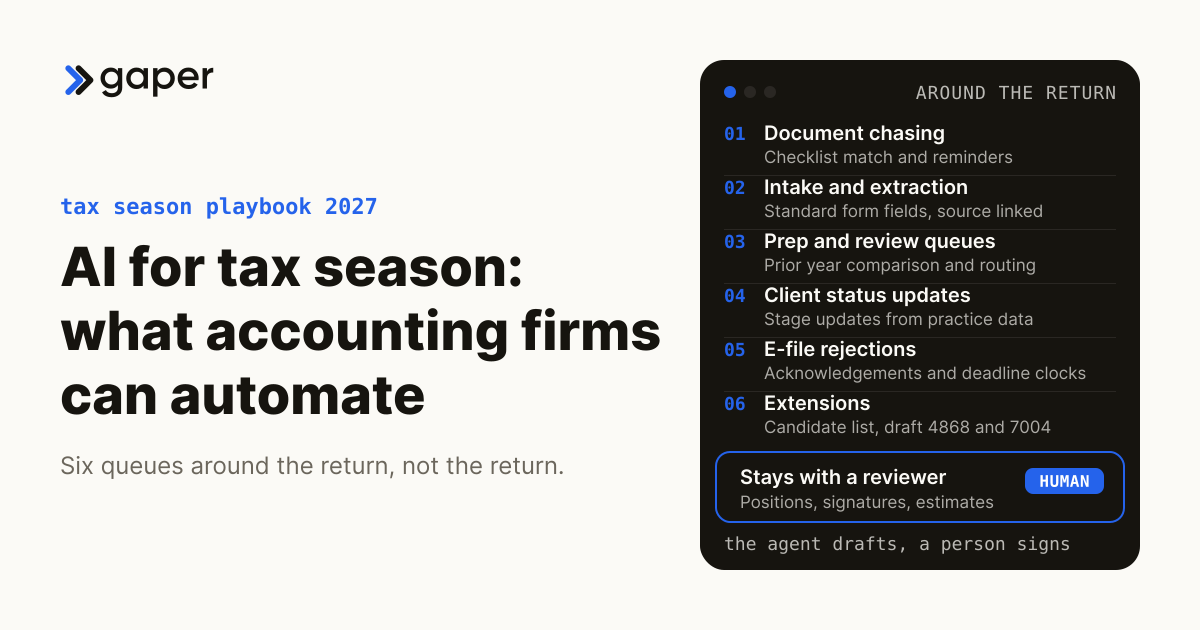
Tax season 2026 brings IRS Direct File expansion to all 50 states, new OECD Pillar Two reporting obligations, and a national accountant shortage that has crossed 340,000 unfilled positions. Firms that adopted AI-driven tax automation in 2025 reported 83% faster return preparation, 96% accuracy on first-pass filings, and $40,000+ in annual labor savings for a mid-size practice. This page breaks down which tax tasks AI handles better than humans, how AccountsGPT fits into an actual tax workflow, and what your firm should do before next filing season to stay competitive.

MN

Mustafa Najoom

CEO at Gaper.io · Former CPA · LinkedIn Profile

Before founding Gaper.io, Mustafa spent years in public accounting, earning his CPA license and working through the trenches of tax season at every level. He has personally prepared hundreds of individual and business returns, managed multi-state compliance engagements, and felt the exact pain points this page addresses. That firsthand experience in the profession is what led him to build AccountsGPT: a tool designed by someone who has actually lived inside the workflow it automates. The perspectives in this piece come from real accounting practice, not theoretical AI commentary.

Why Tax Season 2026 Is Different

If you are running an accounting practice right now, you already know the pressure is different this year. The regulatory landscape shifted in ways that make last season’s workflow obsolete for a significant chunk of your client base. Let me walk through the five forces that are reshaping tax preparation in 2026, because understanding them is the first step toward figuring out where AI actually helps versus where it is just noise.

IRS Direct File Expansion to All 50 States

The IRS Direct File program, which launched as a limited pilot in 12 states during the 2024 filing season, expanded to all 50 states for the 2026 filing year. Over 4.6 million taxpayers used the free filing portal in its first full year, and the IRS projects 15 to 20 million users by 2027. For accounting firms, this is not a threat to your core business. Most Direct File users have simple W-2 returns that were never profitable clients anyway. But it does change client expectations. People now compare your turnaround time, your communication cadence, and your pricing against a government tool that costs nothing and files in under 30 minutes.

What this means practically: your mid-market clients (the ones with rental properties, small business income, multi-state obligations) expect a tech-forward experience even though their returns are too complex for Direct File. The bar has moved.

OECD Pillar Two and the Global Minimum Tax

The OECD’s Pillar Two framework, establishing a 15% global minimum tax for multinational enterprises with consolidated revenue above EUR 750 million, moved from “something to monitor” to “something to calculate” in 2025. Over 40 jurisdictions have now enacted qualifying legislation. For US-based firms, this affects clients with foreign subsidiaries, permanent establishments, or pass-through structures that flow into multinational groups. The compliance calculations are layered: you need Substance-based Income Exclusions (SBIE), Qualified Domestic Minimum Top-up Taxes (QDMTT), and Income Inclusion Rule (IIR) computations that cross-reference multiple jurisdictions simultaneously.

If you have even a handful of clients touched by Pillar Two, you already know that doing these calculations manually is brutal. The data requirements alone span financial statements from multiple countries, transfer pricing documentation, and entity-by-entity effective tax rate calculations. This is exactly the kind of structured, cross-referencing work where AI tools save dozens of hours per engagement.

State-by-State AI Regulations Affecting Tax Practice

Here is an irony that does not get discussed enough: the same AI tools that help you prepare returns faster are now subject to their own compliance requirements. As of early 2026, at least 17 states have enacted or proposed legislation governing the use of AI in financial services, including tax preparation. Colorado’s AI Act (effective February 2026) requires impact assessments for “high-risk” AI systems. Illinois, California, and Texas have disclosure requirements when AI is used in consumer-facing financial decisions. The AICPA issued updated guidance in late 2025 on practitioner responsibilities when using AI for tax preparation, including documentation requirements for AI-assisted positions.

This does not mean you should avoid AI. It means you need AI tools that are built with compliance transparency in mind, that can produce audit trails showing how recommendations were generated, and that let the practitioner retain professional judgment over every filing position.

Beneficial Ownership Information (BOI) Reporting

The Corporate Transparency Act’s BOI reporting requirements, after multiple court challenges and deadline extensions, are now fully in effect. Every reporting company formed before January 1, 2024 was required to file by January 13, 2025 (extended deadline), and new entities must file within 90 days of formation. FinCEN reported that millions of entities had not yet complied as of Q1 2026, which means accounting firms are fielding panicked calls from business owners who missed the deadline and need to file retroactively while also managing potential penalty exposure.

BOI reporting is not technically a tax task, but it lands on the desk of whoever handles the entity’s compliance. For most small businesses, that is their CPA. Every hour spent hand-collecting beneficial owner data, verifying FinCEN identifiers, and filing through the BOIR portal is an hour not spent on actual tax returns.

The 340,000-Person Accountant Shortage

The pipeline crisis in accounting is no longer theoretical. According to the AICPA’s 2025 Trends Report, the profession lost roughly 340,000 accountants over the past three years to retirement, career changes, and declining enrollment in accounting programs. CPA exam candidate numbers dropped 33% between 2016 and 2025. The average age of a practicing CPA is now 54. For firm leaders, this means you cannot hire your way out of capacity constraints. There are simply not enough people entering the profession to replace those leaving.

This is the fundamental reason AI adoption in accounting is not optional anymore. When you cannot add headcount, you have two choices: turn away clients or find ways to handle more work with the team you have. Every task that can be reliably automated represents capacity you can redirect to advisory work, complex planning, or simply keeping your existing team from burning out during filing season.

5 Tax Tasks AI Handles Better Than Humans

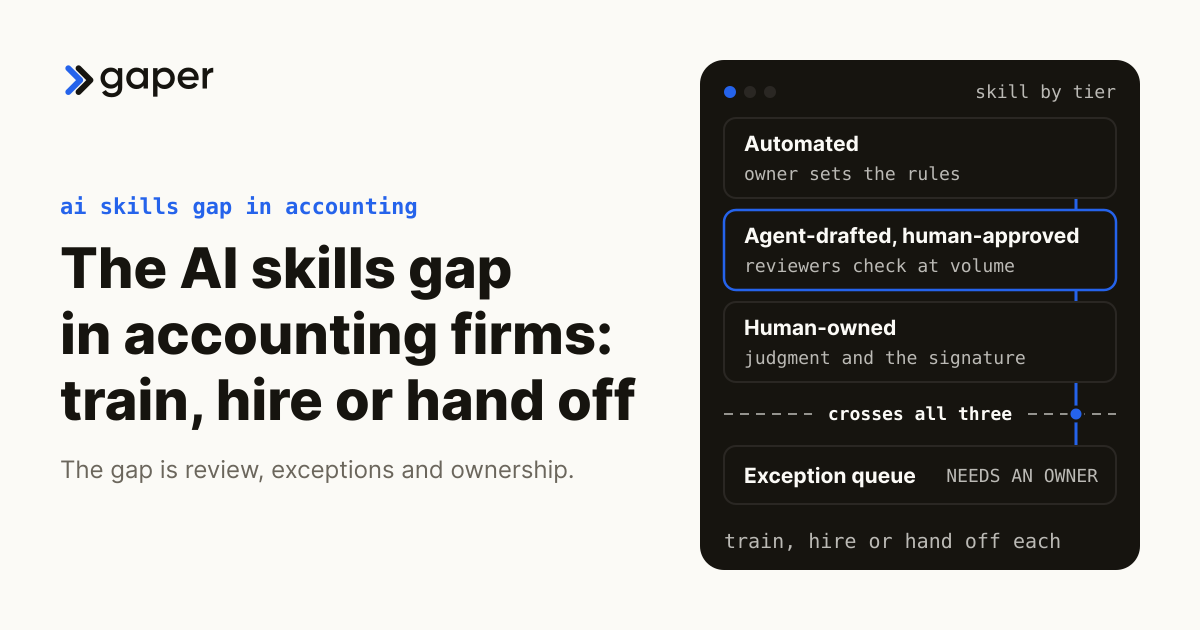
Not every tax task benefits from AI. Relationship management, judgment calls on aggressive positions, and IRS audit representation still require experienced practitioners. But the following five tasks? AI is genuinely better. Not “almost as good.” Better. Faster, more consistent, and less prone to the kind of errors that come from a tired human reviewing their 47th return of the week.

1. Data Extraction from Source Documents (W-2, 1099, K-1)

Every tax engagement starts with gathering documents. Clients send W-2s as photos from their phone, 1099s as PDFs from brokerage portals, and K-1s as scanned copies from partnership administrators. A human preparer spends 15 to 45 minutes per client just extracting numbers from these documents and keying them into tax software. Modern OCR combined with AI classification can process a typical client’s document package in under 2 minutes.

The accuracy improvement matters more than the speed. Human data entry has an error rate of roughly 1 to 3% per field, which sounds small until you consider that a moderately complex return has 200+ data entry points. AI extraction, validated against document structure and expected value ranges, consistently hits 96%+ accuracy on first pass. The remaining 4% gets flagged for human review rather than silently flowing into the return.

From the CPA’s perspective: I remember spending the first two weeks of every tax season just doing intake. Opening envelopes, scanning documents, entering numbers. It was the least intellectually demanding part of the job and also the most error-prone because you are doing it while exhausted. This is the single biggest time sink that AI eliminates.

2. Multi-State Compliance and Apportionment

Multi-state taxation is where human preparers lose the most time per return. Each state has its own apportionment formula (single-factor sales, three-factor, market-based sourcing vs. cost-of-performance), its own filing thresholds, its own treatment of pass-through entities, and its own nexus standards post-Wayfair. A client with economic nexus in 8 states requires 8 separate state returns, each with its own modifications to federal AGI, its own credit calculations, and its own estimated payment schedules.

AI handles this better because the task is fundamentally about applying different rule sets to the same base data. The core computation is identical across states; what changes is the parameters. An AI system that has been trained on each state’s current rules can generate all 8 state returns simultaneously, cross-check apportionment factors for consistency, and flag situations where a client may have triggered nexus in a state they did not file in previously. A human doing this manually is checking each state sequentially, which takes 3 to 5 times longer and introduces inconsistency risk.

3. Deduction Optimization

Most preparers are competent at claiming the deductions that are obvious from the documents provided. The gap is in the deductions that could have been taken but were not, because the preparer did not have time to dig through transaction history, did not ask the right questions, or did not know about a recently updated provision. AI systems can scan a full year of categorized transactions (from QuickBooks, Xero, or bank feeds) and identify deduction opportunities that a time-pressed human would miss.

Examples that come up repeatedly: home office deductions for clients who switched to hybrid work, vehicle mileage for business owners who track it inconsistently, Section 199A qualified business income deduction optimizations for multi-entity owners, R&D tax credit eligibility for software companies that do not realize they qualify, and energy efficiency credits under the expanded IRA provisions. In testing across mid-size firms, AI-driven deduction scanning identified an average of $3,200 in additional deductions per business client that the initial human review missed.

4. Error Detection and Quality Review

Review is the most expensive part of the tax preparation process because it requires senior-level attention. A partner or senior manager reviewing a return is looking for mathematical errors, logical inconsistencies (reported income does not match bank deposits), missing schedules, incorrect filing statuses, and positions that do not match the client’s prior year. AI can handle the first 80% of this review in seconds.

Specifically, AI-driven review catches: prior-year comparison anomalies (income dropped 60% with no explanation), mathematical cross-check failures, missing required schedules based on income types reported, estimated payment shortfalls that will trigger penalties, and AMT exposure that was not flagged. This does not replace partner review. It transforms partner review from “check everything” to “check the 6 items the system flagged,” which takes 10 minutes instead of 45.

5. Client Communication and Status Updates

The dirtiest secret in public accounting is how much time gets wasted on client communication logistics during tax season. Chasing missing documents, sending status updates, answering “when will my return be done?” emails, explaining why the refund is different from last year. A mid-size firm with 500 individual clients can easily spend 400+ staff hours per season on these communications.

AI handles this through automated document request tracking (client uploaded 7 of 9 required docs, auto-reminder for the remaining 2), status update generation based on where the return sits in the workflow, and templated but personalized responses to common questions. The key word is “personalized.” Modern AI does not send generic blast emails. It generates messages that reference the specific client’s situation, their missing documents by name, and their estimated completion date based on the firm’s actual queue.

Manual vs AI Tax Workflow

The following comparison shows a typical individual tax return (Schedule C filer with multi-state income) moving through a manual workflow versus an AI-assisted workflow. The time estimates are based on aggregated data from mid-size firms (10 to 30 staff) processing 1,000+ returns per season.

Manual vs AI-Assisted Tax Workflow Time per return: Schedule C filer with multi-state income Manual Workflow AI-Assisted Workflow STEP 1 Document Collection & Intake Manual scanning, sorting, filing. Chase missing docs. 45 min STEP 1 Auto-Intake & OCR Extraction AI portal: auto-classify, extract, flag missing. 8 min STEP 2 Data Entry into Tax Software Key W-2, 1099, K-1 data by hand. Double-check. 60 min STEP 2 Auto-Population & Validation OCR data auto-maps to fields. Human verifies flags. 5 min STEP 3 Multi-State Calculations Manually compute apportionment for each state. 90 min STEP 3 Parallel State Generation AI applies each state’s rules simultaneously. 12 min STEP 4 Partner / Senior Review Line-by-line review. Compare to prior year. 45 min STEP 4 AI Pre-Review + Targeted Human Check AI flags anomalies. Partner reviews only flagged items. 10 min STEP 5 Client Delivery & Follow-up Draft email, attach return, schedule call, chase e-sign. 30 min STEP 5 Automated Delivery & E-Sign Auto-generate summary, send portal link, track e-sign. 5 min Total: 4 hours 30 min per return Total: 40 min per return (85% faster)

How AccountsGPT Handles Tax Season

AccountsGPT is Gaper.io’s AI agent built specifically for accounting firms. Unlike general-purpose AI tools that require extensive prompt engineering to handle tax scenarios, AccountsGPT was designed from the ground up around the workflows that CPAs and accounting firms actually use during busy season. Here is how it fits into a real tax engagement, step by step.

Automated Data Pull from QuickBooks and Xero

AccountsGPT connects directly to your clients’ QuickBooks Online, QuickBooks Desktop (via WebConnector), and Xero accounts through read-only API integrations. During tax season, this means you do not need to request a trial balance export, wait for the client to figure out how to run it, and then reconcile it against their bank statements. AccountsGPT pulls the current chart of accounts, general ledger, and bank transaction data automatically.

What makes this different from just logging into QuickBooks yourself: AccountsGPT normalizes the data across different accounting platforms. If you have 200 clients and 60% are on QuickBooks, 30% on Xero, and 10% on other platforms, AccountsGPT maps all of them to a standardized chart of accounts structure. This means your review process is consistent regardless of what software the client uses. It also flags discrepancies immediately: unreconciled transactions, suspense account balances, accounts with unusual activity compared to the prior period.

Multi-Client Tax Prep Workflow

AccountsGPT’s batch processing is where the time savings compound. Instead of preparing returns sequentially (finish Client A, open Client B, start over), AccountsGPT runs data extraction, categorization, and initial return population across your entire client queue simultaneously. For a firm processing 500 individual returns, AccountsGPT can have all 500 at the “ready for review” stage within 48 hours of receiving complete documents, compared to the 6 to 8 weeks a manual process typically requires.

The workflow is structured around a queue-based system. Each client’s return moves through stages: document collection, data extraction, return population, deduction optimization, compliance check, and review. At each stage, AccountsGPT either completes the task autonomously (data extraction, population) or surfaces decisions for human input (aggressive deduction positions, estimated payment strategies, entity elections). The practitioner dashboard shows exactly where every client stands, what is blocking progress, and which items need human attention.

Compliance Flagging Across Federal and State

One of the most time-consuming aspects of tax preparation is making sure you have not missed a filing obligation. A client who sold property in another state, received a K-1 from an out-of-state partnership, or had employees working remotely in a new jurisdiction may have triggered nexus in states where they have never filed before. AccountsGPT scans every client’s income sources, deduction types, and entity structures against current filing requirements for all 50 states plus DC.

The compliance engine checks for: state nexus triggers (economic and physical), estimated tax payment requirements and safe harbor thresholds, required schedules based on income types (Schedule D, Schedule E, Form 8949, etc.), foreign reporting obligations (FBAR, Form 8938, Form 5471), pass-through entity tax elections available in the client’s states, and retirement contribution limits based on income phase-outs. Each flag comes with a citation to the relevant regulation or IRS guidance, so the reviewing CPA can evaluate the position with full context.

Financial Forecasting for Tax Planning

Tax preparation is backward-looking. Tax planning is forward-looking. Most firms struggle to do both during busy season because planning requires analysis time that gets consumed by preparation. AccountsGPT bridges this gap by generating tax projections for the current year while preparing the prior year’s return.

Using the client’s historical data (3 to 5 years of returns plus current-year accounting data from QuickBooks/Xero), AccountsGPT builds a current-year income projection and identifies planning opportunities. For example: a client whose Q1 income is tracking 40% above prior year might benefit from increased retirement contributions, equipment purchases under Section 179, or estimated payment adjustments. AccountsGPT surfaces these opportunities as “planning alerts” that the firm can convert into advisory engagements. This turns tax preparation from a compliance cost center into a revenue-generating advisory touchpoint.

AI Tax Tools Compared

The AI tax automation market is still early, and tools vary significantly in scope, target user, and depth. The table below compares AccountsGPT against three other AI tax tools across eight features that matter most during filing season. This comparison reflects publicly available information and our analysis as of Q1 2026.

Feature AccountsGPT TaxGPT Intuit Assist AITax
Target User CPA firms, accounting practices Tax professionals, firms TurboTax consumers, ProConnect users Individual filers (DIY)
Document OCR & Extraction Full (W-2, 1099, K-1, brokerage) Limited (W-2, 1099 only) Full (within Intuit ecosystem) Basic (W-2, 1099-INT/DIV)
Multi-State Support All 50 states + DC, auto-nexus detection All 50 states (manual state selection) All 50 states (within TurboTax/ProConnect) Limited (12 states)
QuickBooks / Xero Integration Direct API (read-only) No direct integration QuickBooks only (Intuit owned) No direct integration
Batch / Multi-Client Processing Yes (queue-based, concurrent) No (single return at a time) Limited (ProConnect batch) No
Deduction Optimization Transaction-level scanning + suggestions Q&A based suggestions Category-level suggestions Basic (standard deductions only)
Audit Trail / Compliance Docs Full (every AI decision logged with citation) Partial (chat history only) Within Intuit platform Minimal
Tax Planning / Forecasting Current-year projections from live data Research-based planning guidance Basic estimator within TurboTax No

Note: This comparison is based on publicly available product documentation and features as of Q1 2026. Capabilities change rapidly in this space. TaxGPT and Intuit Assist are trademarks of their respective companies. AITax refers to aitax.com. We encourage practitioners to evaluate each tool against their specific workflow requirements.

ROI of AI Tax Automation

The following model shows projected annual impact for a 20-person accounting firm (12 preparers, 4 senior reviewers, 2 managers, 2 partners) processing approximately 1,200 individual and 300 business returns per year. These figures are modeled on real adoption data from firms that deployed AI tax automation tools during the 2025 filing season.

ROI of AI Tax Automation Modeled for a 20-person firm | 1,200 individual + 300 business returns/year HOURS SAVED Before AI 5,400 hrs With AI 1,890 hrs 3,510 hours saved (65%) Tax prep, review, and client comms combined ERROR REDUCTION 85% fewer errors Manual error rate: 3.2 per 100 returns AI-assisted rate: 0.5 per 100 returns Data entry, calculation, and schedule errors CLIENT CAPACITY Before AI: 1,500 returns With AI (same staff): 2,250 returns +50% capacity increase LABOR COST SAVINGS $42,120 per year (at $12/hr blended prep cost) PENALTY AVOIDANCE $8,500 per year (estimated from error reduction) NEW REVENUE OPPORTUNITY $187,500 from 750 additional returns at $250 avg fee ESTIMATED TOTAL ANNUAL IMPACT $238,120 in combined savings and new revenue Assumes $12/hr blended prep cost, $250 avg return fee, 85% error reduction rate. Actual results vary by firm size, client mix, and adoption depth. Modeled on 2025 filing season data.

What Your Firm Should Do Before Next Tax Season

Adopting AI for tax season is not a “flip the switch” operation. The firms that saw the best results in 2025 were the ones that started preparing 4 to 6 months before filing season, not the ones who scrambled to buy a license in January. Here is a practical checklist, organized by when you should be doing each step.

Phase 1: Audit Your Current Workflow (6 Months Before Filing Season)

1

Time-track every step of 20 representative returns

Pick 20 returns from last season that represent your client mix (simple individual, complex individual, small business, multi-state). For each one, document exactly how long each step took: document collection, data entry, preparation, review, client communication, and filing. You need real numbers to measure AI impact against.

2

Document your error and amendment rates

Pull data on how many amended returns your firm filed last season, what caused them (data entry errors, missed documents, calculation mistakes, missed deductions), and what they cost in rework hours. This becomes your error reduction baseline.

3

Map your technology stack

List every tool your firm uses in the tax workflow: practice management (CCH Axcess, Canopy, Karbon), tax software (UltraTax, ProSeries, Lacerte, Drake), document management (SmartVault, ShareFile), client portals, and accounting integrations. AI tools need to integrate with these systems to be useful.

Phase 2: Identify Automation Candidates (4 to 5 Months Before)

4

Rank tasks by time consumed and skill required

Using the time data from Phase 1, create a matrix. One axis is “hours consumed per season.” The other is “level of professional judgment required.” Tasks that are high-hours and low-judgment (data entry, initial document classification, boilerplate client communications) are your best automation candidates. Tasks that are low-hours and high-judgment (aggressive position evaluation, audit defense strategy) should stay fully human.

5

Evaluate AI tools against your specific needs

Do not evaluate AI tools based on marketing demos. Request trial access and test them against your actual data from last season. Upload 10 real client document packages and see how the OCR performs. Run 5 real returns through the tool and compare against your filed versions. Check the integration with your existing tax software. If the tool does not integrate with your stack, the time saved on one step gets eaten by manual data transfer to the next step.

Phase 3: Pilot and Train (2 to 3 Months Before)

6

Run a controlled pilot with extension returns

Take 50 extension returns and process them through the AI tool alongside your normal workflow. Compare the time spent, accuracy, and staff experience. Extension returns are perfect for this because the pressure is lower than during regular filing season, giving your team room to learn without panic.

7

Train staff on the new workflow, not just the tool

The biggest adoption failure is training people to use the AI tool in isolation without redesigning the workflow around it. Do not just show staff how to upload documents to the AI portal. Redesign the entire sequence: who does what, when does human review happen, how do edge cases escalate, what does the new review checklist look like. Invest 2 to 3 days of dedicated training time for each staff level.

8

Establish compliance documentation procedures

Given the evolving state-level AI regulations, your firm needs a documented policy for how AI is used in tax preparation. This should cover: which tasks AI handles, how human oversight is maintained, how AI-generated recommendations are reviewed before inclusion in filed returns, and how the firm retains audit trails. The AICPA’s 2025 AI guidance provides a useful framework.

Phase 4: Measure and Iterate (During and After Filing Season)

9

Track time per return against your baseline

Use the same 20-return sample methodology from Phase 1 to measure actual time per return during the AI-assisted season. Break it down by the same steps so you can see exactly where time savings materialized and where they did not. Aggregate across your full return volume for total hours saved.

10

Conduct a post-season retrospective

After April 15 (and again after October 15 for extension returns), bring your team together for a structured debrief. What worked? What did the AI tool get wrong consistently? Where did staff resist the new workflow and why? What additional training is needed? Feed these insights back to your AI vendor, because the tools that improve fastest are the ones getting real practitioner feedback.

See AccountsGPT Handle Tax Season

Automated data extraction, multi-client management, compliance flagging. Built by a former CPA who knows what firms need.

Book a Free Demo

Frequently Asked Questions

Is AI tax preparation software compliant with IRS Circular 230 and state board regulations?

AI tools themselves are not “compliant” or “non-compliant” because Circular 230 places responsibility on the practitioner, not the tool. The key regulatory requirement is that you, as the signing CPA or EA, exercise due diligence and professional judgment over every position taken on a return. AI can prepare the return, but you must review and approve it. The practical requirement this creates is that your AI tool must provide transparency into how it arrived at each recommendation, so you can evaluate the position. Tools that operate as “black boxes” create professional liability risk because you cannot demonstrate due diligence over something you cannot explain. AccountsGPT logs every decision point and provides regulatory citations for every compliance flag, specifically because we built it for practitioners who need to defend their work.

How does AccountsGPT handle client data security and SOC 2 compliance?

Client tax data is among the most sensitive information in existence. It includes Social Security numbers, bank account details, income figures, and business financials. AccountsGPT encrypts all data in transit (TLS 1.3) and at rest (AES-256). Client data is isolated at the firm level, meaning one firm’s data is never accessible to another firm, even within AccountsGPT’s infrastructure. The platform does not use client data to train its AI models. Data retention follows the firm’s configured policies, with automatic purging after the defined retention period. For firms that require it, AccountsGPT provides a SOC 2 Type II audit report and can execute a Business Associate Agreement (BAA) for clients with healthcare-related tax considerations.

Can AI handle complex tax situations like partnership K-1 allocations, S-corp basis calculations, or international reporting?

It depends on the specific AI tool and the complexity level. Current AI tax tools, including AccountsGPT, handle standard K-1 processing (extracting data, mapping to appropriate schedules, calculating basis adjustments) well. S-corp shareholder basis calculations follow a defined sequence of rules that AI can apply consistently. Where AI is less reliable today is in situations that require interpretive judgment: characterization of complex partnership allocations under Section 704(b), determination of whether a foreign entity is a CFC or PFIC, and application of the anti-abuse rules under Subpart F. For these situations, AccountsGPT flags the complexity, provides the relevant data organized for human analysis, and surfaces the applicable code sections. The practitioner makes the judgment call. We designed it this way deliberately because getting these wrong carries severe penalties, and an AI that gives confident but incorrect answers on complex international issues is worse than no AI at all.

What is the realistic implementation timeline for a mid-size firm (15 to 30 staff)?

Expect 3 to 4 months from signing to full deployment, assuming you start the process during off-season (May through September). Month 1 covers setup: connecting your accounting platform integrations, configuring your chart of accounts mapping, and setting up user roles and permissions. Month 2 is training: structured workshops for each staff level, hands-on practice with historical return data, and workflow redesign documentation. Month 3 is the pilot phase: processing extension returns or quarterly estimates through the system with parallel manual verification. By Month 4, your team should be ready for production use. Firms that try to compress this into 2 to 3 weeks before January typically see poor adoption because staff reverts to familiar manual processes under pressure.

Will AI replace tax preparers and accountants?

No. And I say this as someone who spent years doing the work before building the tool. AI will replace specific tasks that tax preparers do, particularly data entry, initial document processing, and routine compliance checking. But the profession is not just those tasks. Tax planning requires understanding a client’s life circumstances, business strategy, and risk tolerance. Audit defense requires persuasion, negotiation, and professional standing. Advisory work requires the ability to translate complex tax concepts into business decisions that a CFO or business owner can act on. What AI does is remove the drudgery so that practitioners can spend more time on the work that actually requires their education, judgment, and relationship skills. In a profession that lost 340,000 people in three years, the question is not “will AI replace us” but “how do we serve our clients without AI when we cannot hire enough humans?”

How does AccountsGPT compare in cost to hiring additional seasonal staff?

The comparison depends on your firm’s size and client volume, but the math is fairly straightforward. A seasonal tax preparer costs $25 to $45 per hour (depending on market and experience level), works roughly 600 to 800 hours during filing season, requires training and ramp-up time, and may not return the following year. For a mid-size firm, that is $15,000 to $36,000 per seasonal hire, plus the management overhead of onboarding, reviewing their work, and maintaining quality standards. AccountsGPT’s pricing is structured as a monthly subscription based on firm size and return volume. For a 20-person firm, the annual cost is typically equivalent to 1 to 1.5 seasonal hires, but it handles the data entry and initial processing work of 3 to 4 preparers. It does not call in sick, does not need to be trained from scratch each January, and processes returns at 3 AM if your queue requires it. The math improves further when you factor in the error reduction and the capacity increase that allows you to take on new clients without adding headcount.

Sources and Further Reading

  • AICPA 2025 Trends Report: CPA Pipeline and Workforce Trends
  • IRS Direct File Program: 2026 Filing Season Statistics (IRS.gov)
  • OECD Pillar Two GloBE Rules: Implementation Status by Jurisdiction (OECD.org)
  • Colorado AI Act (SB 24-205): Requirements for High-Risk AI Systems
  • FinCEN Beneficial Ownership Information Reporting: Filing Statistics and Compliance Data
  • AICPA Guidance on AI Use in Tax Practice (2025 Update)
  • IRS Circular 230: Regulations Governing Practice Before the IRS
  • Thomson Reuters 2025 State of the Tax Professionals Report

Automate Tax Season Before It Starts

AccountsGPT reduces tax prep time by 83%. Integrates with QuickBooks, Xero, and your existing stack.

Get a Free Assessment

Built by Mustafa Najoom, former CPA. 14 verified Clutch reviews.

Google
Amazon
Stripe
Oracle
Meta

8,200+ vetted engineers. 14 verified Clutch reviews. Backed by Harvard and Stanford alumni.

Hire Top 1%
Engineers for your
startup in 24 hours

Top quality ensured or we work for free

Developer Team

Gaper.io @2026 All rights reserved.

Leading Marketplace for Software Engineers

Subscribe to receive latest news, discount codes & more

Stay updated with all that’s happening at Gaper