
AI Employees: What They Are, What They Cost to Run, and Who Supervises Them
What AI employees are, how they differ from chatbots, renting vs owning one, which accounting and law firm jobs suit them, what they cost and who supervises.
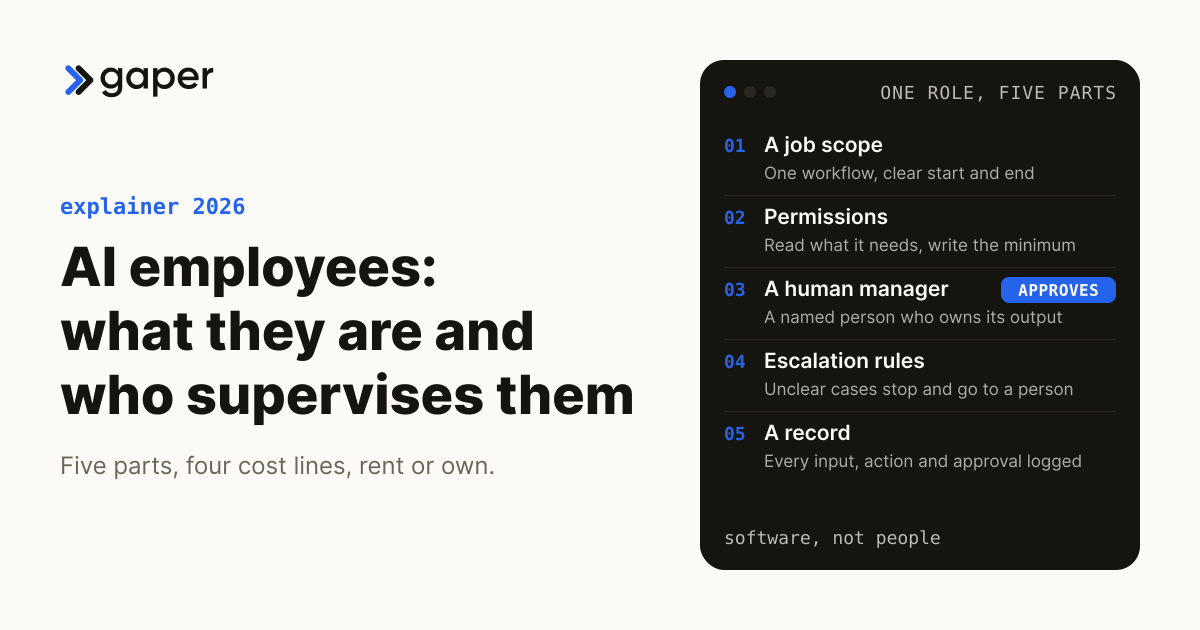
AI employees are AI agents set up to do one defined job, each with a scope of work, permissions in specific systems and a named human manager who approves anything material. They are software, not people, and they do not run themselves. You can rent a generic one as a subscription or deploy one you own inside your own systems, and the right choice depends on which data and systems the job touches.
What is an AI employee?
An AI employee is an AI agent packaged as a role. It reads inputs, uses tools in your systems, drafts or completes work inside a defined scope, and hands anything material to a named person for approval. Vendors also sell it as a digital employee, digital worker or AI teammate.
A working AI employee has five parts:
- A job scope. One workflow with a clear start and end, such as "build the missing-documents list for each tax client and draft the request". "Help the office" is not a scope.
- Permissions. Read access to what the job needs, write access to as little as possible, and no sending, posting or filing without a gate, granted and revoked in your systems like a staff login.
- A human manager. A named person who owns its output and answers for it.
- Escalation rules. When the input is unclear, a client is upset or the numbers do not tie, it stops and routes the case to a person.
- A record. Every input, action and approval logged, so you can answer "who did this, and why" months later.
It is not a person on your payroll or a contractor placed with you, and it carries no professional responsibility. The partner who signs the return is still responsible for it.
Is an AI employee the same as an AI agent?
In principle, yes. An AI employee is an AI agent configured for a single role, with a name, a scope and a supervisor, though many products sold under the label are chatbots or fixed automations, so ask to see its permissions, approval points and logs.
"Agent" describes the technology; "employee" describes the job it does and the budget line a vendor wants it to come out of. In June 2025 Gartner warned about "agent washing", vendors rebranding chatbots, assistants and robotic process automation as agents, and estimated that only about 130 of the thousands of vendors claiming agentic AI are real (Gartner, June 2025).
| Chatbot | Rule-based automation | AI employee (agent) | |
|---|---|---|---|
| What it does | Answers questions in a conversation | Runs fixed steps when a trigger fires | Plans steps toward a goal and uses your tools to finish a task |
| Messy input | Falls back to a script | Breaks when the input changes | Copes within limits, and should escalate when unsure |
| What the human does | Takes escalations | Maintains the rules | Approves, handles exceptions, decides on autonomy |
If a product cannot show you its permissions, approval points and logs, it is probably a chatbot with a job title. AI agents vs chatbots covers the difference in depth.
Do AI employees really work around the clock with no overhead?
Partly. The software can run at any hour without a salary, but approvals wait for people, accuracy has to be tested and monitored, and the underlying model is retired on the provider's schedule. The overhead moves from payroll to supervision, integration and upkeep rather than disappearing.
The AI employee pitch reuses six promises from older remote outsourcing ads, and each holds up only in part.
| The pitch | What holds | What it leaves out |
|---|---|---|
| More productive than a person | Fast on narrow, well-specified tasks | Long, multi-step office work still fails often without a person |
| Any skill, on demand | Broad general knowledge | Your procedures, clients and exceptions, until you give it access and examples |
| Zero infrastructure | No desk or laptop | Accounts, permissions, integrations, logging and somewhere to run, held by you or the vendor |
| Low running costs | No salary or benefits | Model usage, integration upkeep, testing, monitoring and review hours |
| Always on | It can run overnight | Anything that needs approval waits for the human, and outages happen |
| Never quits | No resignations | Models get retired, and vendors change products, terms and pricing |
TheAgentCompany, a benchmark led by Carnegie Mellon University researchers, simulates a small software company with 175 workplace tasks. In the paper, the best agent fully completed about 30% of them (arXiv, revised September 2025), and the top verified entry on its public leaderboard reached about 43% in November 2025 (TheAgentCompany leaderboard, 2025), so most still were not fully completed. Administrative and finance tasks were among the weakest categories, which the authors link to work that depends on documents, coworkers and private company data. That is most of a firm's back office.
Anthropic's Project Vend put an AI agent in charge of a small office shop. In phase two, newer models, a CRM, better inventory tools and forced procedures largely ended the losing weeks. Anthropic says the shop may have started making money in spite of the AI "CEO" agent it added as a manager, which shared the same model's blind spots, and staff could still talk the agents into bad deals. The agents still needed "a great deal of human support", to stock shelves and to get them out of awkward situations with customers (Anthropic, December 2025).
On "never quits": Anthropic notified developers on 30 September 2026 that Claude Sonnet 4.5 would retire from its API on 30 November 2026, and its policy is at least 60 days' notice for publicly released models (Anthropic model deprecations, 2026). Each retirement means retesting the AI employee on a new model, whether you do it or a vendor does.
Should you rent an AI employee or deploy one you own?
Rent one when the work is narrow, common and stays away from client data and systems of record. Own one when the job touches your ledger, document system, client files or any decision with risk attached. Renting buys a fast start on the vendor's terms; owning buys control over data, permissions, logs and change.
A rented AI employee is the old outsourcing model in new packaging: a third party runs the worker on its own infrastructure, under its own terms, and you pay one invoice. That is a fair trade for generic work such as scheduling or first-line website questions. It gets harder once the job needs client data, because the vendor's model, logs and retention settings now sit inside your compliance perimeter.
An owned AI employee is an agent built inside your systems: your cloud, your identity provider, your logs, your approval rules. You can change models without changing vendors. Ownership only counts if someone on your side can run it after handover, so ask for the runbook and the training, not just the repository.
| Rented AI employee | AI employee you own | |
|---|---|---|
| Where it runs | The vendor's platform | Your systems and cloud |
| Permissions and approval points | Vendor defaults, some settings yours | Set by you, action by action |
| Logs and audit trail | Held by the vendor; export and retention on its terms | Held by you |
| When the model changes | The vendor decides | You decide, and retest first |
That is the Gaper Rent-vs-Own test, and our build vs buy guide covers the full decision.
Neither renting nor owning hands off the oversight duty. For accounting firms covered by the FTC Safeguards Rule, the rule requires you to take reasonable steps to select and retain service providers capable of appropriate safeguards, require those safeguards by contract, and periodically assess each provider based on the risk it presents (16 CFR 314.4(f)). A rented AI employee that touches customer information is one of those providers, and so are the model provider behind an owned one and any build partner with access.
Which accounting firm jobs suit an AI employee?
Accounting jobs that suit an AI employee are high volume, arrive as documents and follow firm rules: client document intake, missing-items requests, transaction categorization, reconciliation exception prep and workpaper tie-outs. Sign-offs, tax positions and client advice stay with people.
Use the Gaper Ownership Map to label every step before anything is built: Automated, Agent-drafted, human-approved, or Human-owned, meaning the agent never runs it alone.
| Job | Ownership Map label | Why |
|---|---|---|
| Sorting and naming client uploads, flagging what is missing | Automated | Rules-based, reversible, high volume; a person audits samples |
| Drafting missing-document requests to clients | Agent-drafted, human-approved | Client-facing, so tone and accuracy matter |
| Categorizing bank transactions and proposing reconciliation matches | Agent-drafted, human-approved | Nothing posts to the ledger before review |
| Preparing workpaper tie-outs and variance notes | Agent-drafted, human-approved | The reviewer signs, so the reviewer approves |
| Tax positions, engagement acceptance, sign-off | Human-owned | Professional judgment and liability |
Any job that touches tax return information raises a Section 7216 question, whether you rent or own. Under 26 CFR 301.7216-3(a), unless the statute or regulations specifically authorize a disclosure, a preparer needs the taxpayer's written consent before disclosing or using return information. Owning the agent changes your control over region, logs and masking, not the consent duty. Our guide to Section 7216 consent for AI tools covers what a valid consent needs.
To place your own workflows, the free accounting workflow automation matrix sorts 36 common workflows into what can run end to end, what needs approval and what stays human. If the alternative on the table is an offshore team, compare the two workflow by workflow in offshore accounting staff vs AI agents.
Reference build: illustrative, not a client engagement. An intake AI employee at a tax practice. Scope: from client upload to a complete document checklist for each return. Permissions: read the client portal and the prior-year organizer, write to the checklist and a drafts folder, no access to e-file, billing or outbound email. Manager: the tax operations lead. Escalation: unreadable documents, new entity types and any client reply that is not a document go to a person. Record: every file classified, every draft and every approval logged. Measured by: the share of checklists the reviewer accepts without changes.
Which law firm jobs suit an AI employee?
Law firm jobs that suit an AI employee are preparatory and easy to check: intake triage, conflict-check preparation, matter-opening paperwork, first-pass document summaries for the responsible lawyer, and time-entry review against billing guidelines. Advice, filings and privilege calls stay with lawyers.
| Job | Ownership Map label |
|---|---|
| Intake triage and conflict-check preparation (a lawyer clears the conflict) | Agent-drafted, human-approved |
| Matter-opening forms and engagement letter drafts | Agent-drafted, human-approved |
| Document and transcript summaries for the responsible lawyer | Agent-drafted, human-approved |
| Flagging time entries that break a client's billing guidelines (a person edits the flagged entries) | Automated |
| Legal advice, court filings, privilege determinations | Human-owned |
The supervision rules do not relax because the assistant is software. ABA Formal Opinion 512 (29 July 2024) applies existing duties to generative AI, including competence (Model Rule 1.1), confidentiality (1.6) and supervision (5.1 and 5.3), and expects managerial lawyers to set clear policies on its use. The Model Rules bind only as states adopt them, and bar opinions are advisory. Where staff already paste client material into personal AI accounts, a supervised AI employee is part of the fix for shadow AI in law firms, alongside the policy. This is information, not legal advice.
What does it cost to run an AI employee?
The cost of running an AI employee has four components: model usage, integration and hosting, testing and monitoring, and the human review time it creates. A subscription folds some of these into a seat or usage price. An owned agent shows each as its own line, plus the build.
The components, left unpriced because vendor and model pricing changes often:
- Model usage. Billed per token of input and output, by the model provider on an owned build or folded into the vendor's price on a rented one. It grows with document length and volume; our AI agent development cost guide explains why it is rarely the biggest line.
- Integration and hosting. Connections to your practice management, document, ledger and email systems, plus somewhere to run. A rented product connects to what its vendor supports; an owned build connects to what the job needs.
- Testing and monitoring. An evaluation set built from past cases, rerun whenever the prompt, a tool or the model changes, plus monitoring for errors and drift. Model retirements make this a recurring cost, not a launch cost.
- Review time. The hours your manager spends approving drafts and working escalations. It is the easiest line to leave out of a budget, and it decides whether the AI employee frees capacity or just moves it.

Timelines depend on the integrations and approvals the workflow needs, so they are scoped up front. If you have one role in mind, scope that AI employee in a free 30-minute assessment.
Who supervises an AI employee?
The person who owns the work the AI employee does should supervise it, not IT alone. That manager owns its output, works its review queue, handles escalations and decides when a step can move from approved to automated, while IT or the build partner keeps access, logs and models in order.
Gartner predicted in May 2026 that by 2027, 40% of enterprises will demote or decommission autonomous AI agents because of governance gaps found only after production incidents, and it recommends governing each agent by its autonomy level (Gartner, May 2026). Our page on human-in-the-loop AI shows how approval gates and autonomy levels fit together.
How do you pilot an AI employee without exposing client data?
Start on one narrow job using fully de-identified copies of past files, keep every output as a draft a person approves, and connect live systems read-only before any write access. Before any real client file goes in, settle tax-data consent, the vendor's training and retention terms, where processing happens and who sees the logs.
- Write one job's scope, permissions, manager and escalation rules on a single page.
- Run it on fully de-identified copies of last season's files, and compare its drafts with what your people did.
- Connect live systems read-only: it drafts, and sends, posts or files nothing.
- Move single steps to approved actions, then to automated, as the review record supports each move.

Where Gaper fits
Gaper is the AI-native implementation partner that deploys supervised AI agents you own. We are not a staffing agency, and we do not supply people or sell seats. Our forward-deployed engineers embed with your team and build the agent in your repo and your cloud, with evals, guardrails and human approval on risky actions. You get the code and the runbook, and your team can operate it without us.
The work follows the Gaper method, Assess, Scope, Build, Supervise and Hand over, and you own the code, prompts, evaluation set, runbook and audit trail. If the Rent-vs-Own test says a subscription covers the job, we will tell you to rent it.
Thirty minutes, no commitment. We map one workflow, make the build or buy call, and scope the smallest thing worth shipping.
Frequently asked questions
What is an AI employee?
Is an AI employee the same as an AI agent?
Do AI employees really work around the clock with no overhead?
Should you rent an AI employee or deploy one you own?
Which accounting firm jobs suit an AI employee?
Which law firm jobs suit an AI employee?
AI Agents for HR: Screening, Onboarding, and Support That Run in Production
A practical guide to AI agents for HR, where screening, onboarding, and employee support agents earn their keep, and what it takes to get them running in production.
May 23, 2026
LLMs for Emotional Support: What They Can and Can't Do
AI agentsHow to Run an AI Agent Pilot That Actually Ships to Production
A practical playbook for running an AI agent pilot that reaches production: scope tight, instrument from day one, and design the handoff before you start.
Mar 21, 2026Ready to turn AI into execution?
Book a free assessment of one workflow. We map it, make an honest build versus buy call before any code, and if an off the shelf product covers the job we will tell you so.