
15 Ways CPAs Use ChatGPT for Accounting (and Where It Stops)
15 ChatGPT prompts for CPA firms, from tax research to close checklists, with where each stops, which plan fits, and the Section 7216 client-data rule.
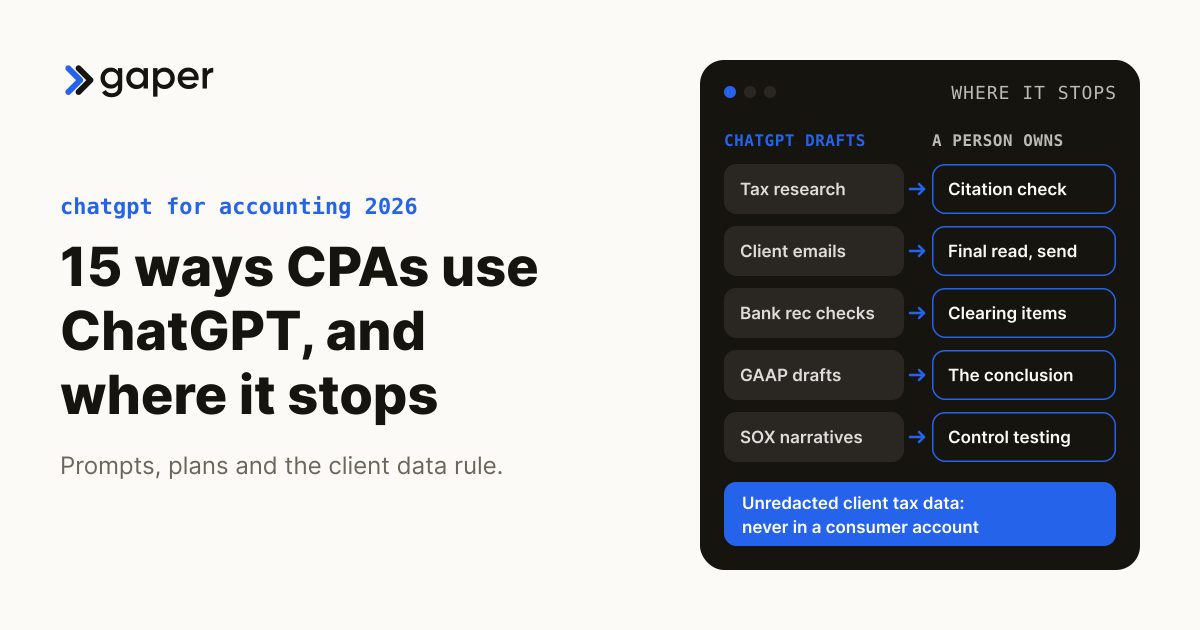
CPAs use ChatGPT for 15 jobs, from tax research summaries and client emails to close checklists and control narratives, and it is good at first drafts. It stops at judgment and at client data: a person verifies every citation and signs off, and unredacted client tax data never goes into a consumer ChatGPT account. For recurring work on client files, a supervised agent your firm owns is the safer tool.
Pick your path first.
- Using ChatGPT safely: go to the 15 ways, with copy-paste prompts and where each one stops.
- Automating a client workflow: read how AccountsGPT handles approvals, audit trails and client data.
Definition: owned supervised agent. An owned supervised agent is AI software that runs one defined step of a workflow inside your firm's own systems, such as matching bank lines to the ledger, with a person approving anything material and a log of every run. Your firm keeps the code, prompts, evaluation set and runbook. Gaper is the AI-native implementation partner that deploys supervised AI agents you own.
Updated October 2026: ChatGPT plans, data terms and ledger connectors rechecked at OpenAI's and the vendors' own pages, and every statistic replaced with a verified source.
TL;DR: The 15 Ways CPAs Actually Use ChatGPT in 2026
- In the Thomson Reuters Institute 2026 AI in Professional Services Report (1,514 professionals in 27 countries, surveyed late 2025; tax firms were 17% of the sample), 65% of tax firm respondents personally use public tools such as ChatGPT for work and 34% use enterprise tools such as Microsoft Copilot.
- The IRS Office of Professional Responsibility's June 2026 AI guidelines apply Circular 230 to AI: verify facts, citations and calculations, keep written firm procedures, and handle client data "using only secure, enterprise-approved AI".
- Common use cases on this page: tax research summarization, client communication drafting, workpaper review, journal entry explanations, month end close checklists, financial statement narratives.
- What ChatGPT cannot do: it now reaches QuickBooks, Xero and NetSuite through vendor plugins and connectors, and admins can limit a plugin to read-only actions or make ChatGPT ask before every change, but the person confirming is the same user in the chat: no separate reviewer, no per-client rule, no firm-controlled record outside Enterprise.
- Where AccountsGPT fits: AccountsGPT, Gaper's supervised accounting agent build, runs inside a firm's own systems for the recurring client work where ChatGPT stops.
Table of Contents
- Should CPAs Use ChatGPT in 2026?
- The 15 Best Ways with Copy-Paste Prompts
- The Limits of Raw ChatGPT for Accounting
- ChatGPT vs AccountsGPT Comparison
- Security Checklist (7 Points)
- How AccountsGPT Handles Approvals, Audit Trails and Client Data
- Questions CPAs Ask About ChatGPT
Should CPAs Use ChatGPT in 2026? (Honest Answer)
Yes, with clear guardrails. In the Thomson Reuters figures above, personal use of public tools runs far ahead of enterprise tools such as Microsoft Copilot (self-reported, by respondents screened for familiarity with AI). The question for smaller firms is how to use it safely, starting with accounts the firm controls.
What the AICPA Says About AI in Accounting
The AICPA Code does not name ChatGPT, but its confidentiality rules reach it: the Confidential Client Information Rule (1.700.001, formerly Rule 301) bars disclosure without the client's specific consent, and interpretation 1.700.040 asks for a confidentiality contract with a service provider, or that consent, first (Journal of Accountancy, March 2015). A personal ChatGPT login is no such contract. The AICPA's members-only Small Firm Generative AI Policy Template (29 April 2026) is a starting point for a written policy.
The most specific guidance is the IRS's: OPR's June 2026 guidelines apply Circular 230 to AI, from verifying AI output (section 10.22) and documenting firm procedures (10.36) to disclosing AI work in fees (10.27), so the engagement letter should say how your firm uses AI. AI output is a starting point, not a final answer. This is information, not legal advice.
The Data Security Reality
Tax and accounting professionals are financial institutions under the Gramm-Leach-Bliley Act and must keep a written information security plan, as the IRS repeated on 18 August 2026 (IR-2026-92). A consumer ChatGPT account sits outside that plan, because the account and its settings belong to the individual.
On the individual plans (Free, Go, Plus, Pro), OpenAI trains on content unless the user opts out, and rating a response may still let it train on that conversation (OpenAI); Business and Enterprise do not train on business data by default (OpenAI). OpenAI does not offer a BAA for ChatGPT Business, while sales-managed Enterprise and Edu accounts can request one through OpenAI sales (OpenAI), so settle it before a healthcare client's protected health information is uploaded.
The 15 Best Ways to Use ChatGPT in Accounting (with Copy-Paste Prompts)
Each includes a copy-paste prompt you can adapt and the point where it stops. These assume a firm-managed ChatGPT Business or Enterprise workspace, where training on business data is off by default.
The client-data rule for every prompt below: no unredacted client tax data in a consumer account (Free, Go, Plus or Pro); use placeholders such as [CLIENT] and [AMOUNT]. A firm workspace does not settle Section 7216 on its own either: on the safer reading, sending tax return information to an AI vendor needs the client's written consent first, as Section 7216 and AI tools explains.
1. Tax Research and IRS Publication Lookup
Act as a senior tax research assistant. Summarize the key provisions of IRS Publication [NUMBER] in 5 bullet points. Include the effective date and any recent updates. I will verify against IRS.gov before using in client work.
Warning: Always verify citations. ChatGPT can invent section numbers and effective dates. Cross-reference against IRS.gov.
Where it stops: the conclusion and the citation check stay with the preparer, as OPR's guidance under Circular 230 section 10.22 expects. Research a fact pattern ("an S corporation with two shareholders"), never a name and an EIN.
2. Drafting Client Communication
Write a professional email to a small business client explaining that we need their updated bank statements and [PERIOD] financial records to complete their [TAX RETURN TYPE]. Friendly but firm tone. Deadline is [DATE]. Keep it under 200 words.
Where it stops: a person reads and sends every email and checks any tax position, deadline or fee against the file. Names and figures go in later, in your own email system.
3. Workpaper Review and Quality Control
I am reviewing a workpaper about [ACCOUNT/TRANSACTION]. Here is the explanation: [PASTE, NO PII]. List 5 things a senior reviewer might question or want more support for.
Where it stops: ChatGPT sees only the explanation you paste, never the evidence behind it, so its questions are a checklist for the reviewer, not a review. The sign-off stays human.
4 to 15. Additional Prompts
The remaining 12 use cases follow the same pattern.
4. Bank reconciliation anomaly detection. Prompt: Group these unreconciled items, with names and account numbers removed, by likely cause (timing, duplicate, missing entry, error) and say what to check first: [PASTE]. Where it stops: clearing items and booking adjustments. Intuit's QuickBooks app is live for Free, Plus and Pro accounts in the US (Intuit, updated March 2026), so linking a client's file to a personal account puts client data in a consumer account; see AI for bank reconciliation.
5. Audit prep checklist generation. Prompt: Draft a PBC request list for a first-year review of a [INDUSTRY] company with [REVENUE RANGE] revenue, by financial statement area. Where it stops: risk assessment, materiality and scope, which are the partner's call.
6. Journal entry explanations for clients. Prompt: Explain this adjusting entry to a business owner in three sentences: Debit [ACCOUNT] [AMOUNT], Credit [ACCOUNT] [AMOUNT], reason: [REASON]. Where it stops: whether the entry is right, because ChatGPT explains a wrong entry just as fluently.
7. Financial statement narrative writing. Prompt: Draft two paragraphs on year-over-year changes from these rounded, anonymized figures: [TABLE]. Neutral tone, no forward-looking statements. Where it stops: the figures and representations, which management owns.
8. GAAP and FASB interpretation drafts. Prompt: Summarize the recognition steps in ASC [TOPIC] for [TRANSACTION TYPE], list the judgment areas, and cite the paragraphs. Where it stops: the accounting conclusion. A reviewer checks each cited paragraph in the Codification, since invented ones look real.
9. Month end close task lists. Prompt: Turn this close process into a checklist with an owner role, due day and review step per task: [PROCESS]. Where it stops: naming real owners and signing off each step.
10. Accruals and deferrals explanations. Prompt: Explain accrued versus deferred revenue with one example each for a [INDUSTRY] client, under 150 words. Where it stops: the estimate itself, which a person makes from the client's records.
11. Client onboarding questionnaires. Prompt: Draft an intake questionnaire for a new [ENTITY TYPE] tax client covering ownership, prior filings, payroll, states and document sources. Where it stops: acceptance, conflict checks and consents. A Section 7216 consent must meet 26 CFR 301.7216-3 and, for Form 1040 clients, the format and wording in Rev. Proc. 2013-14, so build it from the current text, not a chat draft.
12. Marketing content for your firm. Prompt: Write a 300-word LinkedIn post on the new [TOPIC] rule for small business owners, with one example and no promises about results. Where it stops: claims about services, fees or results, which a partner approves; no client stories without written permission.
13. Tax season client triage. Prompt: Sort these coded returns [CODE, ENTITY TYPE, DOCUMENTS RECEIVED, EXTENDED LAST YEAR Y/N] into file now, chase documents or extend, and explain each rule. Where it stops: extension and deadline calls; the named client list stays out of consumer accounts.
14. Internal training material for new staff. Prompt: Create a 10-question quiz on [TOPIC] for first-year staff, with answers and a one-line explanation each. Where it stops: technical accuracy, which a senior checks.
15. SOX control documentation drafting. Prompt: Draft a control narrative for [PROCESS]: objective, activity, frequency, owner role, evidence retained. Description: [DESCRIPTION, NO CLIENT NAMES]. Where it stops: control design and testing. Section 404 requires management's assessment of internal control over financial reporting (404(a)) and, for accelerated and large accelerated filers other than emerging growth companies, an auditor's attestation (404(b)) (SEC, 2020), so no chat tool is "SOX compliant"; it drafts what the control owner confirms.
Risk levels below are our editorial judgment, not measured rates.
| Use Case | Risk Level | What Stays With a Person |
|---|---|---|
| Tax research summarization | Medium (verify) | The conclusion and the citation check |
| Client communication drafting | Low | The final read and the send |
| Workpaper review QC | Medium | The reviewer's sign-off |
| Bank reconciliation anomaly check | Medium | Clearing items and any adjustment |
| Audit prep checklists | Low | Risk assessment and scope |
| Journal entry explanations | Low | Whether the entry is right |
| Financial statement narratives | Low | The figures and representations |
| GAAP / FASB drafts | Medium (verify) | The accounting conclusion |
| Month end close checklists | Low | Owners and sign-off |
| Marketing content for firm | Low | Claims about the firm |
| Accruals and deferrals explanations | Low | The estimate |
| Client onboarding questionnaires | Low | Acceptance, conflicts and consents |
| Tax season client triage | Medium | Extension and deadline calls |
| Internal training material | Low | Technical accuracy |
| SOX control documentation | Medium (verify) | Control design and testing |
Not sure which of your firm's workflows belong in ChatGPT and which need an agent? Sort them by what can run alone, what needs approval and what stays human in the accounting workflow automation matrix.
The Limits of Raw ChatGPT for Accounting Work
Tax Research Accuracy Problems
ChatGPT is trained on tax content but is not a reliable primary source. It can cite IRC sections that do not exist, lean on training data or search results that predate recent law such as Public Law 119-21 of July 2025 (which the IRS now calls the Working Families Tax Cuts), and conflate federal and state rules. Verify against IRS.gov, Thomson Reuters Checkpoint, CCH AnswerConnect or Bloomberg Tax.
Data Privacy and GLBA Concerns
Per the FTC Safeguards Rule, CPA firms must maintain an information security program covering customer information about individual clients, and it reaches the service providers that handle it, which must be able to protect it, be bound by contract and be assessed periodically (16 CFR 314.4(f)). In a consumer ChatGPT account the individual, not the firm, decides on training, retention and deletion, and the firm has no contract with OpenAI. If your written information security plan predates these tools, update your WISP for AI.
Never paste into a consumer ChatGPT account: Social Security numbers or EINs, bank account numbers, client names with dollar figures, full tax returns, audit workpapers with client identifiers, salary data, health information.
A Business or Enterprise workspace answers the training and contract questions better, but tax return information still needs the Section 7216 analysis above.

Client Data Integration, but No Firm Audit Trail
ChatGPT is no longer cut off from your ledger: since July 2026 the QuickBooks plugin can create, send and delete invoices (Intuit, 28 July 2026), Xero's plugin went live on 16 September 2026 (Xero), and NetSuite connects through Oracle's AI Connector Service (Oracle), with the consumer-account risk described in way 4.
What is still missing is the firm's record. Firm quality management and peer review expect evidence of who did the work and who reviewed it; for AI work, that means who asked what, about which client, on which model, and who approved it. A consumer account keeps a chat history the user can delete. On Enterprise and Edu, OpenAI says its Compliance Logs Platform keeps data for 30 days, so records must be exported continuously to last longer (OpenAI), and for agentic ChatGPT Work tasks it adds that these records are not a complete audit trail of every file operation, tool call or approval (OpenAI). OpenAI also changes and retires models on its own schedule and posts the dates in its changelog.
ChatGPT vs AccountsGPT: When CPAs Need the Specialized Version
AccountsGPT is Gaper's supervised accounting agent build, deployed in the firm's cloud with a person approving anything that posts. ChatGPT prices are OpenAI's US list prices in October 2026 (OpenAI pricing, ChatGPT Business help); plugin controls follow OpenAI's admin documentation.
| Feature | ChatGPT Free, Go, Plus, Pro | ChatGPT Business | ChatGPT Enterprise | AccountsGPT (custom build) |
|---|---|---|---|---|
| QuickBooks / Xero integration | Vendor plugins the user connects | Vendor plugins where available, on by default; admins can turn them off | Vendor plugins where available, off until an admin enables them | Built against your ledger's API, scoped per client |
| Full audit trail | No, a chat history the user can delete | No Compliance API | Compliance API records, 30 days unless exported; incomplete for agentic Work tasks | A log of every run, under your retention policy |
| Approval before anything posts | Whatever the user confirms in the chat | Admins can block write actions or make ChatGPT ask first; the user who confirms is the approver | Same as Business | Firm-set approval rules before any write |
| Training on your data | On unless each user opts out | Off by default | Off by default | Set by your model contract, or none with a self-hosted model |
| Safeguards Rule (GLBA) evidence | Hard: no firm contract or admin control | Managed workspace and admin roles | Adds retention and residency controls | Runs under your WISP and access controls |
| HIPAA BAA | No | No (OpenAI does not offer one) | Through OpenAI sales, for sales-managed accounts | Depends on the model host; settle it before PHI is in scope |
| Tax code grounding | Web search and uploads; verify everything | Adds company knowledge connectors | Same as Business | Retrieval over sources you choose, with citations a reviewer checks |
| Price | Free $0, Go $8, Plus $20, Pro from $100 a month | Standard seats $20 a user a month billed annually or $25 monthly (Premium $100 or $125), 2 seats minimum | Contact OpenAI sales | Scoped build plus run cost |
| Who owns it | The individual's account | The firm's workspace on OpenAI's service | Same as Business | Your firm: code, prompts, evaluation set, runbook |
The Same Task Both Ways: A Client's Month-End Bank Reconciliation
| Step | ChatGPT Business seat | Owned supervised agent |
|---|---|---|
| Get the data in | Staff upload statements or connect the client's ledger through a plugin | Pulls the bank feed and ledger with a service role scoped to that client |
| Match | Whatever was uploaded to that chat; results vary with the prompt | Same matching rules every month, tested against past reconciliations |
| Flag exceptions | Listed in the chat | Routed to a named reviewer with the evidence attached |
| Post adjustments | Whatever the user does next, unless an admin has set the plugin to read-only | Drafted; nothing posts until a person approves it |
| Prove what happened | The chat, if nobody deletes it | A run log per item: data used, rule applied, who approved |
| When the model changes | On OpenAI's schedule | The firm pins the model and reruns its evaluation set before any switch |
| Section 7216 | Consent analysis needed before tax return data goes in | Still needed; owning the agent does not remove it |
When Raw ChatGPT Is Fine
A firm Business or Enterprise workspace is fine for template work without client data, marketing content, research you will verify anyway, training drafts, and emails a person edits before sending. Work with no client data carries little risk on any plan, but firm work belongs in an account the firm controls.
When AccountsGPT Beats Raw ChatGPT
Run the Rent-vs-Own test: rent a tool like ChatGPT for narrow, common work, and own a supervised agent when the work touches systems of record, client data or risk. A build like AccountsGPT fits when you need client data under your own access rules, a run log you can show a peer reviewer or a regulator, approval before anything posts, cited retrieval over sources you choose, and prompts built on your firm's templates.
What does an owned build cost next to a stack of seats? See the 2026 AI implementation price bands for accounting firms.
ChatGPT for Accounting Security Checklist (7 Points)
Before using ChatGPT in your CPA firm, answer these 7 questions in writing.
- Which ChatGPT plan are we on (Free, Go, Plus, Pro, Business or Enterprise), and does anyone do firm work on a personal account?
- Is training off? It is by default on Business and Enterprise; on individual plans each user must turn off "Improve the model for everyone", and rating a response may still allow training on that conversation.
- What data categories are allowed, and what is prohibited? Start with this page's rule: no unredacted client tax data in a consumer account.
- Who may use ChatGPT for client work, and who owns the policy: a named partner, or a Chief AI Officer, fractional if the firm is small?
- How are we logging prompts and outputs for audit purposes? Enterprise gets the Compliance API and Business does not, and OpenAI's Compliance Logs Platform keeps records for 30 days unless you export them.
- What review happens before ChatGPT output reaches a client? OPR's guidance treats AI-generated text as a draft.
- Do our engagement letters and consents cover AI? Unless an exception in 26 CFR 301.7216-2 clearly applies, the safer course is to get the client's written consent before tax return information goes to an AI vendor (26 CFR 301.7216-3), and to describe AI work in your billing as OPR's section 10.27 guidance suggests.
65% of tax firm respondents personally use publicly available AI tools such as ChatGPT for work; 34% use enterprise tools such as Microsoft Copilot.
Source: Thomson Reuters Institute, 2026 AI in Professional Services Report, online survey of 1,514 professionals in 27 countries (tax firms 17%), October and November 2025.
How Gaper’s AccountsGPT Handles Approvals, Audit Trails, and Client Data
AccountsGPT is Gaper's supervised accounting agent build: it reads invoices and statements, reconciles transactions and drafts reports inside your systems, and a person approves anything that posts to the ledger. Gaper's forward-deployed engineers embed with your team and build it inside your real systems, following the Gaper method: Assess, Scope, Build, Supervise, Hand over. Where client data should not go to a hosted model API, Gaper fine-tunes and self-hosts open-weight models for clients. Timelines depend on the integrations and approvals the workflow needs, so they are scoped up front. Owning the agent changes where data goes and who controls it, not your Section 7216 consent duty. More on AccountsGPT.
- Human-gated: nothing posts to the ledger without an approval step you control.
- In your environment: deployed in your cloud, on your auth and access controls.
- You own it: code, prompts, evaluation set and runbook.
Reference build: illustrative, not a client engagement. A supervised reconciliation agent for a CPA firm's bookkeeping clients, mapped with the Gaper Ownership Map. Automated: pulling the bank feed and ledger, matching cleared items. Agent-drafted, human-approved: exception notes, proposed adjusting entries, questions to the client about unknown deposits. Human-owned: signing off the reconciliation and anything that touches a tax position; the agent never runs these alone. Metric to track: exceptions the reviewer reclassifies each month.
Want this on your firm's client files? Talk to an AI architect about a supervised reconciliation agent in a free 30-minute assessment, with no obligation.
Can CPAs use ChatGPT for tax research?
Yes, as a starting point. It can summarize a topic and point to authority, but it can invent IRC sections, cite superseded rules and blend federal and state law. IRS OPR's June 2026 guidelines apply Circular 230 to AI: verify the facts, citations and calculations it produces.
Is it safe to paste client financial data into ChatGPT?
Not into a consumer account: the user, not the firm, controls training and deletion, and the firm has no contract with OpenAI. Business and Enterprise keep training off by default, but tax return information still needs a Section 7216 analysis and, on the safer reading, written consent first.
Which ChatGPT plan should a CPA firm use?
For firm work, at least ChatGPT Business, where OpenAI lists Standard seats at $20 a user a month billed annually and does not train on business data by default. Enterprise adds retention controls, data residency and the Compliance API. Free, Go, Plus and Pro are individual plans and should not hold client data.
What can AccountsGPT do that raw ChatGPT cannot for accounting work?
AccountsGPT is Gaper's supervised accounting agent build. A build like it works inside your own systems, routes exceptions to a named reviewer, holds anything that posts for approval and logs every run, and your firm owns the code and runbook. ChatGPT connects to ledgers but cannot route work to your reviewers.
How widely have CPA firms adopted generative AI?
In the Thomson Reuters Institute 2026 report, 34% of tax firm respondents said their firm already uses generative AI and 65% personally use public tools like ChatGPT (tax firms were 17% of 1,514 professionals in 27 countries, surveyed late 2025). Staff use runs ahead of the firm.
What is the best AI tool for accountants in 2026?
There is no single best tool. A ChatGPT Business or Enterprise workspace suits drafting and verified research, the research and tax platforms you already license may carry their own AI features, and an owned supervised agent suits recurring work on client data. Choose by workflow and by where the data has to go.
Can ChatGPT do my bookkeeping?
Not on its own. ChatGPT can read QuickBooks, Xero and NetSuite data through vendor plugins and connectors, and the QuickBooks plugin can create invoices, but it does not run your close, route a write to a separate reviewer or give the firm its own record of who approved what. Bookkeeping still runs in the ledger, reviewed by a person.
What are the best ChatGPT prompts for CPAs?
This guide's prompts cover 15 jobs, from tax research summaries to SOX control narratives. The pattern matters more than the wording: give a role, the task and the output format, use placeholders instead of client data, and say you will verify the answer against the primary source before using it.
Should my CPA firm use AccountsGPT instead of ChatGPT?
Use both, for different jobs. A ChatGPT Business or Enterprise workspace covers drafting, research and training material with no client tax data. A supervised agent build such as AccountsGPT covers recurring client work, such as reconciliation, inside your systems, with approval before anything posts and a log of every run.
Thirty minutes, no commitment. We map one workflow, make the build or buy call, and scope the smallest thing worth shipping.
Frequently asked questions
Can CPAs use ChatGPT for tax research?
Is it safe to paste client financial data into ChatGPT?
Which ChatGPT plan should a CPA firm use?
What can AccountsGPT do that raw ChatGPT cannot for accounting work?
How widely have CPA firms adopted generative AI?
What is the best AI tool for accountants in 2026?
Can ChatGPT do my bookkeeping?
What are the best ChatGPT prompts for CPAs?
Should my CPA firm use AccountsGPT instead of ChatGPT?
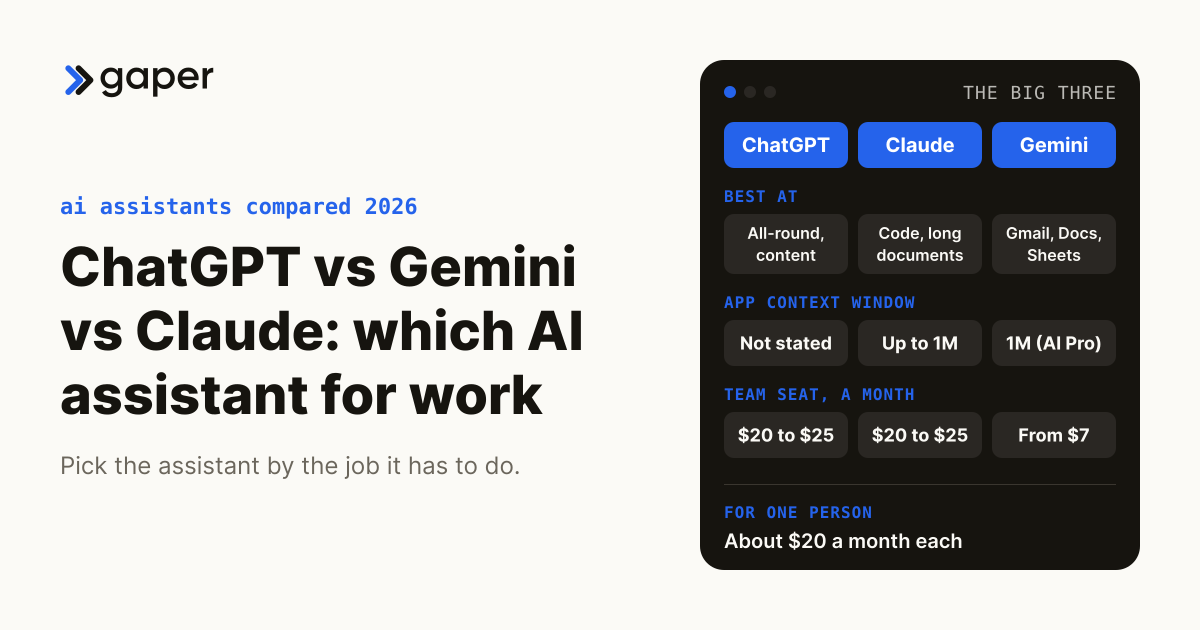
ChatGPT vs Gemini vs Llama vs Meta AI vs Claude (2026): Which AI Assistant for Work
IndustryCan software decide economic nexus for your clients, and where does it have to stop?
Software can monitor state thresholds and alert you, but it cannot decide sourcing, taxability, marketplace treatment or whether to register. Here is the line.
Oct 1, 2026AutomationAI Agents for Operations Teams: Where to Start
A practical guide for ops leaders rolling out AI agents: how to pick the right first workflow, scope it, and get from pilot to production without stalling.
May 10, 2026Ready to turn AI into execution?
Book a free assessment of one workflow. We map it, make an honest build versus buy call before any code, and if an off the shelf product covers the job we will tell you so.