Enterprise automation is hitting a ceiling. Macros, scripts, and “if-this-then-that” flows work until reality shows up: missing data, exceptions, approvals, changing policies, messy inboxes, and humans who do not follow perfect steps.
Written by Mustafa Najoom
CEO at Gaper.io | Former CPA turned B2B growth specialist
TL;DR: Enterprise AI Agents Are Delivering 40 to 60% Cost Savings Right Now
AI agents are no longer a research curiosity. They are production infrastructure at Fortune 500 companies and growth-stage startups alike. Unlike chatbots that wait for a prompt, enterprise AI agents perceive their environment, make decisions, take actions, and learn from outcomes without constant human direction.
Table of Contents
Our engineers build enterprise AI agent systems for teams at
Need expert guidance on enterprise AI agent deployment?
Gaper’s engineering teams bring 8,200+ top 1% vetted engineers to the table. Teams assemble in 24 hours starting at $35 per hour.
An enterprise AI agent is an autonomous software system that uses large language models as its reasoning engine to perceive its environment, make decisions, execute multi-step tasks, and learn from feedback within a business context. Unlike a standard chatbot that responds to a single query and stops, an agent operates in a loop: it observes, plans, acts, evaluates the result, and then decides what to do next.
The distinction matters because enterprises need software that handles workflows, not conversations. A customer service chatbot answers questions. A customer service agent resolves tickets end to end: it reads the complaint, pulls account history, diagnoses the issue, executes the fix, updates the CRM, and sends a follow-up email. All without a human touching the keyboard.
According to the Stanford HAI AI Index Report, enterprise adoption of agentic AI systems grew 3.2x between 2024 and 2025, with the fastest growth in healthcare, financial services, and professional services.
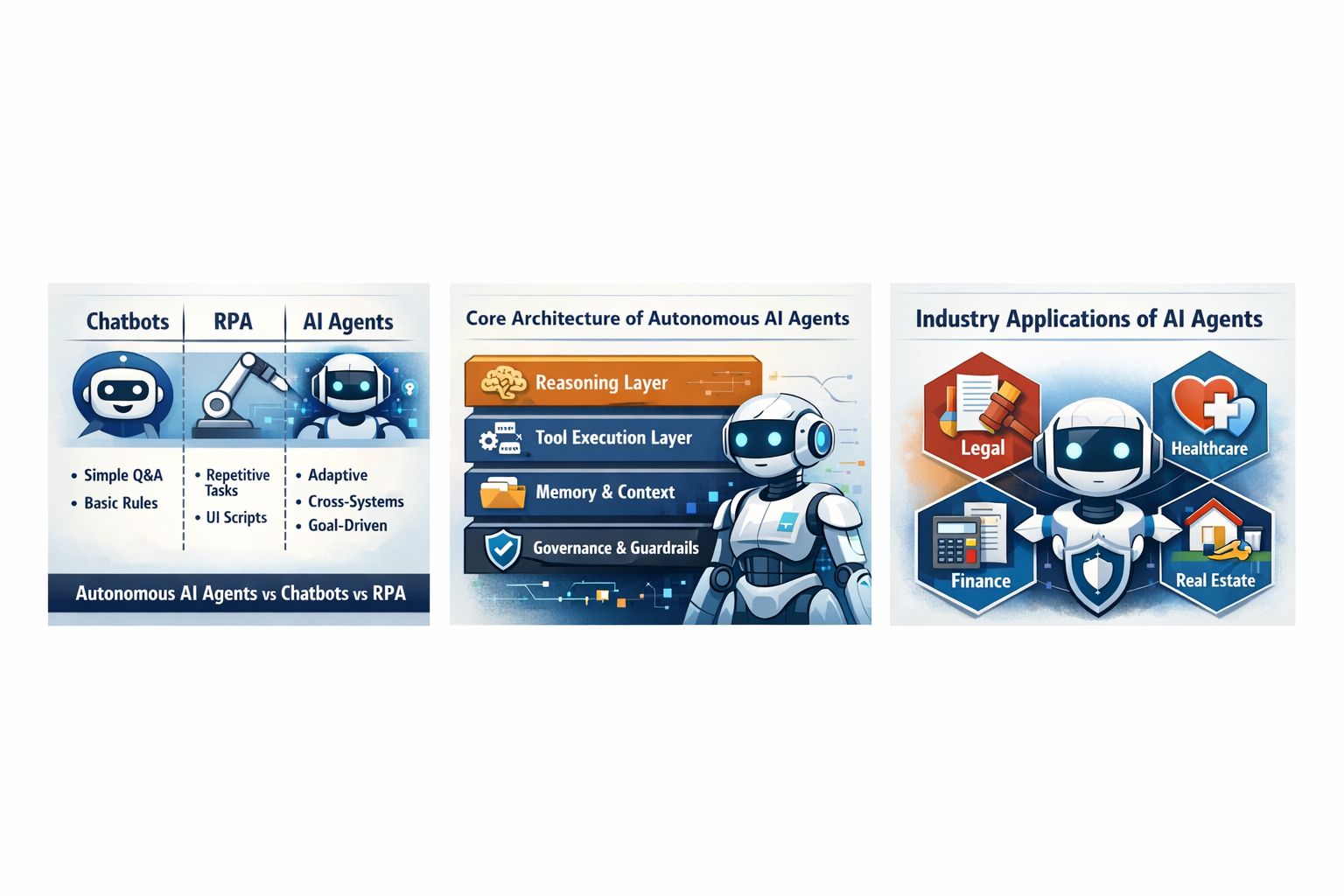
Every enterprise AI agent, regardless of framework or vendor, consists of three core components.
1. The Brain (LLM Reasoning Engine). This is the large language model that powers the agent’s decision-making. GPT-4o, Claude, Gemini, Llama 3, and Mistral are all used as agent brains. The brain receives context (current state, past actions, available tools) and decides what to do next. For enterprise deployments, model selection depends on cost, latency, accuracy, and data residency requirements.
2. Tools (Action Layer). Tools are the APIs, databases, file systems, and third-party services that the agent can interact with. An accounting agent might have tools for reading invoices, querying QuickBooks, sending payment confirmations, and updating spreadsheets. Tool design is where most enterprise agent projects succeed or fail. Poorly defined tools create agents that are unpredictable. Well-defined tools with clear input/output schemas create agents that behave like reliable colleagues.
3. Memory (State Management). Memory gives the agent context beyond its current task. Short-term memory holds the current conversation or workflow state. Long-term memory stores learned preferences, historical decisions, and knowledge bases. Shared memory allows multiple agents to collaborate by reading from and writing to a common state store. Enterprise deployments typically use vector databases like Pinecone, Weaviate, or pgvector for long-term memory, combined with Redis or similar for working memory.
Enterprise buyers often confuse AI agents with three related technologies. The differences are significant.
| Criterion | AI Agent | Chatbot | RPA Bot | Traditional Automation |
|---|---|---|---|---|
| Decision-making | Autonomous, context-aware | Rule-based or single-turn LLM | Rule-based, deterministic | Hardcoded logic |
| Adaptability | Handles novel situations | Fails on out-of-scope queries | Breaks when UI changes | Requires code changes |
| Multi-step execution | Yes, plans and chains actions | No, single response | Yes, but scripted sequences | Yes, but predefined workflows |
| Learning | Improves from feedback and experience | Minimal | None | None |
| Setup complexity | Moderate (needs tool definitions) | Low | High (screen scraping) | High (custom development) |
| Maintenance cost | Low (self-adapting) | Low | High (brittle scripts) | High (code updates) |
| Best for | Complex knowledge work | Simple Q and A | Repetitive data entry | Predictable, high-volume tasks |
The key insight is that AI agents occupy the space between fully human work and fully automated work. They handle the messy middle: tasks that require judgment, context, and adaptability but happen frequently enough to justify automation.
Understanding the technical mechanics helps enterprise leaders evaluate vendors, estimate implementation timelines, and set realistic expectations for what agents can and cannot do.
Every AI agent operates in a continuous loop with four phases.
Perception. The agent receives input from its environment. This could be a new email in an inbox, a Slack message, a database event, a scheduled trigger, or a webhook from an external system. The perception layer converts raw input into structured context that the reasoning engine can process.
Reasoning. The LLM brain analyzes the context, considers available tools, evaluates possible actions, and decides on the next step. This is where chain-of-thought prompting, few-shot examples, and system instructions shape the agent’s behavior. Enterprise agents typically use carefully crafted system prompts that encode business rules, compliance requirements, and decision boundaries.
Action. The agent executes its chosen action by calling a tool. This might be querying a database, sending an API request, generating a document, or escalating to a human. Actions produce results that feed back into the perception layer, creating a closed loop.
Evaluation. After acting, the agent evaluates the outcome. Did the API call succeed? Did the customer respond positively? Did the data validate correctly? Based on the evaluation, the agent decides whether to continue with the next step, retry with a different approach, or escalate to a human.
Tool calling is the mechanism that gives agents their power. Instead of just generating text, agents generate structured function calls that execute real-world actions.
Here is a simplified example of how an enterprise agent processes an invoice:
# Agent receives: "New invoice from Acme Corp, $15,000, Net 30"
# Agent reasoning: Need to verify vendor, check budget, route for approval

Step 1: agent.call_tool("lookup_vendor", {"name": "Acme Corp"})
# Returns: {"vendor_id": "V-4521", "status": "approved", "payment_terms": "Net 30"}

Step 2: agent.call_tool("check_budget", {"department": "Engineering", "amount": 15000})
# Returns: {"remaining_budget": 85000, "approval_required": False}

Step 3: agent.call_tool("create_payment", {"vendor_id": "V-4521", "amount": 15000, "terms": "Net 30"})
# Returns: {"payment_id": "PAY-8823", "scheduled_date": "2026-05-13"}

Step 4: agent.call_tool("notify_accounting", {"message": "Invoice processed for Acme Corp"})
Each tool call is a structured JSON object with defined parameters. The LLM generates the function call, the execution layer runs it, and the result feeds back into the agent’s context for the next decision.
Enterprise agents need three types of memory to function effectively in real business environments.
Short-term memory holds the current task context: the conversation history, the current workflow state, intermediate results from tool calls. This typically lives in the LLM’s context window and in a session store. For enterprise agents handling complex workflows, effective short-term memory management prevents the agent from forgetting what it was doing mid-task.
Long-term memory stores learned knowledge, user preferences, historical decisions, and reference documents. Vector databases enable semantic search over this knowledge base. When an accounting agent encounters an unusual invoice, it can search long-term memory for similar past invoices and how they were handled.
Shared memory enables multi-agent collaboration. When Kelly (healthcare scheduling agent) identifies a staffing gap, she can write to shared memory. James (HR recruiting agent) reads from the same shared memory and begins sourcing candidates. This inter-agent communication through shared state is what enables truly autonomous enterprise workflows.
The highest-ROI enterprise AI agent deployments target departments with high volumes of knowledge work that follows patterns but requires judgment.
Kelly is Gaper’s healthcare scheduling AI agent. She handles appointment coordination, staff scheduling, patient communication, and insurance verification workflows. In healthcare, the combination of regulatory complexity (HIPAA), high volume (thousands of appointments per week), and the cost of errors (missed appointments, scheduling conflicts) makes AI agents particularly valuable.
Healthcare organizations deploying scheduling agents report 35 to 50% reductions in no-show rates and 60% faster appointment booking according to research published by the American Medical Association.
AccountsGPT handles invoice processing, expense categorization, financial reconciliation, and compliance reporting. The Journal of Accountancy reports that AI-assisted accounting workflows reduce manual data entry by 80% and cut month-end close times from 10 days to 3 days.
For enterprise finance teams, the ROI calculation is straightforward. If a team of 5 accountants spends 40% of their time on data entry and reconciliation, an AI agent that handles 80% of that work frees up 1,600 hours per year. At loaded cost of $75 per hour, that is $120,000 in annual savings from a single agent deployment.
James manages candidate screening, interview scheduling, offer letter generation, and onboarding workflow automation. The Society for Human Resource Management reports that the average time to fill a position is 44 days. AI recruiting agents reduce this by 30 to 50% by automating the screening and scheduling phases that consume most of the recruiter’s time.
James can screen 500 resumes in the time a human recruiter reviews 20. But unlike simple keyword matching, James understands context: he recognizes that a candidate with “distributed systems experience at Netflix” is relevant for a “microservices architect” role even if the exact keyword does not appear.
Stefan handles campaign analytics, content distribution, A/B test management, and marketing attribution analysis. Marketing teams generate enormous amounts of data across dozens of platforms. An AI agent that consolidates data from Google Analytics, HubSpot, Meta Ads, and email platforms into actionable insights saves 10 to 15 hours per week for marketing managers.
AI agents in engineering handle code review triage, incident response, deployment automation, and infrastructure monitoring. GitHub Octoverse data shows that 92% of developers now use AI tools, but only 15% use autonomous agents for workflow automation. This gap represents a massive opportunity for enterprises to gain competitive advantage by deploying engineering agents that handle on-call triage, dependency updates, and test automation.
Enterprise teams evaluating AI agent frameworks face a critical build decision. The three dominant frameworks each serve different patterns.
| Feature | LangChain/LangGraph | Microsoft AutoGen | CrewAI |
|---|---|---|---|
| Primary pattern | Graph-based agent workflows | Multi-agent conversations | Role-based agent crews |
| Learning curve | Moderate to steep | Moderate | Gentle |
| Enterprise readiness | High (LangSmith monitoring) | High (Microsoft backing) | Growing |
| Multi-agent support | Yes (LangGraph) | Native (conversation-based) | Native (crew-based) |
| Observability | LangSmith, LangFuse | Built-in logging | Basic, improving |
| Model flexibility | Any LLM provider | Any LLM provider | Any LLM provider |
| Deployment options | Cloud, on-premise, hybrid | Cloud, on-premise | Cloud, on-premise |
| Best for | Complex, custom workflows | Research and conversational agents | Rapid prototyping and role-based teams |
| Community size | Largest (80K+ GitHub stars) | Large (Microsoft ecosystem) | Growing (25K+ GitHub stars) |
| Production examples | Thousands of enterprise deployments | Microsoft internal plus enterprise | Growing enterprise adoption |
Choose LangChain/LangGraph when you need fine-grained control over agent behavior, have complex multi-step workflows with branching logic, and want the deepest ecosystem of tools and integrations. LangGraph’s state machine approach is ideal for enterprise workflows that must be auditable and deterministic at certain decision points.
Choose AutoGen when your use case centers on multi-agent collaboration through structured conversations. AutoGen excels at scenarios where multiple specialist agents need to discuss, debate, and reach consensus. It is particularly strong for code generation and analysis workflows.
Choose CrewAI when you want to get a multi-agent system running quickly with minimal boilerplate. CrewAI’s role-based metaphor (each agent has a role, goal, and backstory) is intuitive for business teams. It is the fastest path from prototype to working demo.
For most enterprise deployments, Gaper recommends starting with the framework that best matches your team’s existing expertise. A Python team comfortable with graph-based programming will be productive faster with LangGraph. A team that thinks in terms of roles and responsibilities will prefer CrewAI.
Enterprise buyers need hard numbers. Here is how to calculate AI agent ROI for your organization.
McKinsey’s research on generative AI estimates that generative AI (including agents) could automate 60 to 70% of employee activities. For enterprise knowledge workers earning $50 to $150 per hour (loaded cost), even automating 30% of their workflows produces significant savings.
Conservative enterprise ROI model:
These numbers are conservative. Organizations that deploy agents across multiple departments and workflows report compounding returns as agents learn from each other through shared memory systems.
Beyond direct cost savings, AI agents create productivity multiplier effects that are harder to quantify but equally valuable.
Speed. Tasks that took hours complete in minutes. Invoice processing that required 30 minutes per invoice drops to 2 minutes with AI agent assistance.
Accuracy. Agents do not get tired, distracted, or make transcription errors. Deloitte’s AI Institute reports that AI-assisted workflows reduce error rates by 50 to 80% in financial document processing.
Availability. Agents work 24/7 across time zones. For global enterprises, this means workflows that previously stalled when the US team went home now continue processing through the night via agents.
Scalability. Adding capacity means spinning up additional agent instances, not hiring and training new employees. An enterprise can scale from processing 100 invoices per day to 10,000 per day without adding headcount.
| Cost Category | Range | Notes |
|---|---|---|
| Assessment and planning | $10,000 to $25,000 | Use case mapping, tool inventory, data audit |
| Agent development (pilot) | $30,000 to $75,000 | Single department, 2-3 workflows |
| Infrastructure and hosting | $2,000 to $10,000/month | Cloud compute, vector DB, LLM API costs |
| LLM API costs | $500 to $5,000/month | Depends on model choice and volume |
| Monitoring and observability | $500 to $2,000/month | LangSmith, Datadog, custom dashboards |
| Ongoing maintenance | $5,000 to $15,000/month | Prompt tuning, tool updates, scaling |
| Full enterprise rollout | $150,000 to $500,000 | Multi-department, 10+ workflows |
Gaper’s engineering teams start at $35 per hour, which significantly reduces the development cost compared to US-based agencies charging $150 to $300 per hour for equivalent expertise.
Build custom when: your workflows are unique to your industry, you need deep integration with proprietary systems, data residency requirements prohibit cloud solutions, you have (or can hire) strong AI engineering talent.
Buy a platform when: your use cases are common (customer service, document processing), you need rapid deployment (weeks, not months), you lack internal AI engineering expertise, you want vendor-managed updates and improvements.
The hybrid approach (Gaper’s recommendation): Most enterprises benefit from a hybrid model. Use a platform for common use cases and build custom agents for workflows that create competitive advantage. Gaper’s engineering teams can build custom agents using open-source frameworks while integrating with existing platform investments.
Security is the primary concern for enterprise AI agent adoption. NIST’s AI Risk Management Framework provides the authoritative guidance for managing AI risk in enterprise environments.
Enterprise AI agents process sensitive data. A healthcare agent reads patient records. An accounting agent accesses financial statements. An HR agent screens candidate information. Each of these interactions requires granular access control.
Best practices for enterprise agent data governance include role-based access control (RBAC) for all agent tool calls, data classification labels that determine which agents can access which information, audit logging of every agent action for compliance reviews, data minimization principles (agents only access data they need for their current task), and encryption at rest and in transit for all agent memory stores.
Healthcare enterprises must ensure AI agents comply with HIPAA’s Privacy Rule and Security Rule. This means Business Associate Agreements (BAAs) with all LLM providers, encrypted storage for any protected health information (PHI) the agent processes, access logging that satisfies HIPAA audit requirements, and data residency within approved geographic boundaries.
For financial services, SOC 2 Type II compliance requires demonstrating that AI agents operate within defined control frameworks. This includes evidence of access controls, change management, and incident response procedures specific to agent operations.
Enterprise agents need boundaries. Guardrails prevent agents from taking actions that exceed their authority or could cause harm.
Effective guardrail patterns include action limits (agents cannot take more than N actions per task), spending limits (agents cannot authorize transactions above a threshold without human approval), content filters (agents cannot generate or send content that violates compliance policies), escalation triggers (agents must escalate to humans when confidence drops below a defined threshold), and time boundaries (agents only operate during defined business hours for non-critical workflows).
Human-in-the-loop (HITL) design is not a limitation; it is a feature. The World Economic Forum recommends that enterprise AI agents operate with graduated autonomy: full autonomy for routine tasks, human approval for high-stakes decisions, and mandatory human review for novel situations.
Based on Gaper’s experience deploying AI agents for enterprise clients, here is a proven 12-week roadmap from assessment to production.
The goal of Phase 1 is to identify the highest-ROI use case for your first agent deployment. Map all workflows in the target department. Score each workflow on three dimensions: volume (how often it happens), complexity (how many steps and decisions), and value (cost per manual execution). The ideal first agent target scores high on volume and value but moderate on complexity.
Gaper’s Free AI Assessment covers this phase. Our engineering team analyzes your workflows, identifies the top three agent candidates, and provides an ROI estimate for each.
Build the first agent targeting a single, well-scoped workflow. Define tools with clear input/output schemas. Write system prompts that encode your business rules. Build comprehensive test suites that cover happy paths, edge cases, and failure modes.
Testing enterprise agents requires scenario-based evaluation, not just unit tests. Create test scenarios from real historical data: take 100 actual invoices, emails, or support tickets and verify the agent handles them correctly. Track accuracy, latency, and tool call patterns.
Deploy with a shadow mode first: the agent processes real data but a human reviews every action before it executes. This builds confidence and catches edge cases that testing missed. After two weeks of shadow mode with acceptable accuracy (typically 95%+ for critical workflows), transition to supervised autonomy where the agent executes independently but humans review a sample of actions daily.
Once the pilot agent is stable in production, expand in two directions. First, add more workflows to the existing agent’s repertoire within the same department. Second, deploy agents in adjacent departments using shared memory to enable cross-functional automation.
This is where Gaper’s engineering teams provide the most value. Scaling from one agent to a multi-agent enterprise system requires expertise in distributed systems, state management, and inter-agent communication patterns. Gaper’s 8,200+ engineers include specialists in every framework and deployment pattern.
Ready to move beyond pilot stage?
Gaper’s engineering teams bring 8,200+ top 1% vetted engineers. Get your multi-agent system into production in weeks, not months. Starting at $35 per hour.
Gaper.io in one paragraph
Gaper.io is a platform that provides AI agents for business operations and access to 8,200+ top 1% vetted engineers. Founded in 2019 and backed by Harvard and Stanford alumni, Gaper offers four named AI agents (Kelly for healthcare scheduling, AccountsGPT for accounting, James for HR recruiting, Stefan for marketing operations) plus on demand engineering teams that assemble in 24 hours starting at $35 per hour.
For enterprise AI agent deployments, Gaper provides both the AI products (Kelly, AccountsGPT, James, Stefan) and the engineering talent to customize, integrate, and scale these agents within your infrastructure. This dual offering means you get production-ready agents on day one plus the engineering support to adapt them to your specific workflows, compliance requirements, and integration landscape.
Enterprise AI agent development typically costs $150 to $300 per hour with US-based agencies. Gaper’s top 1% vetted engineers start at $35 per hour with no compromise on quality. This is possible because Gaper sources from a global network of 8,200+ engineers and applies rigorous vetting (technical assessments, behavioral interviews, portfolio reviews, and reference checks) to ensure every engineer meets enterprise standards.
A typical enterprise agent project (single department, 3 to 5 workflows) requires 2 to 4 engineers over 8 to 12 weeks. At Gaper’s rates, that is $22,400 to $67,200 compared to $96,000 to $288,000 with US agencies. The savings are substantial enough to fund additional agent deployments within the same budget.
Gaper offers a free AI assessment for enterprise teams evaluating AI agent deployment. The assessment includes a workflow audit identifying top agent candidates, ROI estimates for each candidate workflow, framework recommendations (LangChain, AutoGen, CrewAI, or custom), a compliance and security requirements review, and an implementation timeline with cost projections.
The assessment is delivered within one week by a senior AI engineer from Gaper’s network. There is no commitment required, and the assessment document is yours to keep regardless of whether you engage Gaper for implementation.
8,200+
Vetted Engineers
24hrs
Team Assembly
$35/hr
Starting Rate
Top 1%
Vetting Standard
Free assessment. No commitment.
A chatbot responds to individual queries within a single conversation turn. An AI agent operates autonomously across multiple steps, makes decisions, executes actions through tool calls, and manages workflows end to end. Think of a chatbot as a receptionist who answers questions and an agent as an employee who completes tasks. The agent can read data, call APIs, update databases, send communications, and make judgment calls without waiting for a human to direct each step.
Implementation costs vary by scope. A single-department pilot (2 to 3 workflows) typically costs $30,000 to $75,000 for development plus $3,000 to $15,000 per month for hosting and LLM APIs. Full enterprise rollouts across multiple departments range from $150,000 to $500,000. Gaper’s engineering teams start at $35 per hour, which can reduce development costs by 60 to 75% compared to US agency rates without sacrificing quality.
Yes, with proper architecture. Enterprise AI agents can comply with HIPAA, SOC 2, PCI DSS, and other regulatory frameworks. The keys are encrypted data handling, role-based access control, comprehensive audit logging, and data residency compliance. NIST’s AI Risk Management Framework provides the authoritative guidance for managing AI risk in regulated environments. Gaper’s agents are designed with compliance as a first-class requirement, not an afterthought.
A typical timeline is 6 to 12 weeks from assessment to production. Weeks 1 to 2 cover assessment and use case selection. Weeks 3 to 6 are pilot development and testing. Weeks 7 to 8 are shadow mode deployment. Weeks 9 to 12 are scaling and expansion. The timeline depends on workflow complexity, integration requirements, and compliance review processes at your organization.
AI agents augment rather than replace knowledge workers. The most successful enterprise deployments use agents to handle routine, repetitive, and data-intensive tasks while freeing humans for strategic thinking, relationship building, and novel problem-solving. According to the World Economic Forum, AI will create more jobs than it displaces by 2030, but the nature of work will shift. Workers who use AI agents effectively will outperform those who do not.
Well-designed enterprise agents include multiple safety nets. Human-in-the-loop approval for high-stakes decisions prevents costly errors. Automated rollback mechanisms can reverse incorrect actions. Comprehensive logging enables root cause analysis. Confidence scoring ensures agents escalate to humans when uncertain. The goal is not zero errors but rapid detection, correction, and learning from mistakes. Gaper’s agent deployments include monitoring dashboards that track accuracy, latency, and error patterns in real time.
Enterprise AI Ready
Start Your AI Agent Deployment Today
Get expert guidance from our 8,200+ top 1% vetted engineers. Deploy production-grade AI agents in weeks, not months.
8,200+ top 1% engineers. 24 hour team assembly. Starting $35/hr.
14 verified Clutch reviews. Harvard and Stanford alumni backing. No commitment required.
Our engineers work with teams at
Top quality ensured or we work for free