
How to Build an AI Agent in Slack That Your Firm Owns
Build an AI agent in Slack your firm owns: when Slackbot or Dust is enough, the scopes it needs, in-thread approval, logging, and how Teams changes the plan.
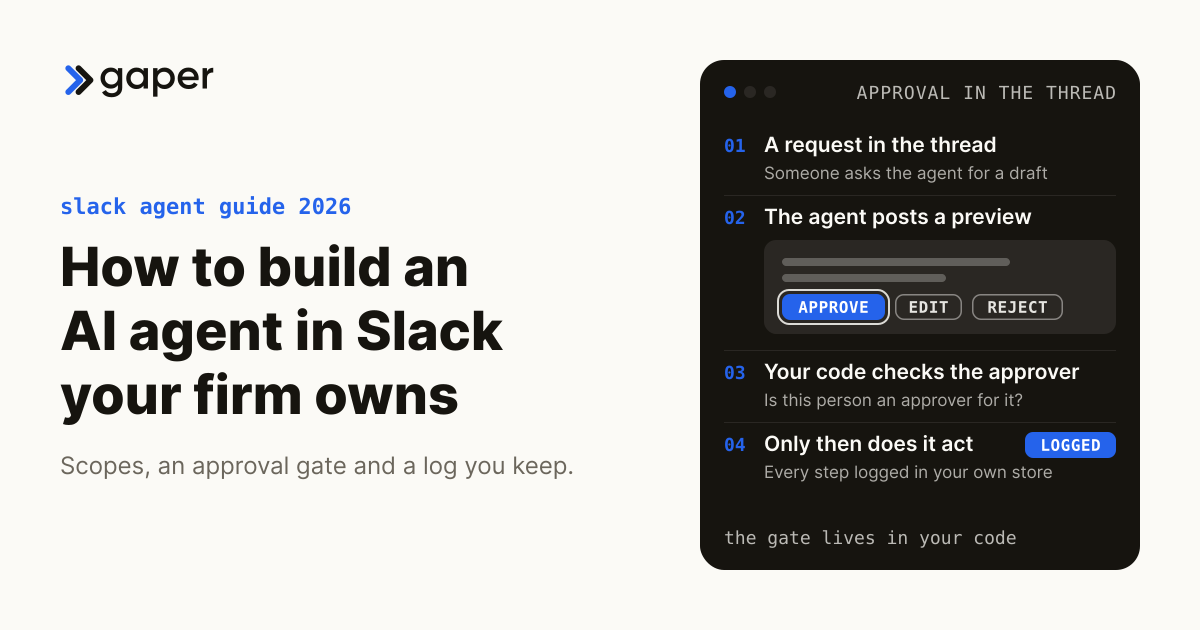
To build an AI agent in Slack, create an internal Slack app with the Agents feature on, give it the narrowest scopes the job needs, connect a model and your firm's approved sources, and route every material action through an approval button in the thread. First check whether Slackbot, an AI agent on Business+ and Enterprise+ plans since January 2026, already does the job. Build your own when the agent must act in systems of record, follow your firm's approval rules, or keep its model and logs in your cloud.
Slack's agent features and their names change often, so confirm them in the Slack developer docs before you write code. This guide was checked in October 2026.
How do you build an AI agent in Slack, and how is it different from a bot?
You build it as an internal Slack app with the Agents feature on, the narrowest scopes, a model, your firm's approved sources and an approval gate in the thread. Unlike a bot, which maps fixed inputs to fixed outputs, an agent reasons about a goal, calls tools and keeps context across a thread.
That split comes from Slack's guide to building agents, which warns that agents are not inherently safe: guardrails, permissions and human checkpoints are engineering requirements. Its agent developer guide covers the surfaces, from split view and streaming to task cards and plan blocks.
Should you configure Slack's own agent, buy one, or build one?
Start with what Slack already ships, then look at agent platforms, then build. Configure Slackbot for search, summaries and drafts, or buy a platform for team assistants across common SaaS tools. Build one your firm owns when the agent touches client data, systems of record or anything with legal or financial risk.
Configure: Slack's native agent, as of October 2026
- Slackbot is now an agent. Salesforce made it generally available on 13 January 2026 for Business+ and Enterprise+ customers. It finds answers across conversations, files and channels (and Salesforce data for Salesforce customers), drafts updates, schedules meetings and creates canvases, and Salesforce says it surfaces only what the user may already see.
- Slackbot can call your tools. The Slackbot MCP client lets Slackbot discover and call your firm's tools on remote MCP servers. A server stays off until an admin approves it through Slack's app approval workflow, and Slack's June 2026 security post says the first release enables read-only tools, with write and delete tools needing per-action user confirmation.
- Tagging Slackbot into channels is still a pilot, Slack said at Dreamforce on 15 September 2026.
- Workflow Builder has AI steps. Slack's help center lists AI answer, channel summary and "Start conversation with Agent" steps on Business+ and Enterprise+ plans. Agentforce agents built in Salesforce can also be added to Slack, and members can install apps with agents by default, so turn on app approval before rollout.
Buy: agent platforms that run inside Slack
- Dust lets teams build agents and @mention them in Slack, grounded in sources such as Notion and Google Drive, per Dust's guide. Its security page lists SOC 2 Type II, EU or US hosting and a company-stated promise never to train on customer data; its Slack listing adds that the OpenAI, Anthropic and Gemini models it calls are hosted in the US, and Mistral in the EU.
- Gumloop runs agents in Slack, Microsoft Teams and email. Its agent docs describe tool approval presets, including "Ask for writes/deletes".
- Other vendors list agents in the Slack Marketplace; check each one's data terms before client data goes in.
Build: an agent your firm owns
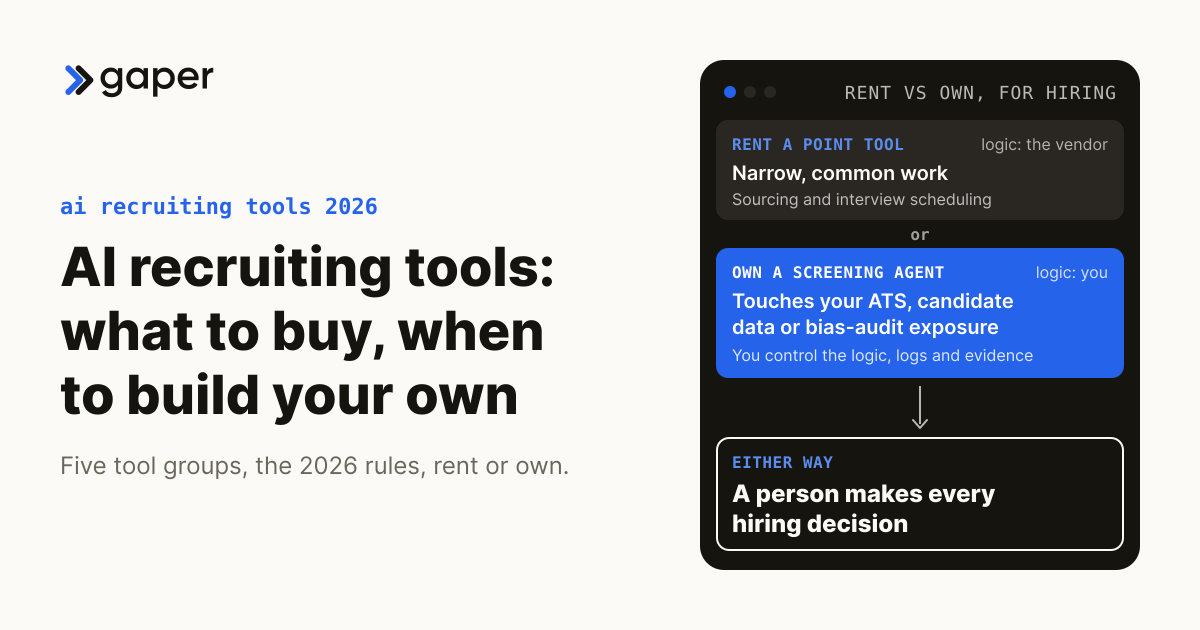
Use the Rent-vs-Own test. Rent a point tool for narrow, common work. Own a supervised agent when the work touches systems of record, client data or risk, such as document management, practice management, tax or billing software.

| Configure Slackbot | Buy a platform | Build one you own | |
|---|---|---|---|
| Where it runs | Slack's infrastructure | The vendor's platform | Your cloud |
| Who sets approval rules | Admins approve MCP servers; the asking user confirms tool calls | Your admins, within vendor settings | Your code, per action and approver |
| What it can reach | Slack, plus admin-approved MCP servers | The vendor's connectors | Anything you integrate |
| Where the log lives | Slack admin tools | The vendor's console | Your store, your retention |
| Model | Slack's choice | The vendor's options | Your choice, including self-hosted |
For the wider decision, see build vs buy AI agents. If the agent will reach internal systems through MCP, the MCP readiness assessment scores your stack in five questions.
What can a Slack agent do safely?
A Slack agent can safely answer from approved documents with citations, summarize a channel for its own members and draft messages or record updates for a person to approve. It should never send client-facing messages, change records or give advice on its own. Sort every step into the Gaper Ownership Map before you build.
| Ownership Map tier | Slack examples |
|---|---|
| Automated | Answer a policy question from the approved handbook, with the source linked; summarize a matter channel for its members; flag an unanswered request |
| Agent-drafted, human-approved | A client status update; a record update in practice management; a new ticket or calendar hold; a reply in a shared client channel |
| Human-owned | Legal advice, filings, tax positions, privilege calls, anything that moves money (the agent never runs it alone) |
Reference build: illustrative, not a client engagement. A law firm's matter channel gets an agent that answers "where are we on this matter?" from approved matter documents and recent channel history, then drafts a client update for the responsible partner to approve, edit or reject in the thread. What you would measure: the share of drafts approved without edits, and how long drafts wait for review.
What permissions and data scopes does a Slack agent need?
Slack's minimal assistant sample uses four bot scopes: app_mentions:read, im:history, chat:write and assistant:write. Add channels:history or groups:history to read channels the agent is invited to, and search private channels or DMs only with a user token, each user's consent and admin approval.
| Scope | What it allows | Add it when |
|---|---|---|
app_mentions:read | See messages that @mention the agent | The agent works in channels |
im:history | Read DMs sent to the agent | People talk to it one to one |
chat:write | Post replies as the agent | Always |
assistant:write | Status, suggested prompts, thread titles | You use Slack's agent surfaces |
channels:history, groups:history | Read public or private channels the agent was invited to | It summarizes or drafts from a channel |
search:read.public | Search public channels via Real-time Search | Answers need to search across public channels |
search:read.files | Search files in the channel types the other scopes allow | Answers need documents shared in Slack |
search:read.private, search:read.im, search:read.mpim | Search private channels and DMs, with each user's consent | The use case truly needs it |
Those four come from Slack's minimal assistant manifest. The Casey sample that slack create agent scaffolds asks for far more: its Python manifest requests 11 bot and 18 user scopes, including private-channel and DM search, canvases:write and users:read.email, so cut it back before installing. The history scopes reach only channels the agent is invited to, which is far narrower than private-search consent, and internal apps were exempt from Slack's 2025 rate-limit cut on those reads.
Slack's Real-time Search guide adds boundaries: searches run as the user and see only what that person can; bot-token searches happen only in response to a message; a public-channel search returns public content only, and a Slack Connect search returns that channel alone. Workspace guests cannot use AI apps, which matters if clients are guests.

Slack's API terms, effective 10 October 2025, bar apps offered outside their own organization, such as a vendor's Slack app, from training a large language model on API data or bulk-exporting messages and files beyond approved uses such as the Discovery API. An internal app is outside that clause, but the Real-time Search guide bars storing, copying or training on anything it returns, so retrieve at question time instead of keeping a shadow archive. Read the terms with counsel; this is information, not legal advice.
Where should a human approve the agent's work?
At every step with real-world effect: sending, changing a record, creating anything a client will see. The agent posts a preview in the thread with Approve, Edit and Reject buttons, your server checks that the person clicking is an approver for that action, and only then does the agent act.
Slack's agent design guide recommends this preview and approve, modify or reject pattern, but not on every trivial step, because people learn to click through. Enforce the gate in your own code: Slackbot's confirmation is a click by whoever asked, and its docs still offer users "Always allow", so it cannot check that the clicker is the partner who should approve. Label actions taken on someone's behalf, so recipients know a person approved them. More in human-in-the-loop AI.
What should a Slack agent log, and where?
Log who asked, in which channel, which sources were used, which tools were called with what inputs, who approved and what the agent drafted or did. Keep the log in your own store, because Slack's Audit Logs API is an Enterprise feature that records actions, not message content.
So the Audit Logs API cannot reconstruct an agent's decision. Store source permalinks and message IDs, never copies of retrieved Slack text, with prompt template and model versions, tool calls, the approval and approver, and cost per run. Set retention with whoever owns records policy: Slack's Discovery API and legal holds are Enterprise features, and the agent's log may be discoverable too. For tracing, see AI agent observability.
What must law and accounting firms settle before the agent reads client data?
Three things: which channels may hold privileged or client-confidential material, whether tax return information will pass through the agent, and who in the firm decides both. Settle them in writing before installation, because the scopes you grant follow from those answers.
For law firms, the question is privilege and discovery: what the agent reads, where the model runs and who sees the log; our breakdown of the Heppner ruling covers what that decision does and does not settle. For accounting firms, an agent touching tax return information falls under the Section 7216 consent rules whoever owns it: ownership changes control over region, logs and masking, not the consent duty (see Section 7216 consent for AI tools). This is information, not legal advice.
What are the steps to build a Slack agent your firm owns?
Pick one workflow, map it, create an internal Slack app with minimal scopes, connect retrieval and tools, add the approval gate and the log, test against real past questions, then roll out to one channel. The Gaper method runs the same path: Assess, Scope, Build, Supervise, Hand over.
- Assess and scope one workflow. Write its Ownership Map, the channels involved and the approvers for each action.
- Create an internal app.
slack create agentscaffolds Slack's Casey sample, with code for the Claude Agent SDK, the OpenAI Agents SDK and, in Python, Pydantic AI, per the quickstart. Turn on the Agents feature and remove every scope the workflow does not need. - Run it in your cloud. Socket Mode delivers events without a public endpoint, which suits a firm firewall.
- Connect retrieval. Index approved firm documents in your own store, and pull Slack context through Real-time Search at question time.
- Define tools with schemas. Mark each tool read or write; write tools always pass the approval gate. Turn on Interactivity so Approve, Edit and Reject clicks reach your server; it works over Socket Mode, and Slack's minimal sample ships with it off.
- Choose the model. Use a hosted API or an open-weight model fine-tuned and self-hosted in your cloud. The Real-time Search guide bars training on its results, and vendor apps may not train on Slack API data at all, so fine-tune on approved firm documents, never Slack messages.
- Test before rollout. Build an evaluation set from real past questions and run it on every change; see how to evaluate AI agents.
- Supervise, then hand over. Start with one channel and one approver group. You keep the code, prompts, evaluation set, runbook and audit trail.
Timelines depend on the integrations and approvals the workflow needs, so they are scoped up front.
Gaper is the AI-native implementation partner that deploys supervised AI agents you own. On a Slack build, a forward-deployed engineer embeds with your team and builds the agent in your repo and your cloud, with evals, guardrails and human approval on risky actions. Once you have picked the workflow, scope a Slack agent in a free AI assessment.
Does the answer change if your firm runs on Microsoft Teams?
Yes, the surface changes but the design does not. Many firms run on Microsoft 365, where Copilot Studio builds low-code agents for Teams and the Microsoft 365 Agents SDK supports agents with your own model and orchestration. Build the agent's core once and treat Slack and Teams as separate front ends.
Microsoft's custom engine agent overview, updated 30 September 2026, says custom engine agent prompts and responses in Teams are stored under Microsoft 365 terms, searchable by admins through Content Search or Microsoft Purview. Your discovery and retention plan should cover that store too.
Who should own a Slack agent inside the firm?
One named person who owns the approval matrix, the scopes and the log review, usually the person accountable for AI across the firm. Without that owner, scopes widen quietly, approval rules loosen and nobody reads the log.
A firm without a Chief AI Officer can use a fractional Chief AI Officer for those decisions. The owner's first review should cover the Ownership Map, every scope added since launch, and a sample of approved and rejected actions.
Thirty minutes, no commitment. We map one workflow, make the build or buy call, and scope the smallest thing worth shipping.
Frequently asked questions
How do you build an AI agent in Slack, and how is it different from a bot?
Should you configure Slack's own agent, buy one, or build one?
What can a Slack agent do safely?
What permissions and data scopes does a Slack agent need?
Where should a human approve the agent's work?
What should a Slack agent log, and where?
What must law and accounting firms settle before the agent reads client data?
What are the steps to build a Slack agent your firm owns?
Does the answer change if your firm runs on Microsoft Teams?
Who should own a Slack agent inside the firm?
Ready to turn AI into execution?
Book a free assessment of one workflow. We map it, make an honest build versus buy call before any code, and if an off the shelf product covers the job we will tell you so.